
1. Ynlieding
This manual provides comprehensive instructions for the safe and efficient operation, setup, and maintenance of your KomShine EX39 Fiber Optic Fusion Splicer and QX55 Mini OTDR. These devices are designed for precise fiber optic cable splicing and advanced network testing, offering reliable performance for various applications.
2. Safety Information
WARNING: Always read and understand all safety instructions before operating the equipment.
- Laserstraling: The OTDR and VFL emit invisible laser radiation. Avoid direct eye exposure to the laser beam. Always use appropriate eye protection.
- Heech Voltage: The fusion splicer operates with high voltage. Iepenje de c netasing or attempt repairs unless qualified.
- Fiber Shards: Optical fiber shards are extremely sharp and can cause injury. Always handle cleaved fibers with care and dispose of waste properly.
- Brandbare materialen: Use alcohol and other cleaning solvents in well-ventilated areas, away from ignition sources.
- Miljeubetingsten: Operate the equipment within specified environmental ranges (temperature, humidity) to prevent damage and ensure accurate readings.
- Batterijfeiligens: Use only the specified charger and battery. Do not expose batteries to extreme temperatures or physical damage.
3. Package Ynhâld
Kontrolearje oft alle hjirûnder neamde items yn jo pakket opnommen binne. As der items ûntbrekke of beskeadige binne, nim dan direkt kontakt op mei jo leveransier.

KomShine EX39 Mini Fusion Splicer: The core device for precise fiber splicing.

KomShine QX55 Mini OTDR: Optical Time Domain Reflectometer for fiber testing.

Draachkoffer: Durable case for transporting and protecting the equipment.

Fiber Cleaver (FC-20): Tool for precise fiber cutting before splicing.
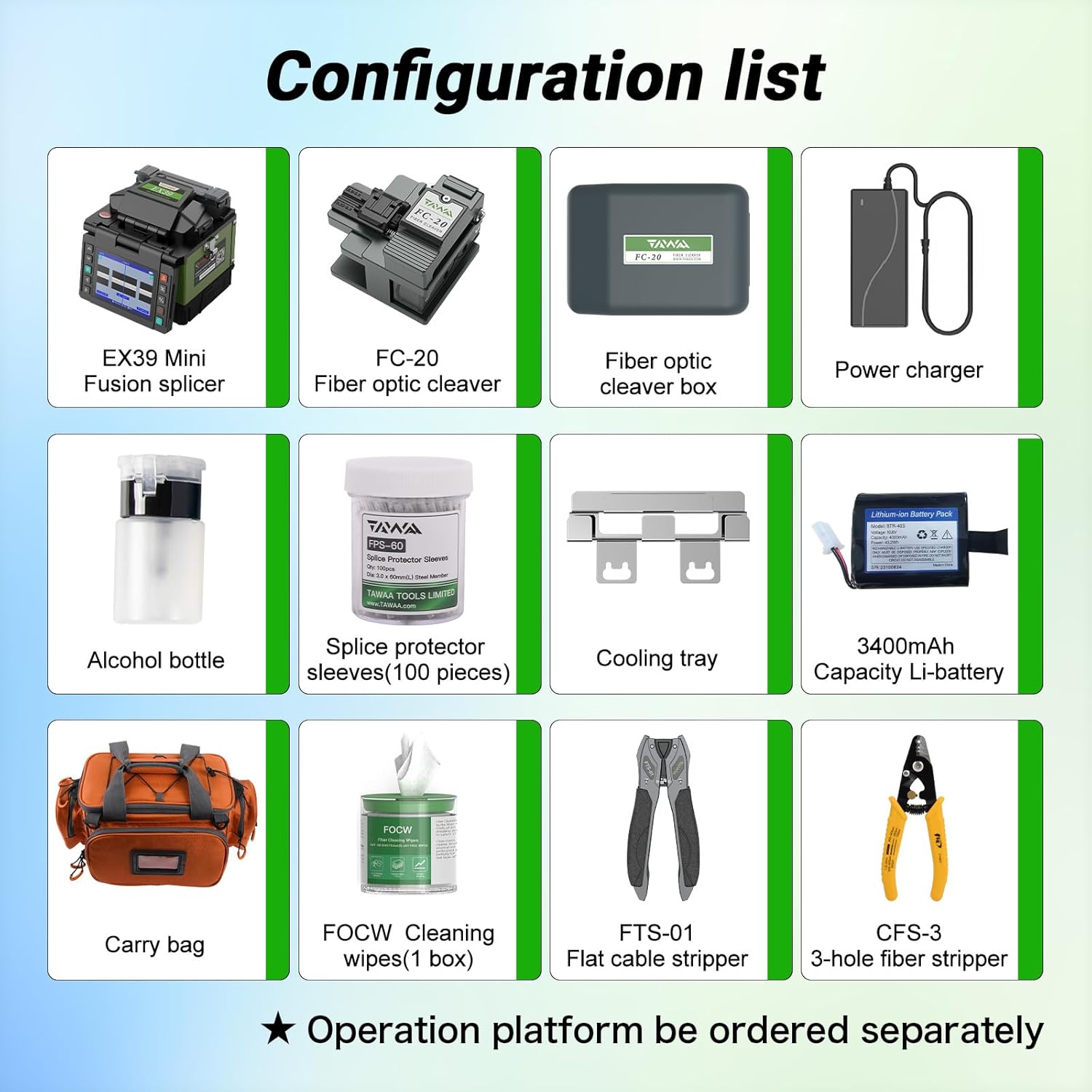
Stromadapter: For charging the devices.

Gallusus Strap: For carrying the OTDR.

Quick Reference Guide: For quick setup and operation.

Kalibraasje sertifikaat: Ensures device accuracy.

Folder: Additional product information.

Ynspeksje sertifikaat: Quality assurance document.

Oanfoljende aksessoires: Alcohol bottle, splice protector sleeves (100 pcs), cooling tray, 3400mAh Li-battery, carry bag, FOCW cleaning wipes (1 box), FTS-01 flat cable stripper, CFS-3 3-hole fiber stripper.
4. Produkt Overview
4.1 KomShine EX39 Fiber Optic Fusion Splicer
The EX39 is a compact and robust fusion splicer designed for efficient and reliable fiber optic splicing. It features fast splicing and heating times, tool-less electrode replacement, and is built for high adaptability in various operating environments, including aerial work.

Figure 4.1: KomShine EX39 Fusion Splicer. This image shows the compact design of the EX39 splicer.
Video 4.1: EX39 Fusion Splicer Introduction. This video provides an overview of the EX39 Fusion Splicer, highlighting its features like fast splicing, tool-less electrode replacement, and adaptability for aerial work.
- 8s Fast Splicing: Achieves quick fiber connections.
- 18s Fast Heating: Rapid heat shrinking for splice protection.
- Tool-less Electrode Replacement: Simplifies maintenance and reduces downtime.
- Hege oanpassingsfermogen: Suitable for various environments, including aerial and ground work.
4.2 KomShine QX55 Mini OTDR
The QX55 is a portable, multi-functional Optical Time Domain Reflectometer (OTDR) designed for comprehensive fiber optic network testing. It integrates OTDR, VFL, optical power meter (OPM), stable light source (SLS), fiber inspection (FIP), and network testing (RJ45) functionalities into a single compact unit.
Figure 4.2: KomShine QX55 Mini OTDR. This image displays the QX55 OTDR unit, showcasing its compact design and user interface.
Video 4.2: Fiber Optic OTDR Overview. This video demonstrates the various functions of the QX55 OTDR, including its multi-functional capabilities and user-friendly interface.
- Multifunksjoneel: Combines OTDR, VFL, OPM, SLS, FIP, and RJ45 testing.
- Lange berik: Capable of testing up to 140km.
- Short Dead Zone: Event dead zone of only 1m for precise fault location.
- Dual Wavelength Testing: Supports 1310/1550nm simultaneous testing.
- Self-kalibraasje: User-independent calibration function for accuracy.
5. Opsette
5.1 Initial Charging
Before first use, fully charge both the EX39 Fusion Splicer and QX55 Mini OTDR using the provided power adapter. Connect the adapter to the device and a power outlet. The charging indicator will show the charging status.
5.2 EX39 Splicer Setup
- Power On: Press and hold the power button to turn on the splicer.
- Electrode Check: Ensure electrodes are clean and properly installed. The EX39 features tool-less electrode replacement for convenience.
- Fiber Cleaver Platform: The splicer can integrate with the FC-20 fiber cleaver via an operating platform for a streamlined workflow.
Figure 5.1: EX39 Splicer showing tool-less electrode replacement. This image illustrates the easy, tool-free method for replacing electrodes on the EX39 splicer.
5.3 QX55 OTDR Setup
- Power On: Press the power button to turn on the OTDR.
- Taalseleksje: Navigate to settings to select your preferred language (e.g., English).
- Self-kalibraasje: Perform a self-calibration for optimal accuracy. Refer to the "Maintenance" section for detailed steps.
- Ferbine glêstried: Connect the fiber optic cable to the appropriate port on the OTDR for testing.
6. Bedriuwsinstruksjes
6.1 EX39 Fusion Splicer Operation
- Prepare Fiber: Strip the fiber coating, clean with alcohol wipes, and cleave using the FC-20 fiber cleaver. Ensure a clean, precise cleave.
- Place Fiber: Carefully place the prepared fibers into the V-grooves of the splicer. Ensure they are correctly aligned.
- Start Splicing: Close the splicer lid. The device will automatically align the fibers and initiate the splicing process. The 8-second fast splice feature will complete the fusion.
- Warmtekrimp: After splicing, place the splice protector sleeve over the splice point and move it into the heating oven. The 18-second fast heating will shrink the sleeve, protecting the splice.
Figure 6.1: EX39 Splicer during a splicing operation. This image shows the splicer's screen displaying the fiber alignment and estimated loss during the splicing process.
6.2 QX55 Mini OTDR Operation
The QX55 offers multiple testing functions accessible via its intuitive UI.
Figure 6.2: QX55 OTDR user interface. This image shows the main menu of the QX55 OTDR, displaying icons for various functions like OTDR, VFL, OPM, SLS, FIP, RJ45, File, and Setting.
6.2.1 OTDR Testing
- Select OTDR Function: From the main menu, select the OTDR icon.
- Measurement Settings:
- Pulse Breedte: Choose between Auto or specific pulse widths (e.g., 5ns, 10ns, 20ns, etc.). Auto mode is recommended for novices.
- Berik: Select Auto or a specific range (e.g., 5km, 10km, 20km, up to 140km).
- Testmodus: Choose between Real-time or Average. Average mode provides more stable results.
- Golflingte: Select 1310nm, 1550nm, or 1310+1550nm for dual-wavelength testing.
- Start test: Press the "Test" button to begin the OTDR scan.
- Resultaten analysearje: The trace will be displayed, showing events like splices, connectors, and fiber breaks. The Link Map function provides a simplified graphical representation of events.
- Splitter Loss Test: The QX55 is capable of measuring up to 3-level 32-way splitters. Select the appropriate settings for splitter testing.
Figure 6.3: QX55 OTDR displaying event analysis. This image shows the OTDR trace with identified events and their parameters, including distance, loss, and reflectance.
Figure 6.4: QX55 OTDR performing a splitter loss test. This image illustrates the OTDR's capability to analyze losses through various splitter configurations.
6.2.2 Other Functions (VFL, OPM, SLS, FIP, RJ45)
Access these functions from the main menu. Each function has its own interface for specific testing needs:
- VFL (Visual Fault Locator): Used to visually locate breaks or sharp bends in fiber optic cables over short distances.
- OPM (Optical Power Meter): Measures the optical power of a fiber optic signal.
- SLS (Stable Light Source): Provides a stable light source for loss measurement when paired with an OPM.
- FIP (Fiber Inspection Probe): (If applicable) Used to inspect the end-face of fiber connectors for contamination or damage.
- RJ45 Testing: For testing Ethernet cables and network connectivity.
7. Underhâld
7.1 Algemiene Cleaning
- Device Exterior: Clean the exterior of both devices with a soft, damp doek. Avoid abrasive cleaners.
- Fiber Optic Ports: Regularly clean all fiber optic ports and adapters using lint-free wipes and optical-grade alcohol. Contaminated ports can lead to inaccurate measurements and poor splices.
- Splicer V-Grooves and Electrodes: Clean the V-grooves and electrode area of the EX39 splicer regularly with a brush or cotton swab and alcohol to ensure optimal splicing performance.
7.2 EX39 Electrode Replacement
The EX39 features tool-less electrode replacement. When the splicer indicates electrode wear (typically after 4,000 splices), follow these steps:
- Skeakelje de splicer út.
- Iepenje de elektrodedeksel.
- Unscrew the old electrodes manually.
- Insert new electrodes and screw them in securely.
- Close the cover and perform an arc calibration (refer to the splicer's on-screen menu).
7.3 QX55 Self-Calibration
The QX55 OTDR includes a user-independent self-calibration function to maintain accuracy. It is recommended to perform this periodically or if you suspect measurement discrepancies.
- Fanút it haadmenu, gean nei "Ynstellings".
- Select "Self-Calibration".
- Follow the on-screen prompts to calibrate the circuit, optical circuit, and optical device.
- Confirm the calibration process.
8. Probleemoplossing
| Probleem | Mooglike oarsaak | Oplossing |
|---|---|---|
| EX39: High Splice Loss | Dirty V-grooves or electrodes, poor fiber cleave, worn electrodes, incorrect splice parameters. | Clean V-grooves and electrodes. Re-cleave fiber. Replace electrodes if worn. Perform arc calibration. |
| EX39: Splicer not powering on | Low battery, faulty power adapter. | Charge battery. Check power adapter connection. |
| QX55: Inaccurate OTDR readings | Dirty fiber connectors/ports, incorrect test parameters (pulse width, range), device out of calibration. | Clean fiber connectors and OTDR ports. Adjust test parameters. Perform self-calibration. |
| QX55: VFL not working | Fiber not connected properly, VFL port dirty, VFL laser faulty. | Ensure fiber is securely connected. Clean VFL port. If problem persists, contact support. |
| General: Device not responding | Software glitch, low battery. | Perform a soft reset (refer to specific device manual). Charge battery. |
9. Spesifikaasjes
9.1 KomShine EX39 Fiber Optic Fusion Splicer
- Average Splicing Loss: 0.02dB
- Elektrode libben: 4,000 times splicing
- Splicing Time: 8 sekonden
- Waarmte tiid: 18 sekonden
- Funksjes: Tool-less electrode replacement, high adaptability for aerial work.
9.2 KomShine QX55 Mini OTDR
- Golflingten: 1310/1550nm (standard), 1625nm (PON OTDR option)
- Dynamic Range: 32/30dB (for 1310/1550nm)
- Event Dead Zone: 1m
- Attenuation Dead Zone: 5m
- Maksimum berik: Oant 140 km
- Funksjes: OTDR, VFL (8-10KM), OPM, SM Light Source, Link Map, RJ45 testing, Fiber Inspection (FIP).
- Spesjale eigenskippen: Self-calibration, dual wavelength testing, pass 1:16 splitter.
10. Garânsje & Support
Garânsje: This product comes with a 3-year warranty from the date of purchase. The warranty covers defects in materials and workmanship under normal use. It does not cover damage caused by misuse, accidents, unauthorized modifications, or improper maintenance.
Retourbelied: A 30-day refund/replacement policy is available from the date of purchase. Please refer to your retailer's specific return policy for details.
Technyske stipe: For technical assistance, troubleshooting, or warranty claims, please contact KomShine customer support. You can find contact information on the official KomShine webside of fia jo produktdokumintaasje.
Fabrikant: KOMSHINE