
1. Ynlieding
Thank you for choosing the techno line WT2600 Digital Calendar. This device provides accurate time, date, indoor temperature, and humidity readings, along with alarm functions. This manual will guide you through the setup, operation, and maintenance of your new digital calendar.
2. Safety Information
- Stel it apparaat net bleat oan ekstreme temperatueren, direkt sinneljocht of hege fochtigens.
- Foarkom it fallen fan it apparaat of it ûnderwurpen oan sterke ynfloeden.
- Besykje it apparaat net sels útinoar te heljen of te reparearjen. Rieplachtsje kwalifisearre servicepersoniel.
- Ferwiderje brûkte batterijen ferantwurde neffens lokale regeljouwing.
- Hâld it apparaat bûten it berik fan bern.
3. Package Ynhâld
Kontrolearje asjebleaft oft alle items yn jo pakket oanwêzich binne:
- techno line WT2600 Digital Calendar Unit
- User Manual (dit dokumint)
- Batteries (may be included depending on region)
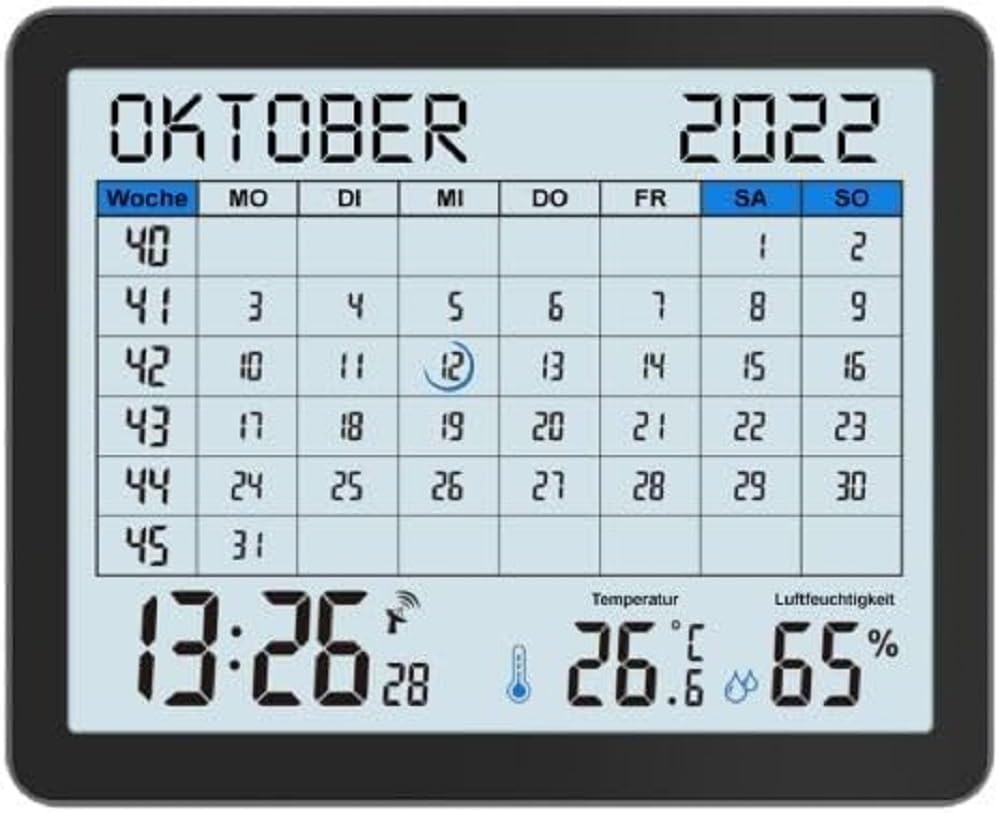
Image of the techno line WT2600 Digital Calendar packaging, showing the device and its key features.
4. Produktfunksjes
The techno line WT2600 Digital Calendar offers the following key features:
- DCF-77 Radio-Controlled Clock: Automatic time synchronization for precise timekeeping, with an option for manual setting.
- 12/24 Hour Time Display: Select your preferred time format.
- Kalinder werjefte: Shows the current date, day of the week, and month.
- 7-Language Month Display: Choose from seven languages for the month display.
- Indoor Temperatur Display: Shows indoor temperature in Celsius (°C) or Fahrenheit (°F).
- Binnenfochtigenswerjefte: Displays the current indoor humidity level.
- MIN/MAX Display: Records and displays the minimum and maximum temperature and humidity values.
- Dual Alarms with Snooze: Set two independent alarms with a convenient snooze function.
- Low Battery Indicator: Warskôget jo as batterijen ferfongen moatte wurde.
- Mearsidige pleatsing: Designed for both wall mounting and table standing.

Front view of the techno line WT2600 Digital Calendar display, showing the calendar grid, current time, temperature, and humidity.
5. Opsette
5.1 Batterij Ynstallaasje
- Sykje de batterij compartment op 'e rêch fan' e ienheid.
- Iepenje de batterij compartment cover.
- Insert the required batteries (e.g., 2 x AAA, not specified in data, common for such devices) according to the polarity markings (+ and -).
- Slút it deksel fan it batterijfak feilich.
5.2 Initial Power On and DCF-77 Signal Reception
Upon battery insertion, the device will power on and automatically begin searching for the DCF-77 radio signal. This process may take several minutes. For optimal reception, place the unit near a window and away from electronic interference.
- A signal icon (e.g., an antenna symbol) will flash during signal search.
- Once the signal is received, the time and date will be set automatically, and the signal icon will become solid.
- If no signal is received after 10-15 minutes, try repositioning the unit.
5.3 Manuele tiid- en datumynstelling
If automatic synchronization is not desired or unsuccessful, you can set the time and date manually.
- Press and hold the 'SET' button (or similar, refer to device buttons) for a few seconds to enter manual setting mode.
- Brûk de knoppen '+' of '-' om de knipperjende wearde oan te passen (bygelyks oere, minút, jier, moanne, dei).
- Press 'SET' again to confirm the current setting and move to the next adjustable parameter.
- Werhelje oant alle ynstellings klear binne.
5.4 Taalynstelling
To change the display language for the month:
- Enter the setting mode (e.g., by pressing 'SET').
- Navigate through the settings until the language option appears.
- Use the '+' or '-' buttons to cycle through the available 7 languages.
- Befêstigje jo seleksje.
6. Bestjoeren
6.1 Viewing Time, Date, Temperature, and Humidity
The main display continuously shows the current time, date, indoor temperature, and indoor humidity. You can switch between 12-hour and 24-hour time formats by pressing a dedicated button (e.g., '12/24H' or 'MODE').
6.2 Alarms ynstelle
The device features two independent alarms.
- Press the 'ALARM' button (or similar) to view Alarm 1 tiid.
- Press and hold 'ALARM' to enter Alarm 1 setting mode.
- Use '+' or '-' to adjust the hour and minute, pressing 'ALARM' to confirm each.
- Repeat for Alarm 2.
- Om in alarm te aktivearjen/deaktivearjen, druk ferskate kearen op 'ALARM' oant it alarmikoantsje ferskynt/ferdwijnt.
6.3 Using Snooze
When an alarm sounds, press the 'SNOOZE' button (or similar, often a large button on top) to temporarily silence the alarm. The alarm will sound again after a few minutes (typically 5-10 minutes). To stop the alarm completely, press any other button.
6.4 MIN/MAX Display Function
The device records the minimum and maximum temperature and humidity values since the last reset.
- Press the 'MIN/MAX' button (or similar) once to view the maximum recorded values.
- Press it again to view the minimum recorded values.
- To reset the MIN/MAX records, press and hold the 'MIN/MAX' button while viewde records opnimme.

Close-up of the techno line WT2600 Digital Calendar display, highlighting the time, temperature, and humidity readings.
7. Underhâld
7.1 Cleaning
Wiskje it apparaat mei in sêft, damp doek. Brûk gjin abrasive reinigingsmiddels of oplosmiddels, om't dizze it display of de c beskeadigje kinne.asing.
7.2 Batterijferfanging
When the low battery indicator appears on the display, replace all batteries with new ones of the same type. Follow the battery installation steps in Section 5.1.
8. Probleemoplossing
- Gjin werjefte: Check battery polarity and ensure batteries are fresh.
- Ferkearde tiid/datum: Ensure the DCF-77 signal icon is solid. If not, reposition the unit or set the time manually (Section 5.3). Check your time zone setting if applicable (not explicitly mentioned in data, but common).
- Temperature/Humidity Readings Seem Inaccurate: Ensure the unit is placed in a location with good air circulation, away from direct heat sources or drafts. Allow some time for readings to stabilize after initial setup or relocation.
- Alarm klinkt net: Verify that the alarm is activated (alarm icon displayed) and the alarm time is set correctly.
9. Spesifikaasjes
| Eigenskip | Spesifikaasje |
|---|---|
| Model Number | WT2600 |
| Ofmjittings (L x B x H) | 17.3 x 3.81 x 14 sm |
| Gewicht | 380 g |
| Kleur | Swart |
| Materiaal | Plestik |
| Power Boarne | Batterij oandreaun |
| Display Type | Digitaal |
| Binnen / bûtengebrûk | Binnen |
10. Garânsje en stipe
Information regarding product warranty and customer support was not available in the provided product data. Please refer to the retailer or manufacturer's official webside foar details oer garânsjedekking en stipeopsjes.