
1. Ynlieding
Thank you for choosing the HICON Vittoria Gaming Chair. This manual provides essential information for the safe assembly, operation, and maintenance of your new chair. Please read these instructions carefully before use and retain them for future reference.

Ofbylding: Front view of the HICON Vittoria Gaming Chair, showcasing its ergonomic design and red finish.
2. Safety Information
- Soargje derfoar dat alle ûnderdielen oanwêzich en ûnbeskeadige binne foardat jo se yninoar sette. Brûk it net as der ûnderdielen ûntbrekke of brutsen binne.
- Follow assembly instructions precisely. Incorrect assembly can lead to instability and injury.
- Stean net op 'e stoel. Brûk it allinnich om op te sitten.
- Oerskriid de maksimale gewichtskapasiteit fan 150 kg (330 lbs) net.
- Hâld bern en húsdieren fuort fan 'e stoel tidens it gearstallen.
- Foarkom dat de stoel bleatsteld wurdt oan direkt sinneljocht of ekstreme temperatueren om materiaaldegradaasje te foarkommen.
- Kontrolearje regelmjittich alle bouten en skroeven om der wis fan te wêzen dat se goed fêst sitte. Draai se opnij oan as it nedich is.
3. Package Ynhâld
Kontrolearje oft alle folgjende ûnderdielen yn jo pakket opnommen binne:
- Rêch
- Seat Base with Armrests and Footrest mechanism
- Star Base (5-star aluminum base)
- Tsjillen (5 stikken)
- Gas Lift silinder
- Gas Lift Cover
- Lumbar Support Cushion with Massage Function (USB powered)
- Headrest Cushion
- Montagehardware (skroeven, ringen, inbussleutel)
4. Opset en gearkomste
Follow these steps to assemble your HICON Vittoria Gaming Chair:
- Befestigje tsjillen oan stjerbasis: Doch elk fan 'e fiif tsjiltsjes yn 'e gatten oan 'e ein fan elke poat fan 'e stjerbasis. Druk stevich oant se fêstklikke.
- Gaslift ynfoegje: Place the gas lift cylinder into the center hole of the assembled star base. Cover the gas lift with the telescopic plastic cover.
- Befestigje de rêchleuning oan 'e sitbasis: Align the backrest with the mounting brackets on the seat base. Secure it using the provided screws and Allen key. Ensure all screws are tightened evenly.
- Plak de gearstalde sit op 'e gaslift: Plak de gearstalde sit en rêchleuning foarsichtich op 'e gasliftsilinder, en soargje derfoar dat it sintraal en stabyl is.
- Kessens befestigje: Secure the headrest cushion to the top of the backrest using its straps. Attach the lumbar support cushion to the lower backrest using its straps. Connect the USB cable from the lumbar cushion to a power source (e.g., power bank, USB adapter) for the massage function.

Image: Close-up of the OmniRoll casters, designed for hard floors and carpets, attached to the chair's stable base.

Image: Detail of the NitroLift gas lift, providing durability and a load capacity of up to 250 kg.
5. Bedriuwsinstruksjes
Your HICON Vittoria Gaming Chair offers several adjustable features for personalized comfort:
- Seat hichte oanpassing: To raise the seat, lift the lever located under the right side of the seat while taking your weight off the chair. To lower the seat, lift the lever while seated. Adjust until your feet are flat on the floor and your knees are at a 90-110 degree angle.
- Backrest Reline: Pull the lever on the right side of the chair (below the seat) to unlock the backrest. Lean back to your desired angle (between 90 and 170 degrees) and push the lever down to lock it in place.
- Armrest Adjustment (Adapto Arm): The armrests can be adjusted in height and forward-backward. Locate the buttons or levers on the armrests to unlock and adjust them to your preferred position. Ensure your forearms rest comfortably and your elbows are at approximately a 90-degree angle.
- Lumbar Support Massage (PneuMassage): The lumbar cushion features a vibration massage mechanism. Connect the USB cable to a power source to activate the massage function. Adjust the cushion's position on the backrest for optimal lower back support and comfort.
- Extendable Footrest (LegRest): To extend the footrest, pull it out from under the seat. To retract, push it back in until it is fully stored. Use the footrest for additional leg support when reclining.
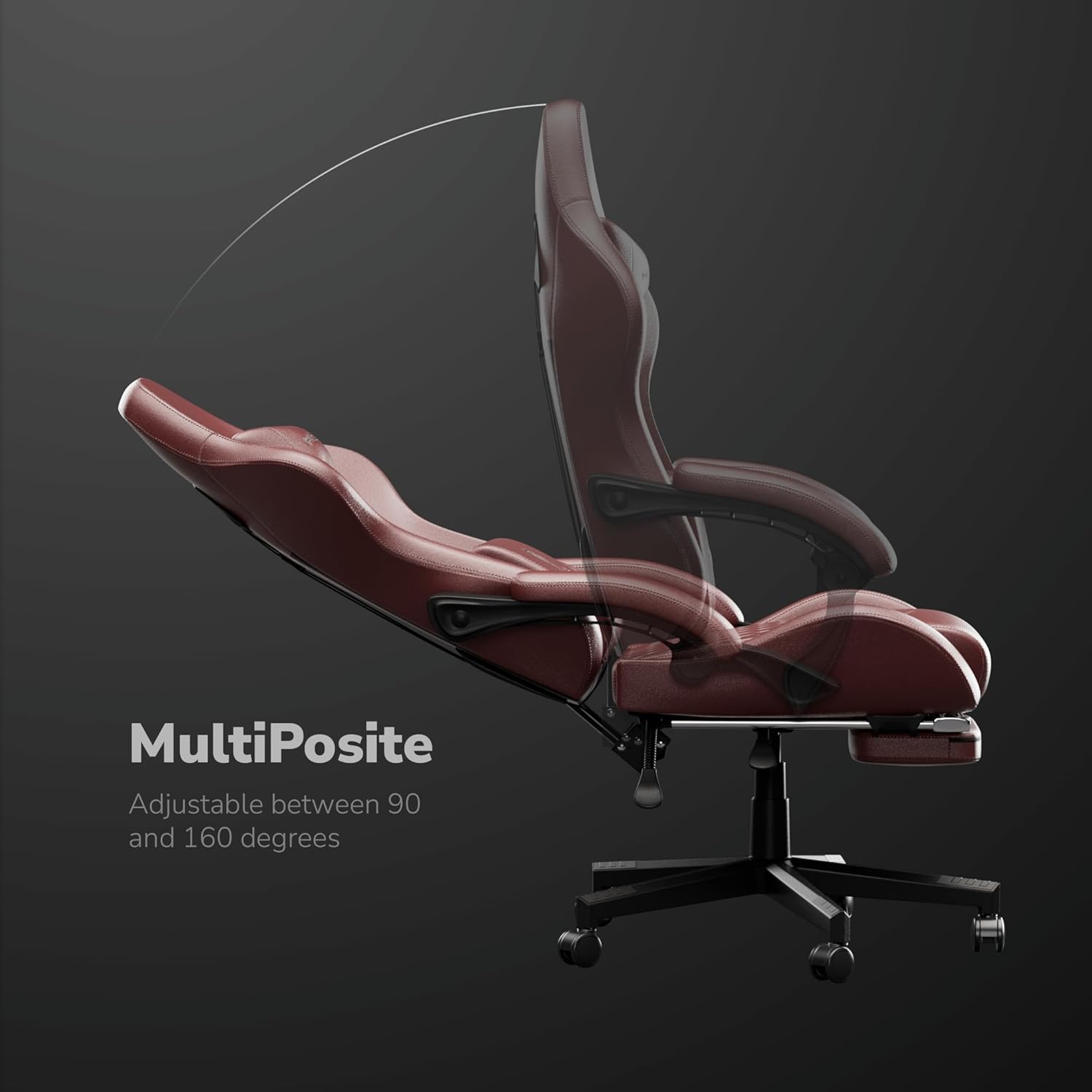
Image: The MultiPosite feature illustrates the adjustable recline range of the chair, from 90 to 160 degrees.

Image: Close-up of the Adapto Arm, highlighting its adjustable height and forward-backward movement for optimal arm support.

Image: Detail of the PneuMassage lumbar cushion, featuring a vibration mechanism for enhanced comfort and support.

Image: Close-up of the LegRest, providing foot support for comfort during extended sitting or reclining.
6. Underhâld
- Reiniging: Feie de PU-learen oerflakken ôf mei in sêfte, damp doek. Brûk foar koppige flekken in mylde sjippeoplossing en feie it dan ôf mei in skjinne,amp doek. Foarkom skealike gemikaliën of skuurmiddels.
- Hardware kontrôle: Periodically check all screws and bolts to ensure they are tight. Retighten as needed to maintain stability and safety.
- Soarch foar tsjillen: Keep the casters clean from hair and debris to ensure smooth movement.
- Foarkom oerladen: Do not place excessive weight on the armrests or backrest.

Image: Detail of the DuraBreathe material, highlighting its durable, waterproof, and easy-to-clean properties.
7. Probleemoplossing
- Stoel piept: Kontrolearje alle bouten en skroeven op fêstens. Bring in lytse hoemannichte silikonsmeermiddel oan op bewegende ûnderdielen as it nedich is.
- Moeilijkheden mei it oanpassen fan de hichte: Soargje derfoar dat de gaslifthendel folslein ynskeakele is. As it probleem oanhâldt, moat de gasliftsilinder miskien ferfongen wurde.
- Tsjillen rôlje net soepel: Remove any hair or debris wrapped around the caster wheels. Clean the wheels thoroughly.
- Backrest Not Locking: Verify that the recline lever is fully pushed down to lock the backrest in position.
8. Spesifikaasjes
| Eigenskip | Spesifikaasje |
|---|---|
| Merk | HICON |
| Model Number | HC-6689 |
| Kleur | Read |
| Materiaal | Aluminum, Faux Leather |
| Frame Materiaal | Metaal |
| Seat Materiaal Type | Memory Foam |
| Item Gewicht | 16 kilogram |
| Oanrekommandearre maksimum gewicht | 150 kilogram |
| Item Ofmjittings (L x B x H) | 64 x 62 x 124 sintimeter |
| Seat djipte | 55 sintimeter |
| Oantal lizzende posysjes | 3 |
| Ferstelber | Ja |
| Gearstalling Required | Ja |
| Binnen / bûtengebrûk | Binnen |
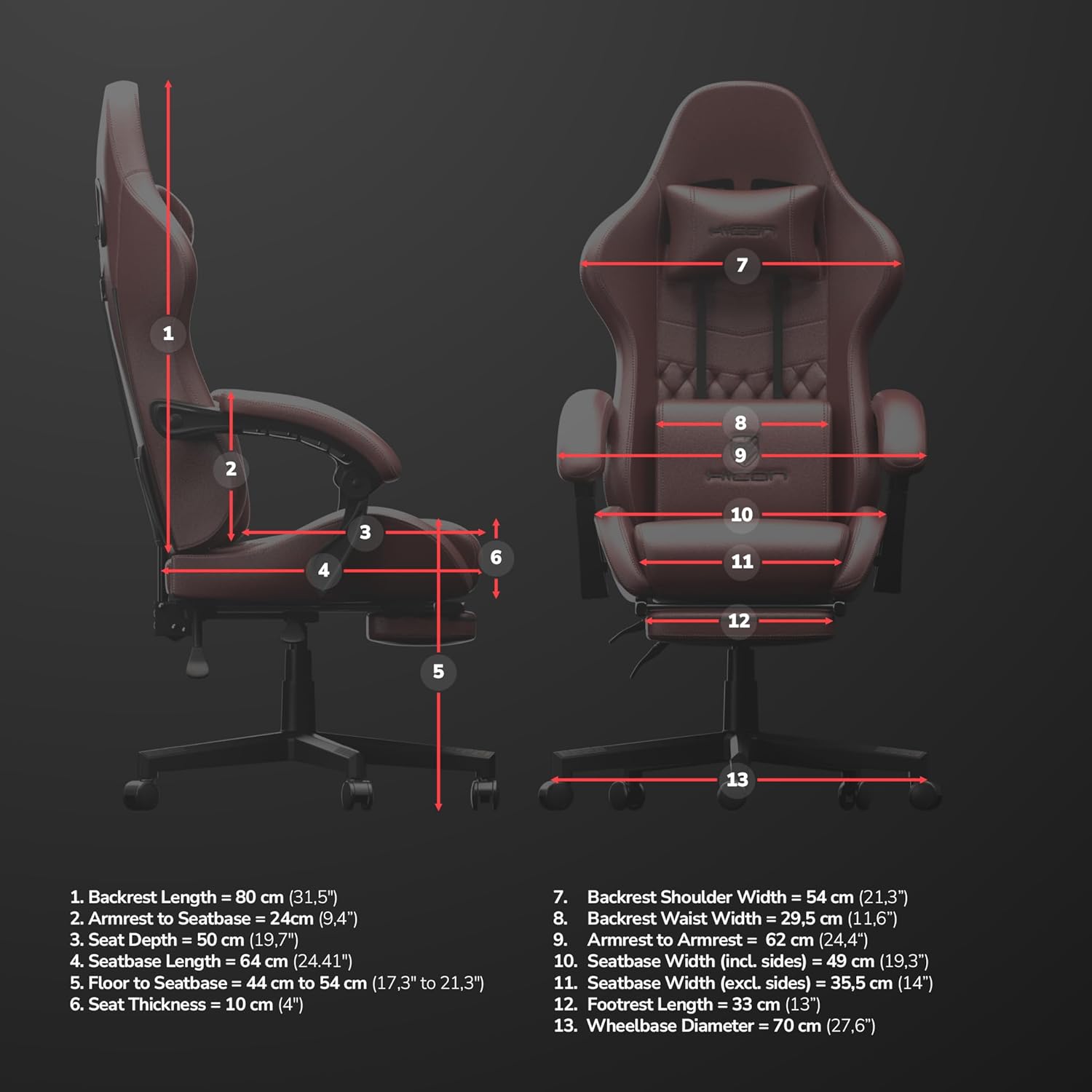
Image: Detailed dimensional diagram of the HICON Vittoria Gaming Chair, showing various measurements for reference.
9. Garânsje en stipe
For warranty information or technical support, please refer to the documentation included with your purchase or contact the retailer/manufacturer directly. Keep your proof of purchase for warranty claims.