
1. Ynlieding
Welcome to the KRUPS Sensation C10 EA910A10 Superautomatic Coffee Machine user manual. This guide provides comprehensive instructions for the safe and efficient operation, maintenance, and troubleshooting of your new coffee machine. Please read this manual thoroughly before first use and keep it for future reference.
2. Wichtige Safety Ynstruksjes
Om feilige wurking te garandearjen, folgje altyd dizze basisfeiligensmaatregels:
- Lês alle ynstruksjes foardat jo it apparaat brûke.
- Dompel it apparaat, it netsnoer of de stekker net ûnder yn wetter of oare floeistoffen.
- Dit apparaat is allinich bedoeld foar húshâldlik gebrûk.
- Soargje de voltagDe oanjûne hoemannichte op it apparaat komt oerien mei jo netspanningsvolumetage.
- Haal de stekker fan it apparaat altyd út it stopkontakt foardat jo it skjinmeitsje of as it net yn gebrûk is.
- Betsjinje gjin apparaat mei in skansearre snoer of stekker, of neidat it apparaat defekt is of op ien of oare manier skansearre is.
- Hâld bern fuort fan it apparaat tidens wurking.
- Brûk allinnich accessoires oanrikkemandearre troch de fabrikant.
- Avoid contact with hot surfaces, such as the coffee spouts or steam nozzle.
3. Produkt Components
Familiarize yourself with the main components of your KRUPS Sensation C10 EA910A10 coffee machine:
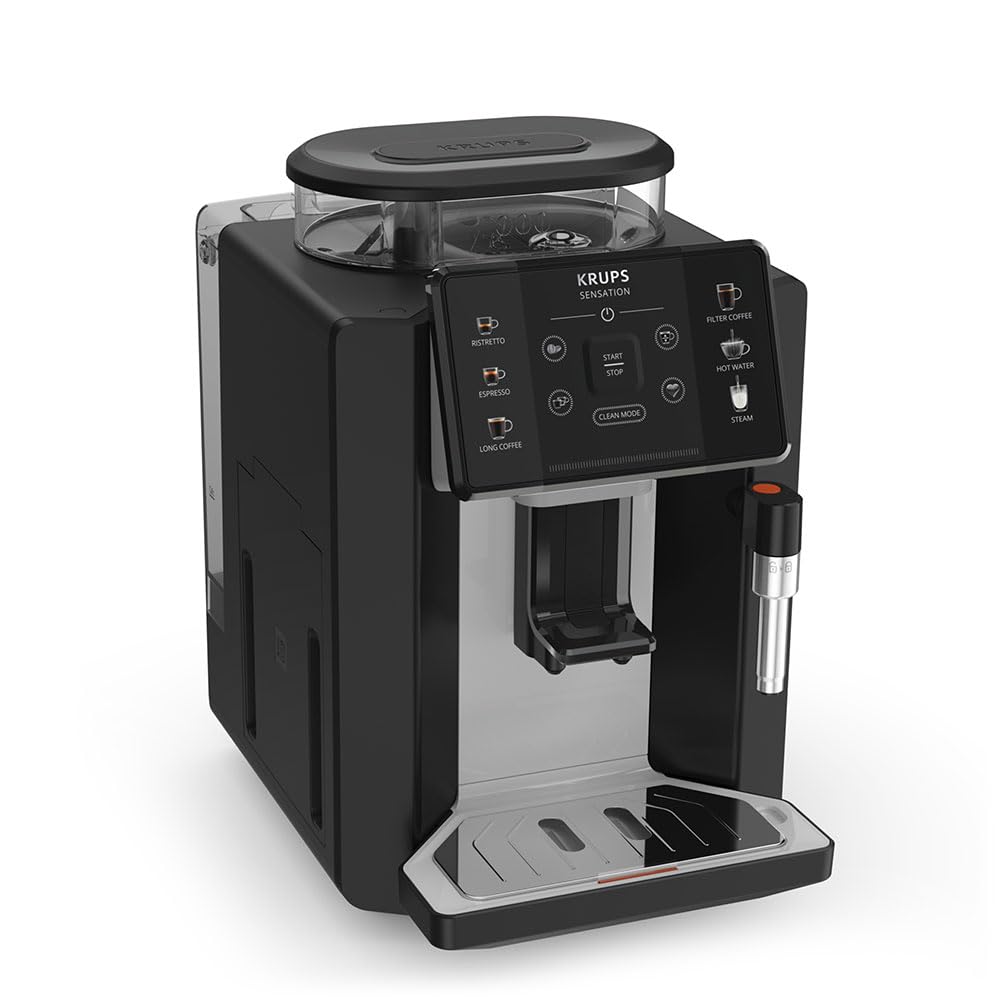
Ofbylding: Foar-rjochts view of the KRUPS Sensation C10 EA910A10 Superautomatic Coffee Machine, showing the bean hopper, control panel, coffee spouts, and drip tray. Two cups of coffee are being dispensed.
- Bean Hopper mei Deksel
- Wetter Tank
- Control Panel (Touchscreen)
- Coffee Spouts (Adjustable)
- Dripbak mei roaster
- Kofje grûn Container
- Steam Nozzle / Hot Water Spout
- Power Cord Ferbining
4. Initial Setup
4.1. Utpakke
- Helje de kofjesetapparaat foarsichtich út 'e ferpakking.
- Ferwiderje alle ferpakkingsmaterialen, ynklusyf beskermjende films en stickers.
- Plak de masine op in stabyl, flak, waarmtebestindich oerflak, fuort fan wetterboarnen en waarmte.
4.2. Tarieding foar it earste gebrûk
- Spoel de wettertank ôf: Remove the water tank, rinse it thoroughly with fresh water, and fill it to the MAX level. Reinsert the tank securely.
- Folje de Bean Hopper: Open the lid of the bean hopper and fill it with fresh coffee beans. Do not use ground coffee in the bean hopper.
- Power Connection: Stek it netsnoer yn 'e masine en dan yn in ierdske stopkontakt.
- Earste spoelsyklus: The machine will prompt you to perform an initial rinse cycle. Follow the instructions on the touchscreen. This primes the system and cleans internal components.
5. Bedriuwsinstruksjes
5.1. Control Panel Overview

Image: A hand interacting with the intuitive touchscreen control panel of the KRUPS Sensation C10 EA910A10, highlighting its ease of use.
The KRUPS Sensation C10 EA910A10 features an intuitive touchscreen control panel for easy operation. Key functions include:
- Ristretto: For a very short, concentrated espresso.
- Espresso: For a classic espresso shot.
- Lange kofje: For a larger volume of coffee.
- Filter Coffee: For a milder, filter-style coffee.
- Warm wetter: Foar tee of oare waarme dranken.
- Steam: Foar it skuimjen fan molke.
- Start/stop: To begin or end a brewing cycle.
- Clean Mode: Initiates cleaning cycles.
- Coffee Strength/Volume Adjustment: Icons to customize your drink.
5.2. Kofje meitsje
To brew a coffee beverage:
- Soargje derfoar dat de wettertank fol is en dat de beane-trimmer genôch beanen befettet.
- Place a cup under the coffee spouts. Adjust the spout height if necessary.
- Select your desired coffee type (e.g., Espresso, Long Coffee) from the touchscreen.
- Adjust coffee strength and volume using the on-screen options if desired.
- Press the "Start" button to begin brewing.
- The machine will grind the beans, brew the coffee, and dispense it into your cup.
- The machine will automatically stop when the brewing is complete.

Image: A selection of coffee beverages, including espresso, long coffee, and a milk-based drink, demonstrating the versatility of the KRUPS Sensation C10 EA910A10.
5.3. Hot Water Funksje
- Plak in beker ûnder de waarme wetterútfier.
- Select the "Hot Water" option on the touchscreen.
- Press "Start" to dispense hot water. Press "Stop" to cease dispensing.
5.4. Steam Function (for milk frothing)
- Folje in kanne mei kâlde molke.
- Position the steam nozzle into the milk.
- Select the "Steam" option on the touchscreen.
- Press "Start" to activate the steam. Move the pitcher up and down to froth the milk.
- Press "Stop" when desired froth is achieved.
- Belangryk: Clean the steam nozzle immediately after use to prevent milk residue buildup.
6. Underhâld en Cleaning
Regelmjittich skjinmeitsjen en ûnderhâld soargje foar optimale prestaasjes en in lange libbensdoer fan jo kofjemasine.
6.1. Deistige skjinmeitsjen
- Dripbakje en kofjedikbakje: Meitsje de lekbak en de kofjedikbak deistich leech en spielje se ôf, of as de masine dêrom freget.
- Koffiespuiten: Feie de kofjetuiten ôf mei advertinsjeamp doek.
- Wettertank: Spoel de wettertank alle dagen mei farsk wetter.
6.2. Avkalking
The machine will indicate when descaling is required. Follow the on-screen instructions and use a KRUPS-approved descaling solution.

Image: A hand inserting a cleaning tablet into the designated slot of the KRUPS Sensation C10 EA910A10, illustrating the ease of the cleaning process.
6.3. Ferfanging fan wetterfilter
If your machine uses a water filter, replace it every 2-3 months or as indicated by the machine to ensure optimal water quality and prevent limescale buildup.
7. Probleemoplossing
Sjoch de tabel hjirûnder foar faak foarkommende problemen en har oplossingen.
| Probleem | Mooglike oarsaak / oplossing |
|---|---|
| Masine giet net oan. | Check if the power cord is securely plugged into the machine and the electrical outlet. Ensure the outlet is functional. |
| Der wurdt gjin kofje útrikt. | Water tank empty: Fill the water tank. Bean hopper empty: Fill with coffee beans. Coffee grounds container full: Empty and clean. Descaling required: Perform descaling cycle. |
| Kofje is te swak. | Adjust coffee strength settings on the control panel. Check if the bean hopper is sufficiently filled. Ensure fresh beans are used. |
| Wetter lekt út 'e masine. | Check if the water tank is correctly inserted. Ensure the drip tray is properly positioned. If leakage persists, contact customer support. |
| "Clean Mode" alert persists. | Perform the indicated cleaning cycle (e.g., descaling, rinsing). Ensure all removable parts are clean and correctly reinserted. |
| Steam nozzle not frothing milk effectively. | Clean the steam nozzle thoroughly after each use to prevent blockages. Ensure cold milk is used. |
| Grinder is unusually loud or not grinding. | Check for foreign objects in the bean hopper. Ensure the bean hopper is not empty. Contact customer support if the issue persists. |
8. Technyske spesifikaasjes
| Eigenskip | Spesifikaasje |
|---|---|
| Model Number | EA910A10 |
| Merk | KRUPS |
| Voltage | 145 Volt |
| Krêft | 1450 watt |
| Materiaal | Stiel |
| Produkt Gewicht | 7.5 kg |
| Ynterface | Touchscreen |

Image: The KRUPS Sensation C10 EA910A10 coffee machine with indicated dimensions: 24 cm width, 34.6 cm depth, and 36.4 cm height.
9. Warranty Information
Your KRUPS Sensation C10 EA910A10 Superautomatic Coffee Machine is covered by a manufacturer's warranty. Please refer to the warranty card included in your product packaging for specific terms, conditions, and duration. Keep your proof of purchase for warranty claims.
10. Klant Support
For further assistance, technical support, or spare parts, please contact KRUPS customer service. Contact details can typically be found on the KRUPS official webwebside of yn 'e garânsjedokumintaasje dy't by jo apparaat levere is.