
1. Produkt Overview
The NOHON MS15 Mag-Safe Wireless Power Bank is a compact and efficient portable charging solution designed for iPhone 12, 13, 14, and 15 series, and other compatible devices. Featuring a 5000mAh capacity, ultra-slim design, and 20W Power Delivery (PD) fast charging, it offers convenient wireless and wired charging capabilities.

Figure 1: NOHON MS15 Mag-Safe Wireless Power Bank with iPhone.
2. Package Ynhâld
- NOHON MS15 Mag-Safe Wireless Power Bank
- USB-C oplaadkabel
- User Manual
3. Ynstelle en opladen fan 'e powerbank
3.1 Inisjele lading
Before first use, fully charge the NOHON MS15 Power Bank. Use the included USB-C cable and connect it to a compatible power adapter (not included).
3.2 Oplaadindikators
The integrated LED indicators on the side of the power bank display the remaining battery capacity and charging status. Each light typically represents approximately 25% of the battery charge.

Figure 2: LED Power Indicator explanation.
4. Bedriuwsinstruksjes
4.1 Wireless Charging (Mag-Safe Compatible)
- Ensure your device is Mag-Safe compatible (iPhone 12 series or newer) or has a magnetic phone case.
- Align the NOHON power bank with the back of your iPhone. The magnets will automatically snap it into place, initiating wireless charging.
- To stop charging, simply detach the power bank from your device.

Figure 3: Magnetic attachment for wireless charging.
4.2 Bedrade opladen (USB-C)
- Connect one end of the USB-C cable to the power bank's USB-C port.
- Connect the other end of the USB-C cable to your device's charging port.
- Opladen sil automatysk begjinne.
4.3 Simultane opladen
The NOHON MS15 supports charging two devices simultaneously: one wirelessly via Mag-Safe and another via the USB-C port.
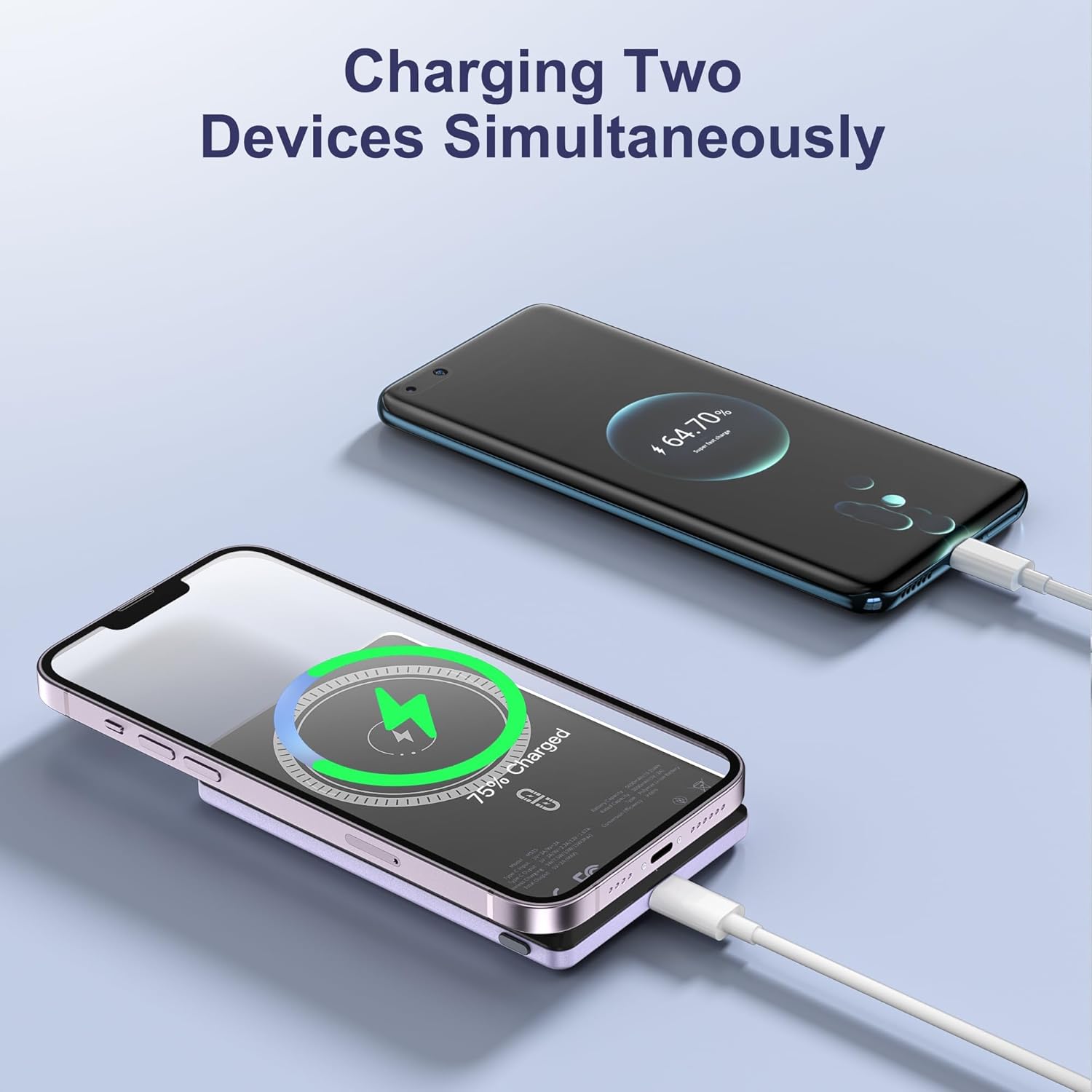
Figure 4: Charging two devices simultaneously.
4.4 Power On / Off
The power bank automatically activates charging when a device is connected wirelessly or via cable. To turn off the power bank, press the power button twice in quick succession.
5. Key Features
- Ultra-slank ûntwerp: Measuring just 0.32 inches (8mm) in thickness, it's designed for easy portability.
- 5000mAh Kapasiteit: Biedt ample macht foar deistich gebrûk.
- Magnetyske ferbining: Ensures a secure and stable wireless charging link.
- 20W PD Fast Charging: Delivers efficient wired charging speeds.
- Simultane opladen: Charge two devices at once (wireless + wired).
- Intelligente beskerming: Ynboude beskermingsmaatregels tsjin te hege stroom, te hege volumintentage, en koartsluting.

Ofbylding 5: Oerview of NOHON MS15 features.
6. Kompatibiliteit
The NOHON MS15 Mag-Safe Wireless Power Bank is designed for universal compatibility with:
- Mag-Safe Charging: iPhone 12, 13, 14, and 15 series (including Pro Max models).
- Draadloze opladen: Other Qi-enabled smartphones (requires a magnetic phone case for secure attachment).
- Wired opladen: Any device compatible with USB-C charging.
Noat: For non-magnetic charging phones, a magnetic phone case is required to ensure a secure connection for wireless charging.
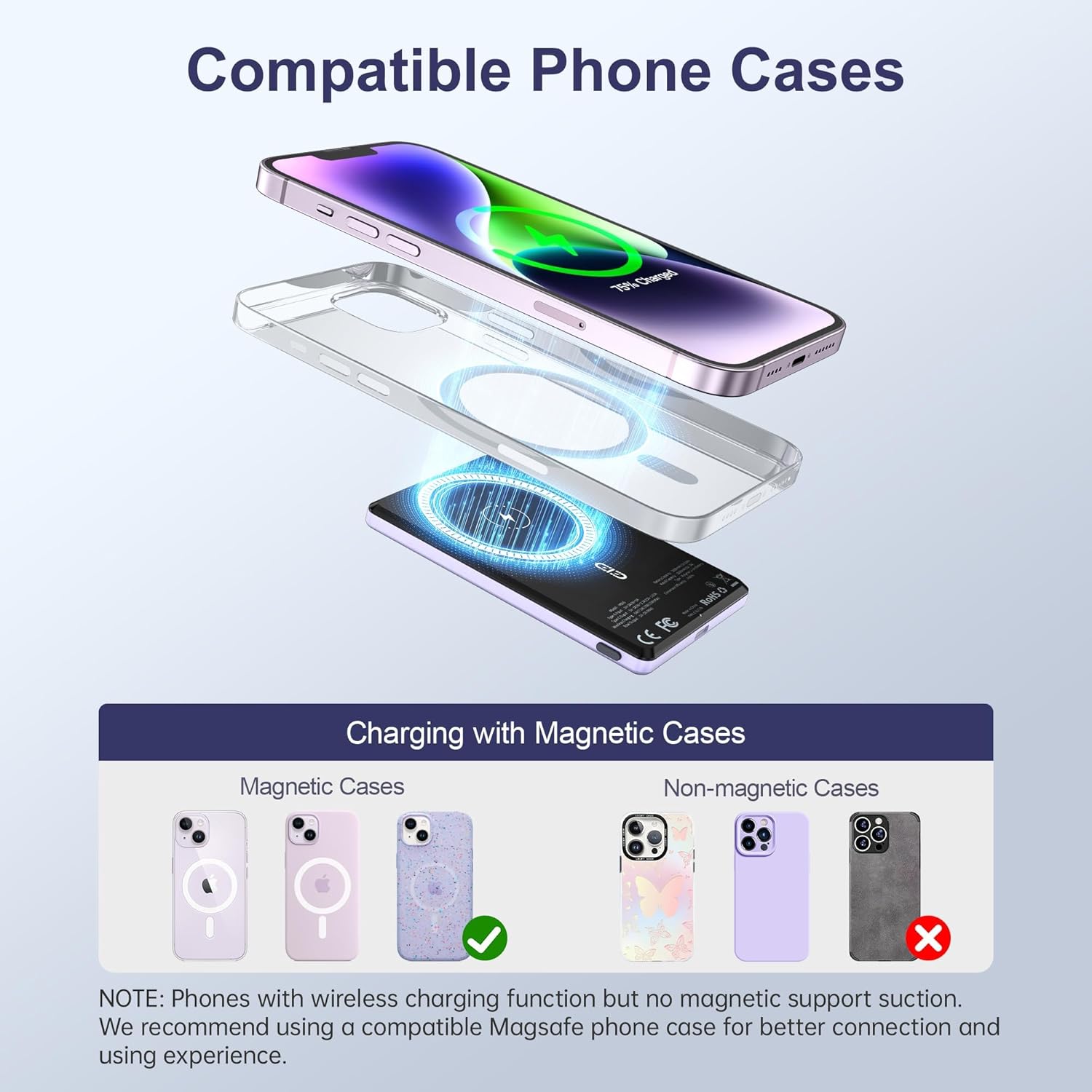
Figure 6: Compatible phone cases for magnetic charging.
7. Underhâld en soarch
- Hâld de powerbank fuort fan wetter, focht en ekstreme temperatueren.
- Meitsje it apparaat te fallen of te ûnderwerpen oan sterke ynfloeden.
- Meitsje it oerflak skjin mei in sêfte, droege doek. Brûk gjin agressive gemikaliën of abrasive materialen.
- Bewarje yn in koel, droech plak as net yn gebrûk.
8. Probleemoplossing
8.1 Apparaat laadt net op
- Ensure the power bank is sufficiently charged. Check the LED indicators.
- For wireless charging, verify proper alignment between the power bank and your device/magnetic case.
- Kontrolearje foar bekabeld opladen oft de USB-C-kabel goed ferbûn is mei sawol de powerbank as jo apparaat. Besykje in oare kabel as it nedich is.
- Remove any non-magnetic cases that may interfere with wireless charging.
8.2 Oerferhitting fan de powerbank
- It is normaal dat de powerbank wat waarm wurdt tidens it opladen.
- If it becomes excessively hot, discontinue use immediately and contact customer support.
- Ensure proper ventilation and avoid charging in direct sunlight or enclosed spaces.
9. Spesifikaasjes
| Eigenskip | Detail |
|---|---|
| Model Number | MS15 |
| Batterij Kapasiteit | 5000 mAh |
| Produkt Ofmjittings | 4 x 2.5 x 0.32 inch |
| Item Gewicht | 4.1 oz |
| Wired Charging Output | PD 20W (USB Type C) |
| Triedleaze laadútfier | Up to 15W (for Android), 7.5W (for iOS) |
| Special Features | Fast Charging, Slim Design, Wireless Charging, Magnetic Attachment |
| Kleur | Violet Ash |
10. Offisjele produktfideo
Fideo 1: Produkt oerview of the NOHON Mag-Safe Power Bank. This video demonstrates the features and usage of the power bank, including its slim design and magnetic attachment.
11. Garânsje en stipe
NOHON products typically come with a 12-month warranty. For any product inquiries, technical support, or warranty claims, please contact NOHON customer service through the retailer's platform or the official NOHON website. Please have your purchase details and model number (MS15) ready.