
1. Produkt Overview
The Irfora SZ305 is a professional digital multimeter designed for accurate and rapid measurement of various electrical parameters. It features a high-definition backlit LCD display for clear readings in diverse environments and a retractable stand for convenient use.
Wichtige funksjes omfetsje:
- AC/DC Voltage en Aktuele mjitting
- Diode, Resistance, and Capacitance testing
- Frekwinsje mjitting
- Buzzer continuity test
- hFE Triode testing for NPN/PNP transistors
- Non-Contact Voltage (NCV) deteksje
- Battery detection (1.5V, 3V, 9V, 12V)

Image 1.1: The Irfora SZ305 Digital Multimeter highlighting its various measurement functions including AC/DC voltage/current, diode, capacitance, frequency, buzzer, resistance, NCV induction, hFE, and battery detection.
2. Safety Information
Please read and understand all safety instructions before operating the multimeter. Failure to follow these instructions may result in electric shock, fire, or damage to the device.
- Always ensure the multimeter is set to the correct function and range before making any measurements.
- Besykje net te mjitten voltages or currents exceeding the maximum specified limits for the device.
- Wês ekstreme foarsichtich by it wurkjen mei stroomkringen. Hege folume.tages kinne gefaarlik wêze.
- Inspect test leads for damage before each use. Do not use if insulation is cracked or damaged.
- Brûk de multimeter net as er skansearre liket of net goed wurket.
- Avoid using the multimeter in wet environments or during electrical storms.
- Ferfange de batterijen fuortendaliks as de yndikator foar lege batterij ferskynt om krekte mjittingen te garandearjen.
- Always disconnect test leads from the circuit before changing functions or ranges.
3. Ynstelling en earste gebrûk
3.1 Batterij Ynstallaasje
The multimeter requires batteries for operation. To install or replace batteries:
- Soargje derfoar dat de multimeter útskeakele is en dat de testkabels loskeppele binne.
- Sykje it deksel fan it batterijfak oan 'e efterkant fan it apparaat.
- Brûk in schroevendraaier om it fak te iepenjen.
- Insert new batteries, observing correct polarity (+ and -).
- Ferfange de batterij compartment cover en befestigje it mei de skroef.
3.2 Using the Retractable Support Stand
The multimeter is equipped with a retractable stand on its back for convenient viewing during measurements.
- To deploy the stand, gently pull it outwards from the back of the device until it locks into position.
- Place the multimeter on a flat surface.
- To retract the stand, push it back into its original position until it is flush with the device body.
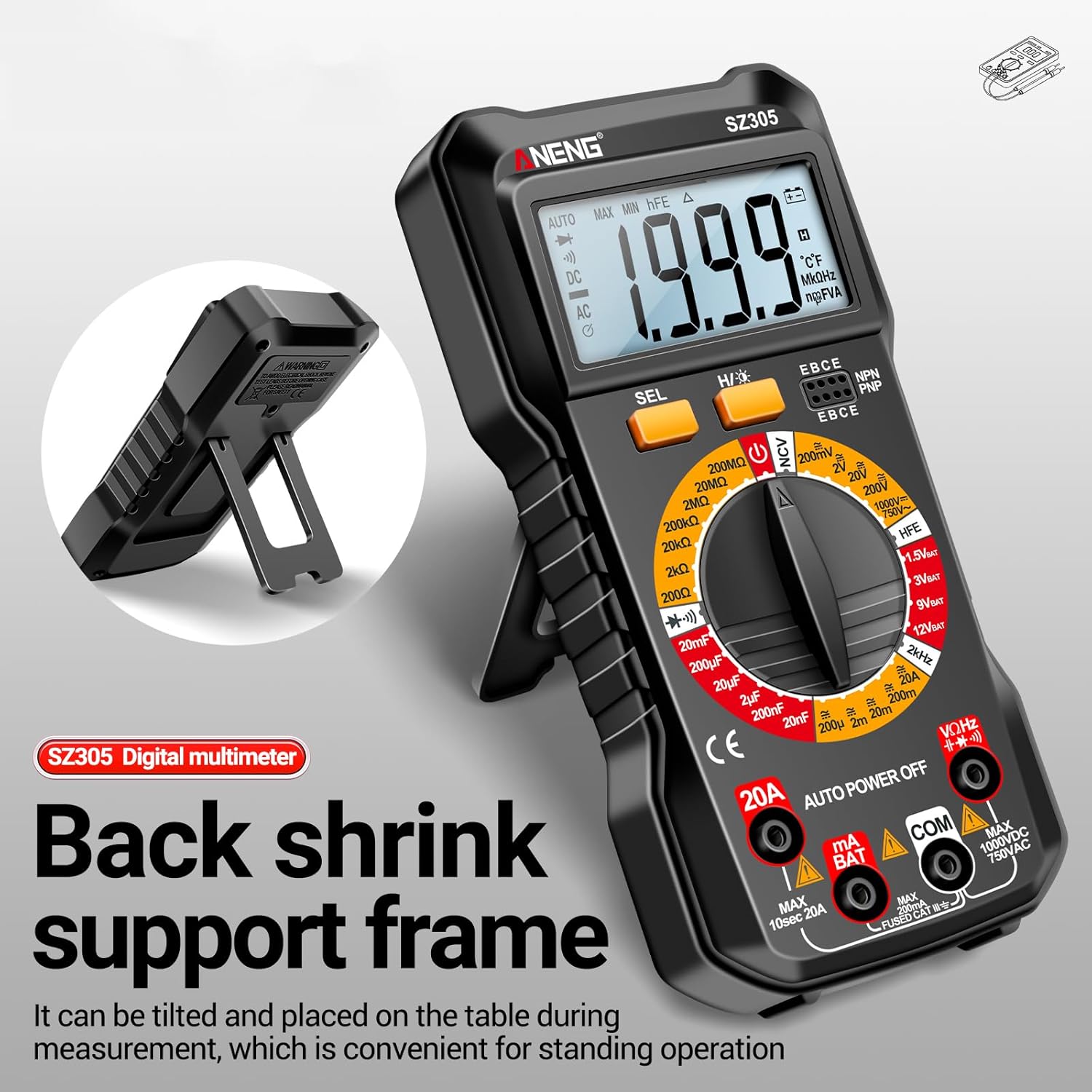
Image 3.1: The Irfora SZ305 Digital Multimeter demonstrating its retractable back support frame for angled viewop in tafel lizze.
4. Bedriuwsinstruksjes
This section details how to perform various measurements with your Irfora SZ305 Digital Multimeter.
4.1 Oan/út en efterljochting
- To power on the device, rotate the rotary switch from "AUTO POWER OFF" to any desired measurement function.
- To power off, rotate the switch back to "AUTO POWER OFF". The device also features an auto-power-off function after a period of inactivity.
- To activate the LCD backlight, press and hold the "H/☝" button. The backlight will illuminate, improving visibility in dark environments. Press and hold again to turn off.

Image 4.1: The Irfora SZ305 Digital Multimeter displaying its high-definition backlit LCD screen, enhancing readability in low-light conditions.
4.2 AC/DC Voltage Meting
- Insert the red test lead into the "VHz" jack and the black test lead into the "COM" jack.
- Rotate the rotary switch to the "V~" (AC Voltage) or "V=" (DC Voltage) berik.
- Connect the test probes across the circuit or component to be measured.
- Lês de voltage wearde werjûn op it LCD-skerm.

Image 4.2: A user measuring AC voltage with the Irfora SZ305 Digital Multimeter in an electrical panel, demonstrating proper probe placement.
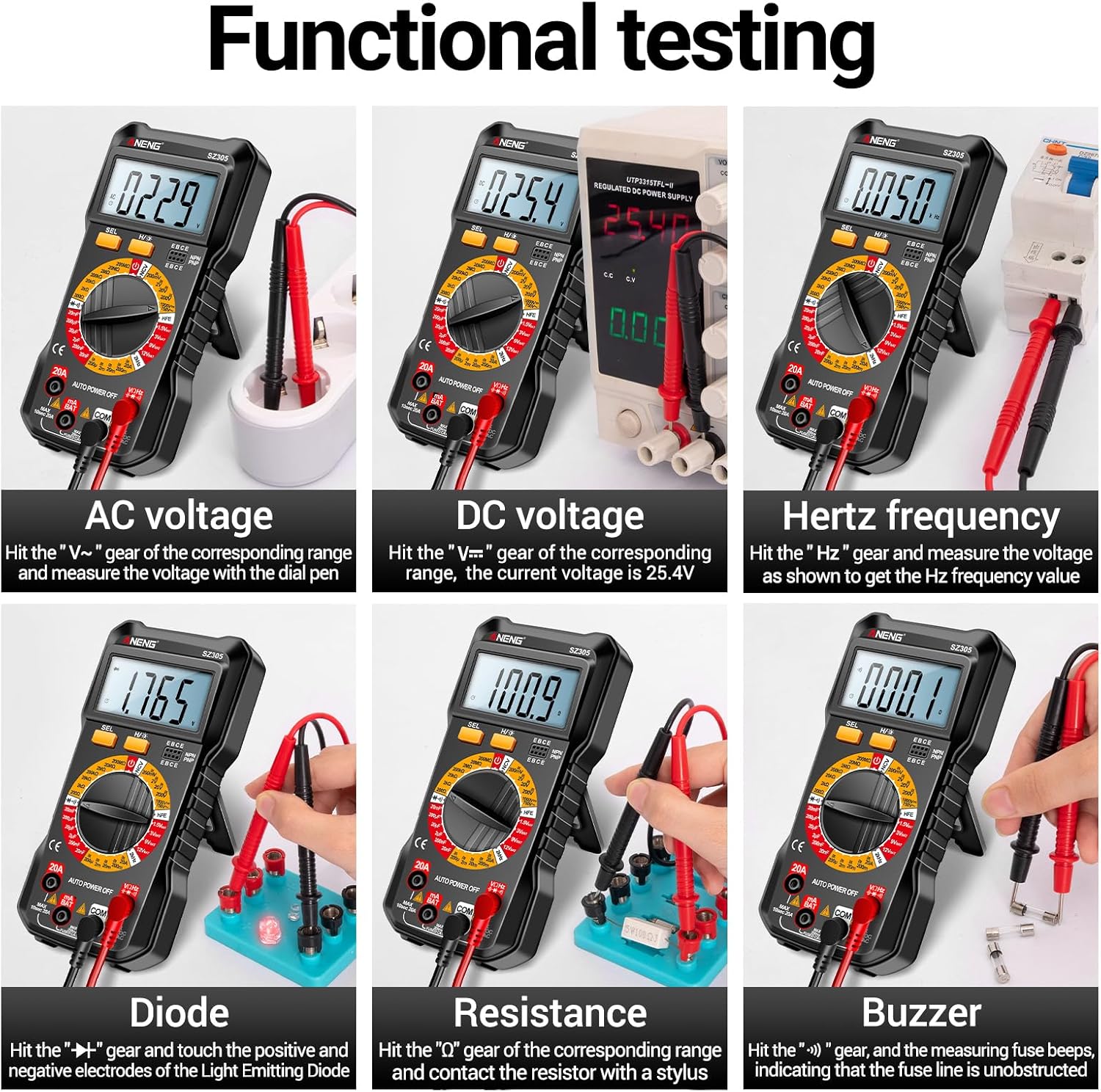
Ofbylding 4.3: Eks.amples of functional testing with the Irfora SZ305, showing measurements for AC voltage, DC voltage, Hertz frequency, diode, resistance, and continuity (buzzer).
4.3 AC/DC-stroommjitting
Foarsichtigens: Ensure the circuit is de-energized before connecting the multimeter in series for current measurement. Incorrect connection can blow the fuse or damage the meter.
- Insert the red test lead into the "mA" or "20A" jack (depending on expected current) and the black test lead into the "COM" jack.
- Rotate the rotary switch to the appropriate "mA~" / "mA=" or "20A~" / "20A=" range.
- Open the circuit where current is to be measured and connect the multimeter in series.
- Set stroom op it sirkwy en lês de stroomwearde ôf.

Ofbylding 4.4: Eks.amples of functional testing with the Irfora SZ305, showing measurements for 9V, 3V, 1.5V, and 12V batteries, hFE, capacitance, AC current, and DC current.
4.4 Resistance Measurement
- Insert the red test lead into the "VHz" jack and the black test lead into the "COM" jack.
- Rotate the rotary switch to the "Ω" (Resistance) range.
- Ensure the component to be measured is de-energized. Connect the test probes across the component.
- Lês de wearde fan 'e wjerstân.
4.5 Meting fan kapasiteit
- Insert the red test lead into the "VHz" jack and the black test lead into the "COM" jack.
- Rotate the rotary switch to the "F" (Capacitance) range.
- Soargje derfoar dat de kondensator folslein ûntladen is foardat jo mjitte om skea oan 'e meter te foarkommen.
- Ferbine de testprobes oer de kondensatorterminals.
- Lês de wearde fan 'e kapasitânsje.
4.6 Diode Test and Continuity (Buzzer)
- Insert the red test lead into the "VHz" jack and the black test lead into the "COM" jack.
- Rotate the rotary switch to the "Diode/Buzzer" symbol.
- Foar diodetest: Ferbine de reade sonde mei de anode en de swarte sonde mei de katode fan 'e diode. In foarútfolgtage drop will be displayed. Reverse the probes; an open circuit ("OL") should be displayed.
- Foar kontinuïteitstest: Connect the probes across the circuit or component. If resistance is below a certain threshold, the buzzer will sound, indicating continuity.
4.7 Frekwinsjemjitting (Hz)
- Insert the red test lead into the "VHz" jack and the black test lead into the "COM" jack.
- Rotate the rotary switch to the "Hz" range.
- Ferbine de testprobes oer de sinjaalboarne.
- Read the frequency value displayed.
4.8 hFE Triode Test
This function measures the DC current gain (hFE) of transistors.
- Rotate the rotary switch to the "hFE" position.
- Identify whether the transistor is NPN or PNP type.
- Insert the transistor leads (Emitter, Base, Collector) into the corresponding sockets on the multimeter's hFE test port.
- Read the hFE value displayed on the screen.

Image 4.5: The Irfora SZ305 Digital Multimeter conducting an hFE test, showing a transistor inserted into the dedicated test socket.
4.9 Non-Contact Voltage (NCV) Deteksje
De NCV-funksje makket it mooglik om AC-voluminten te detektearjentage without direct contact, enhancing safety.
- Rotate the rotary switch to the "NCV" position.
- Bring the top front part of the multimeter close to the suspected AC voltage source (e.g., a live wire, outlet).
- The multimeter will emit an audible alarm and the NCV indicator will flash. The closer the device is to the voltage source, the more urgent the alarm will be.

Image 4.6: The Irfora SZ305 Digital Multimeter demonstrating its Non-Contact Voltage (NCV) detection feature near an electrical outlet, indicating the presence of AC voltage.
4.10 Battery Detection (1.5V, 3V, 9V, 12V)
The multimeter can test common battery voltages.
- Rotate the rotary switch to the desired battery voltage range (e.g., "1.5V BAT", "3V BAT", "9V BAT", "12V BAT").
- Ferbine de reade testkabel mei de positive terminal fan 'e batterij en de swarte testkabel mei de negative terminal.
- Lês de voltage werjûn op it skerm.
5. Underhâld
5.1 Cleaning
Om de multimeter skjin te meitsjen, feegje de behuizing ôf mei advertinsje.amp doek en in myld reinigingsmiddel. Brûk gjin skuurmiddels of oplosmiddels. Soargje derfoar dat it apparaat útskeakele is en loskeppele is fan alle circuits foardat jo it skjinmeitsje.
5.2 Batterijferfanging
Refer to section 3.1 for instructions on battery installation and replacement. Replace batteries when the low battery indicator appears on the display to maintain measurement accuracy.
5.3 Fuse Replacement
If the current measurement function fails, the fuse may need replacement. This typically requires opening the back casing of the multimeter. Refer to the specifications for the correct fuse type and rating. If unsure, consult a qualified technician.
6. Probleemoplossing
- Gjin werjefte of swakke werjefte:
- Check battery charge. Replace batteries if low.
- Ensure the multimeter is powered on by rotating the switch from "AUTO POWER OFF".
- Ferkearde lêzingen:
- Soargje derfoar dat de juste funksje en berik selektearre binne foar de mjitting.
- Check test leads for proper connection and damage.
- Verify battery charge. Low batteries can affect accuracy.
- Ensure the circuit or component is properly prepared (e.g., capacitor discharged).
- Stroommeting wurket net:
- Check if the fuse is blown. Replace if necessary (refer to section 5.3).
- Ensure test leads are connected to the correct current jacks ("mA" or "20A").
- Verify the multimeter is connected in series with the circuit.
- NCV function not responding:
- Ensure the rotary switch is set to "NCV".
- Confirm there is an AC voltage source present.
7. Spesifikaasjes
| Eigenskip | Detail |
|---|---|
| Model | SZ305 |
| Merk | Irfora |
| Skerm | 1999 Counts, Backlit LCD |
| Funksjes | AC/DC Voltage, AC/DC Current, Resistance, Capacitance, Frequency, Diode, Continuity, hFE, NCV, Battery Test |
| Auto Power Off | Ja |
| Kleur | Swart |
| Fabrikant Referinsje | TYHDEE24863B |
Note: Detailed measurement ranges and accuracies are typically found in the full product datasheet.