
Ynlieding
Tankewol foar de oankeapasing the LDNIO Portable Wireless Bluetooth Speaker GTS-1393. This manual provides essential information for the safe and efficient use of your speaker. Please read these instructions carefully before use and retain them for future reference.
Wichtige feiligens ynformaasje
- Stel de sprekker net bleat oan ekstreme temperatueren, direkt sinneljocht of hege fochtigens.
- Meitsje de sprekker te fallen of te ûnderwurpen oan sterke ynfloeden.
- Demontearje, reparearje of feroarje de sprekker net sels. Nim kontakt op mei kwalifisearre servicepersoniel foar alle reparaasjes.
- Hâld de sprekker fuort fan wetter en oare floeistoffen.
- Brûk allinnich de oantsjutte oplaadkabel en stroomadapter.
- Smyt de batterij en sprekker fuort neffens lokale regeljouwing.
Pakketynhâld
Kontrolearje asjebleaft oft alle items yn jo pakket oanwêzich binne:
- LDNIO Portable Wireless Bluetooth Speaker GTS-1393
- USB-oplaadkabel (x1)
- Oplaadbare lithiumbatterij (500mAh)
- Remote Control
- Hâlder
- User Manual (dit dokumint)
Produkt oerview
Meitsje josels bekend mei de komponinten en kontrôles fan 'e sprekker. Note: The image below displays a similar model (GTS-1173) for illustrative purposes. The functionality described in this manual applies to the GTS-1393 model.
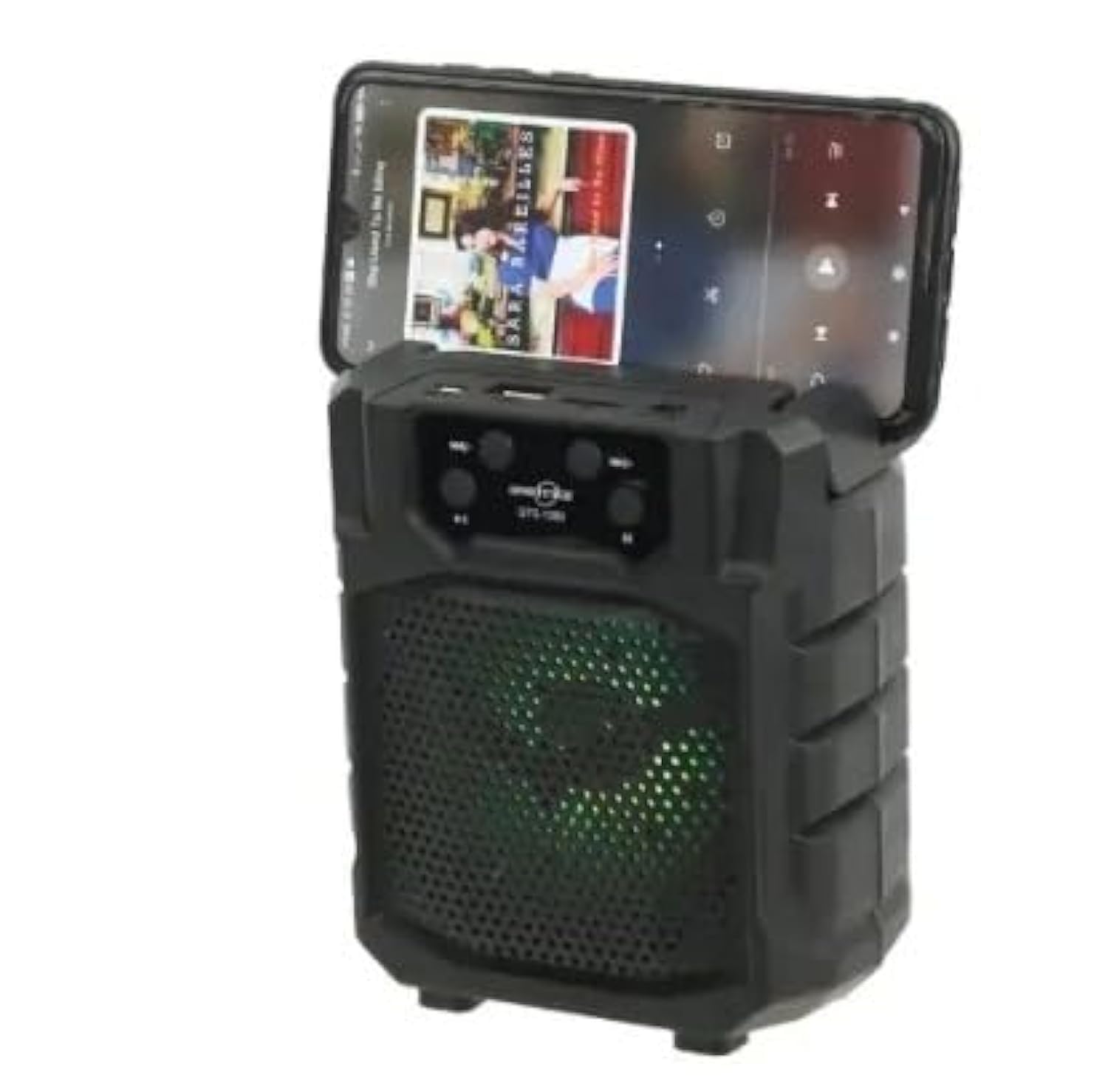
Ofbylding: Front view of a portable wireless Bluetooth speaker, model GTS-1173, featuring control buttons at the top and a speaker grille with multi-color LED lights. This image is for illustrative purposes, showing a similar product design to the GTS-1393.
Controls and Ports (Based on typical speaker design and OCR from image):
- Power knop: Usually long press to turn on/off.
- Modusknop (M): Koart yndrukke om te wikseljen tusken Bluetooth-, FM-radio-, USB- en TF-kaartmodi.
- Knop spielje/pauze: Bestjoert it ôfspieljen fan media.
- Foarich nûmer / Folume omleech (-): Koart yndrukke foar foarich nûmer, lang yndrukke om it folume te ferminderjen.
- Folgjende nûmer / Folume omheech (+): Koart yndrukke foar it folgjende nûmer, lang yndrukke om it folume te ferheegjen.
- USB-poarte: Foar it ôfspyljen fan in USB-flashstasjon.
- TF-kaartslot: For MicroSD/TF card playback.
- Oplaadpoarte: Foar it oansluten fan de USB-oplaadkabel.
Opsette
1. De sprekker oplade
- Ferbine it lytse ein fan 'e meilevere USB-oplaadkabel mei de oplaadpoarte op 'e sprekker.
- Ferbine it gruttere ein fan 'e USB-kabel mei in USB-stroomadapter (net ynbegrepen) of de USB-poarte fan in kompjûter.
- It oplaadindikatorljocht sil oangean (kleur kin ferskille) om oan te jaan dat de sprekker oan it opladen is.
- Once fully charged, the indicator light may change color or turn off. Disconnect the charging cable.
2. Oan- / útskeakelje
- Om oan te setten: Druk lang op de Power knop until you hear an audible prompt or see the indicator lights activate.
- Om út te skeakeljen: Druk lang op de Power knop wer oant de sprekker útskeakele is.
Operating Instructions
1. Bluetooth Mode (Default)
- Ensure the speaker is powered on. It will typically enter Bluetooth pairing mode automatically, indicated by a flashing LED light and an audible prompt.
- Skeakelje Bluetooth yn op jo mobyl apparaat (smartphone, tablet, ensfh.) en sykje nei beskikbere apparaten.
- Select "GTS-1393" (or similar name) from the list of devices.
- Sadree't de sprekker keppele is, sil hy in hoorbere befêstiging jaan en sil it LED-ljocht ophâlde mei knipperjen.
- You can now play audio from your device through the speaker. Use the speaker's controls or your device's controls to adjust volume and navigate tracks.
2. USB/TF-kaartôfspieljen
- Doch in USB-stick of TF (MicroSD)-kaart yn mei MP3-audio files yn 'e respektive haven.
- Druk op de Modusknop (M) to switch to USB or TF card mode. The speaker will automatically begin playing audio from the inserted storage device.
- Brûk de knoppen Ofspielje/Pauze, Foarige nûmer en Folgjende nûmer om it ôfspyljen te kontrolearjen.
3. FM Radio Mode
- Druk op de Modusknop (M) repeatedly until you enter FM Radio mode.
- To auto-scan for stations: Long press the Play / Pause knop. The speaker will scan and save available FM stations.
- To switch between saved stations: Use the Foarige nûmer (-) en Folgjende nûmer (+) knoppen.
4. TWS (Echt Draadloze Stereo) Funksje
The TWS function allows you to connect two GTS-1393 speakers together for a stereo sound experience.
- Soargje derfoar dat beide sprekkers útskeakele binne.
- Power on both speakers simultaneously. They should both enter Bluetooth pairing mode.
- On one of the speakers, long press the Modusknop (M) or a dedicated TWS button (if available) until you hear a confirmation tone, indicating they are paired with each other.
- Now, connect your mobile device to one of the speakers via Bluetooth as described in "1. Bluetooth Mode". The audio will play in stereo through both connected speakers.
Ûnderhâld
- Reiniging: Brûk in sêfte, droege doek om de sprekker ôf te feegjen. Brûk gjin skurende reinigingsmiddels of oplosmiddels.
- Opslach: Bewarje de sprekker op in koel, droech plak, fuort fan direkt sinneljocht en ekstreme temperatueren.
- Batterij soarch: Om de batterijlibben te ferlingjen, foarkom dat de batterij faak folslein ûntladen wurdt. Laad de sprekker regelmjittich op, sels as er lange perioaden net brûkt wurdt.
Troubleshooting
| Probleem | Mooglike oplossing |
|---|---|
| De sprekker giet net oan. | Soargje derfoar dat de batterij opladen is. Ferbine de sprekker mei in stroomboarne mei de USB-kabel. |
| Gjin lûd fan 'e sprekker. | Check the volume level on both the speaker and your connected device. Ensure the speaker is in the correct mode (Bluetooth, USB, TF, FM). |
| Kin net keppele fia Bluetooth. | Ensure the speaker is in Bluetooth pairing mode (flashing LED). Turn off and on Bluetooth on your device. Move your device closer to the speaker. Forget the device from your phone's Bluetooth list and try pairing again. |
| USB/TF-kaart spilet net ôf. | Ensure the card is inserted correctly. Verify that the audio files are in a supported format (e.g., MP3). Press the Mode button to select the correct input. |
| Minne FM-radio-ûntfangst. | Relocate the speaker to an area with better signal. Extend any built-in antenna if available. |
Spesifikaasjes
| Merk: | LDNIO |
| Model Namme: | GTS-1393 |
| Maksimale sprekkerútfierkrêft: | 5 watt |
| Konnektivität technology: | Wireless (Bluetooth) |
| Audioútfiermodus: | Stereo |
| Ynstallaasje type: | Tabletop |
| Speaker Type: | Bûten (Draachber) |
| Spesjale funksje: | Draachber |
| Oanrikkemandearre gebrûk: | Smartphones, Tablets, Music Players, Computers |
| Kompatibele apparaten: | Tablet, Laptop, Smartphone |
| Speaker Diameter: | 4 ynf |
| Kleur: | Swart |
| Kontrôlemetoade: | Remote |
| Power Boarne: | Batterij Powered |
| Driver Type: | Dynamic Driver |
| Ynbegrepen komponinten: | Remote control, Holder |
| Oantal items: | 1 |
| Surround Sound Channel Konfiguraasje: | 2 |
| Triedleaze kommunikaasjeprotokol: | Bluetooth |
| Batterij Kapasiteit: | 500 mAh |
Garânsje en stipe
Foar ynformaasje oer garânsje of technyske stipe, rieplachtsje de dokumintaasje dy't by jo oankeap levere is of nim kontakt op mei jo winkelier. Bewarje jo bewiis fan oankeap foar garânsjeclaims.