
1. Ynlieding
Thank you for choosing the WORKPRO 7.2V Cordless Rotary Tool. This manual provides essential information for the safe and effective operation, maintenance, and troubleshooting of your tool. Please read it thoroughly before use and retain it for future reference.
The WORKPRO 7.2V Cordless Rotary Tool is a versatile and compact device designed for various DIY and craft projects. Its lightweight design and variable speed settings make it suitable for tasks such as sanding, engraving, cutting, drilling, grinding, and polishing.

Figure 1: WORKPRO 7.2V Cordless Rotary Tool with included accessories and storage bag.
2. Safety Information
Nim altyd basisfeiligensmaatregels yn acht om it risiko op brân, elektryske skok en persoanlik letsel te ferminderjen by it brûken fan elektrysk ark.
- Lês alle ynstruksjes: Meitsje josels bekend mei de wurking en feilichheidsrjochtlinen fan it ark.
- Oogbeskerming drage: Draach altyd feiligensbrillen of feiligensbrillen mei sydskermen.
- Feilich wurkstik: Altyd clamp of oars it wurkstik befeiligje om beweging tidens operaasje te foarkommen.
- Hâld in skjin wurkgebiet: Romme gebieten noegje ûngemakken út.
- Foarkom gefaarlike omjouwings: Net brûke macht ark yn damp as wiete lokaasjes, of stel se bloot oan rein. Hâld wurkgebiet goed ferljochte.
- Hâld bern fuort: Alle besikers moatte op in feilige ôfstân fan it wurkgebiet hâlden wurde.
- Klear goed: Do not wear loose clothing or jewelry. They can be caught in moving parts. Non-skid footwear is recommended. Wear protective hair covering to contain long hair.
- Brûk it juste ark: Twing it ark of taheaksel net om in wurk te dwaan wêrfoar it net ûntwurpen is.
- Strom útskeakelje: Disconnect the tool from its power source before making adjustments, changing accessories, or storing it.
- Net oerrekke: Hâld altyd goede foet en lykwicht.
- Hâld ark mei soarch: Hâld ark skerp en skjin foar bettere en feiliger prestaasjes. Folgje ynstruksjes foar lubricating en feroarjen fan accessoires.
- Kontrolearje op skansearre dielen: Foar it fierdere gebrûk fan it ark moat in beskermer as in oar skansearre diel soarchfâldich wurde kontrolearre om te bepalen dat it goed sil wurkje en de bedoelde funksje útfiere.
- Do Not Operate While Charging: For safety reasons, do not use the tool while it is being charged.
3. Produkt Overview
The WORKPRO 7.2V Cordless Rotary Tool is designed for precision work. Understanding its components is key to effective operation.
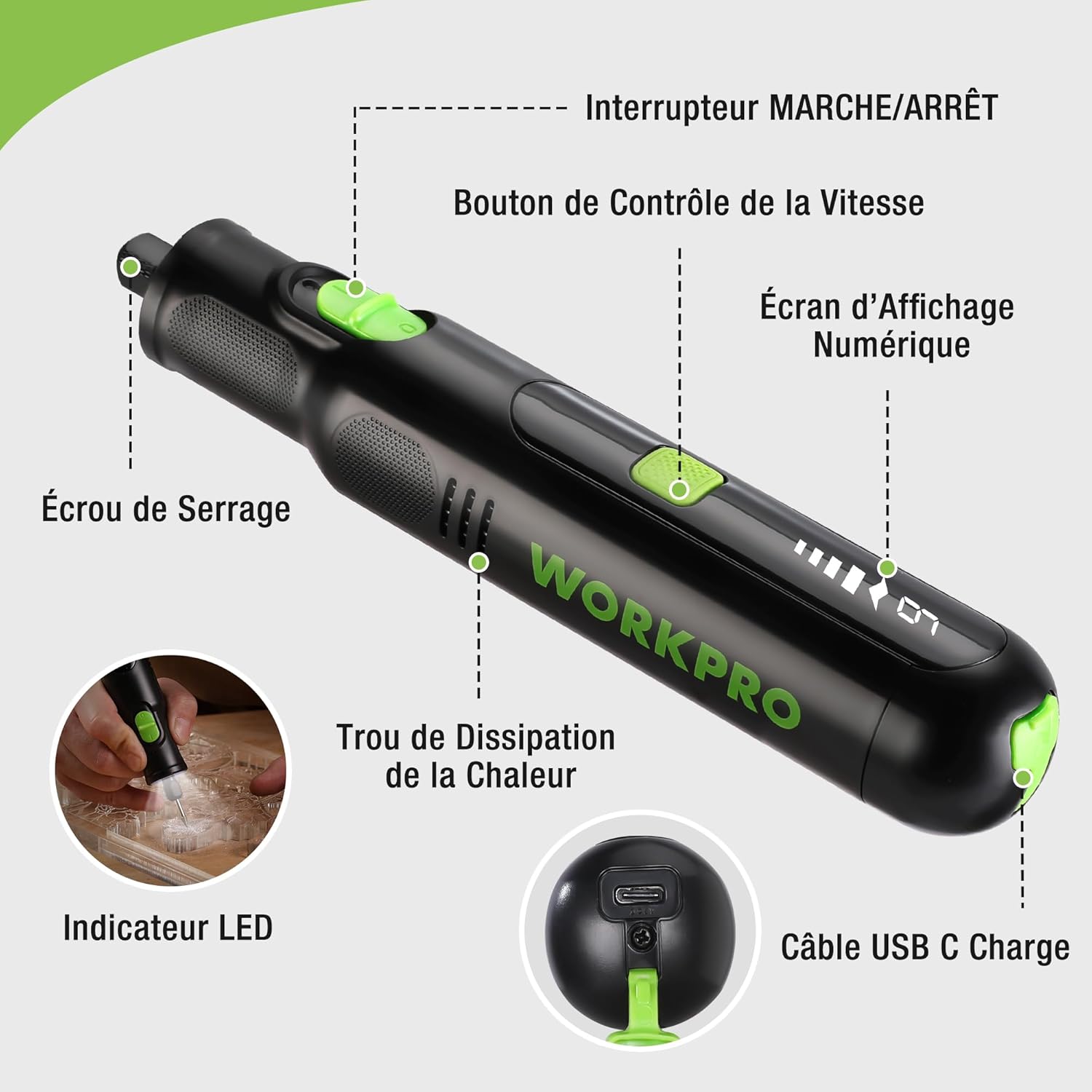
Figure 2: Key components of the rotary tool.
Komponinten:
- ON/OFF Switch: Aktivearret en deaktivearret it ark.
- Snelheidskontrôleknop: Adjusts the rotational speed of the tool.
- Digitaal skerm skerm: Toant de aktuele snelheidsynstelling.
- Collet Nut: Secures the accessory bits in place.
- Heat Dissipation Hole: Ensures proper cooling of the motor during operation.
- LED-yndikator: Provides illumination for the work area.
- USB-C oplaadpoarte: Foar it opladen fan 'e ynterne batterij.
Ynbegrepen aksessoires:
Your WORKPRO rotary tool comes with 117 diverse accessories, enabling a wide range of applications. These include:

Ofbylding 3: Oerview of the 117 included accessories.
- Slypjen/Skerpjen: Grinding stones and wheels for material shaping and sharpening.
- Snijwurk: Diamond bits for detailed carving and engraving.
- Poetsen: Wool felt wheels, felt wheels, screw mandrels, and metal brushes for achieving smooth, shiny finishes.
- Frezen: Milling bits for precise material removal.
- Snijden: Cutting discs and saw blades for various cutting tasks, along with a cutting disc holder.
- Slypjen: Sandpaper, rubber sanding drums, and sanding bands for surface preparation and finishing.
- Collets: 2.35mm and 3.2mm collets to accommodate different shank sizes.
- Boarjen: 2.35mm and 3.2mm drill bits for small-scale drilling.
- Wrench: For securing and loosening collet nuts.
4. Opsette
4.1 It ark opladen
The tool is equipped with a 7.2V 1100mAh Lithium-ion rechargeable battery. Before first use, fully charge the tool.
- Connect the provided USB-C charging cable to the tool's USB-C charging port.
- Ferbine it oare ein fan 'e USB-kabel mei in kompatibel USB-stroomboarne (bygelyks, kompjûter, USB-muorreadapter).
- It digitale display sil de oplaadstatus oanjaan. In folsleine lading duorret normaal sawat 2 oeren.
- Ien kear folslein opladen, losmeitsje de oplaadkabel.
Note: For optimal battery life, it is recommended to store the tool with the battery charged between 50% and 75%. Recharge the tool at least once every 3 to 6 months if not used regularly.

Figure 4: Charging the rotary tool via USB-C.
4.2 Ynstallaasje fan accessoires
The WORKPRO rotary tool features an automatic spindle lock design for easy and secure accessory changes.
- Soargje derfoar dat it ark ÚT is.
- Unscrew the collet nut at the front of the tool.
- Select the appropriate collet size for your desired accessory (2.35mm or 3.2mm). Insert the collet into the tool if not already present.
- Insert the shank of the accessory bit into the center of the collet nut. Ensure the bit is fully seated.
- Hand-tighten the collet nut. For a secure fit, use the included wrench to tighten the collet nut firmly. Do not overtighten.

Figure 5: Two-step accessory replacement process.

Figure 6: Detailed installation steps for various accessories.
Note: The automatic spindle lock engages when the tool is off, allowing for accessory changes without needing to press a separate button. A slight clicking sound when the tool stops is normal due to this mechanism.
5. Bedriuwsinstruksjes
5.1 Yn-/útskeakelje
To turn the tool ON, slide the ON/OFF switch to the 'ON' position. To turn it OFF, slide the switch to the 'OFF' position.
5.2 Snelheid oanpasse
The tool features 6 variable speed settings, ranging from 5000 RPM to 30000 RPM. Press the Speed Control Button to cycle through the speeds. The current speed setting will be displayed on the digital screen.
- Speed I: 5000 RPM
- Speed II: 10000 RPM
- Speed III: 15000 RPM
- Speed IV: 20000 RPM
- Speed V: 25000 RPM
- Speed VI: 30000 RPM
Choose the appropriate speed for your task and material. Lower speeds are generally suitable for polishing, delicate work, and softer materials, while higher speeds are for cutting, grinding, and harder materials.

Figure 7: Variable speed settings and powerful motor.
5.3 Yntegreare LED-ljocht
The tool includes an integrated LED light that illuminates the work area, improving visibility in dimly lit spaces and for detailed tasks.

Figure 8: Using the LED light for precision engraving.
5.4 Applikaasjes
The WORKPRO rotary tool is highly versatile and can be used for:
- Snijden: Use appropriate cutting discs for various materials.
- Snijwurk/Gravearje: Utilize diamond bits for intricate designs on wood, plastic, or soft metals.
- Poetsen: Apply felt wheels and polishing compounds to restore shine to surfaces.
- Slypjen: Use sanding bands and drums for smoothing rough edges or preparing surfaces.
- Boarjen: Employ small drill bits for precision holes.

Figuer 9: Examples of versatile applications.
6. Underhâld
6.1 Cleaning
- Koppel it ark altyd los fan elke stroomboarne foardat jo it skjinmeitsje.
- Brûk in sêft, damp doek om de bûtenkant fan it ark ôf te feegjen. Brûk gjin agressive gemikaliën of skurende reinigingsmiddels.
- Use a small brush or compressed air to clear dust and debris from the heat dissipation holes and around the collet area.
6.2 Batterijsoarch en opslach
- To prolong battery life, avoid completely discharging the battery regularly.
- For long-term storage, ensure the battery is charged to approximately 50-75%. Recharge the tool every 3 to 6 months to prevent deep discharge and maintain battery health.
- Bewarje it ark op in koel, droech plak, fuort fan direkt sinneljocht en ekstreme temperatueren.
6.3 Opslach fan accessoires
Keep all accessories organized in the provided storage bag or a suitable container to prevent loss and damage.
7. Probleemoplossing
This section addresses common issues you might encounter with your WORKPRO rotary tool.
| Probleem | Mooglike oarsaak | Oplossing |
|---|---|---|
| It ark giet net oan. | Batterij is ûntslein. | Charge the tool fully using the USB-C cable. |
| It ark stoppet ûnferwachts tidens gebrûk. | De batterij is leech of it ark is oerladen. | Recharge the battery. Reduce pressure on the tool or use a lower speed setting for the task. |
| Clicking sound when turning off. | Normal operation of the automatic spindle lock. | This is a normal function and does not indicate a fault. |
| Accessory bit is loose or wobbles. | Collet nut not tightened sufficiently or incorrect collet size. | Ensure the correct collet size is used for the accessory. Tighten the collet nut firmly with the included wrench. |
| Reduced performance or short runtime. | Battery degradation or improper charging/storage. | Ensure proper charging and storage practices are followed (refer to Section 6.2). If the issue persists, the battery may need replacement. |
8. Spesifikaasjes
Below are the technical specifications for the WORKPRO 7.2V Cordless Rotary Tool (Model W123024A).
| Eigenskip | Spesifikaasje |
|---|---|
| Merk | WORKPRO |
| Model Number | W123024A |
| Voltage | 7.2 Volt |
| Batterij Type | Lithium-ion (1 ynbegrepen) |
| Batterij Kapasiteit | 1100 mAh |
| Max rotaasje snelheid | 30000 RPM |
| Fariabele snelheden | 6 (5000-30000 toeren per minuut) |
| Oplaadtiid | Ca. 2 oeren |
| Runtime (Max Speed) | Ca. 45 minuten |
| Gewicht | 227g wy |
| Ofmjittings (L x B x H) | 25.2 x 16.8 x 5.5 sm |
| Special Feature | Cordless, Integrated LED Light, Automatic Spindle Lock |
| Ynbegrepen komponinten | 117 Accessories |
| Fabrikant | Hang Zhou Great Star Yndustrybedriuw, Ltd. |
9. Garânsje en stipe
For warranty information, please refer to the documentation provided at the time of purchase or contact your retailer. WORKPRO is committed to providing quality products and customer satisfaction.
If you encounter any issues or have questions regarding your WORKPRO 7.2V Cordless Rotary Tool, please contact the seller or WORKPRO customer support through their official website or contact channels. Please have your model number (W123024A) and purchase details ready when seeking support.