
Ynlieding
De priis fan VOX amPlug 3 Boutique is a compact headphone guitar amplifier designed to deliver the sophisticated tones of high-end boutique amplifiers directly to your headphones. This portable device offers versatile sound options, built-in rhythms, and an auxiliary input for an enhanced practice experience without disturbing others. Its innovative design and analog circuitry ensure rich, nuanced sound quality for both home and on-the-go practice sessions.

Ofbylding: Front view of the VOX amPlug 3 Boutique Headphone Guitar Amplifer, showcasing its compact design and classic aesthetic.
Key Features
- Boutique Amplifier Tones: Designed to deliver the sophisticated tones of high-end boutique amplifiers, perfect for discerning players.
- Three Versatile Modes: Boutique OD for smooth overdrive, Boutique Clean for pristine clarity, and Boutique High-Gain for soaring leads.
- Built-in Rhythm Patterns: Equipped with nine selectable rhythm patterns including jazz, rock, and funk, providing an ideal practice companion.
- Custom Analog Circuitry: Ensures rich, nuanced sound, capturing the warmth and character of premium boutique amps.
- Kompakt en lichtgewicht: Weighing only 40 grams (excluding batteries), making it easy to take anywhere.
- Lange batterijlibben: Operates on two AAA batteries, offering up to 17 hours of continuous playtime.
- Auxiliary Ynfier: Allows you to connect external audio sources for jamming along with your favorite tracks.
- Foldable Plug Mechanism: Innovative design rotates 180 degrees for optimal positioning and easy storage.
- Automatysk útskeakelje: Helps conserve battery life by automatically shutting down when not in use.
Opsette
1. Batterij Ynstallaasje
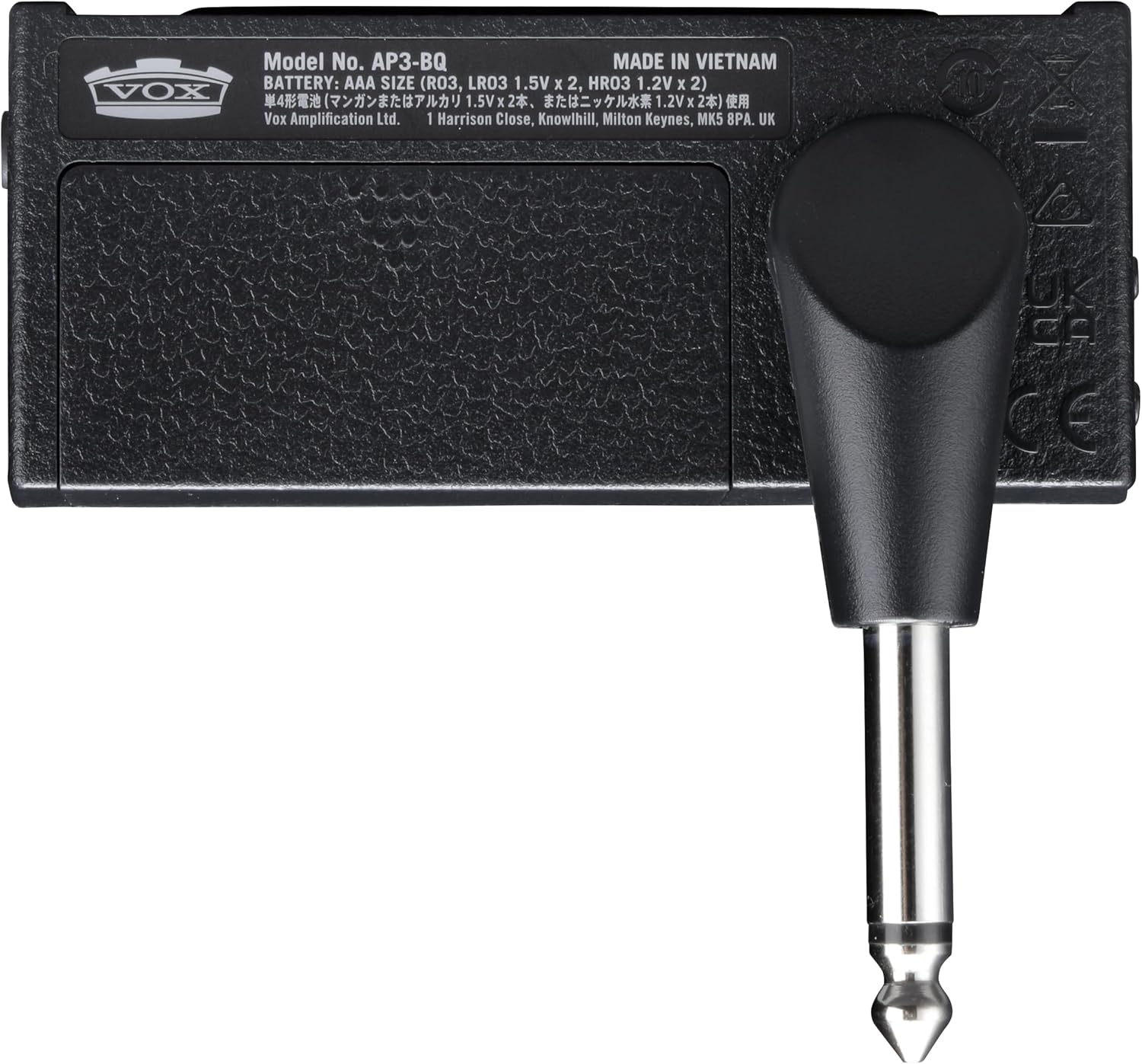
De amPlug 3 requires two AAA batteries for operation. These are typically included with the product.
- Sykje de batterij compartment op 'e rêch fan' e amPlug unit.
- Skuif de dekking fan it batterykompartij iepen.
- Doch twa AAA-batterijen yn, en soargje derfoar dat de polariteit (+/-) goed is lykas oanjûn yn it fak.
- Slút it deksel fan it batterijfak feilich.

Ofbylding: Efterkant view fan de amPlug 3, highlighting the battery compartment and the 1/4-inch jack.
2. Connecting to Your Guitar
- Rotate the integrated 1/4-inch jack on the amPlug 3 to align with your guitar's output jack. The plug can rotate 180 degrees for optimal positioning.
- Stek de amPlug 3's jack into your guitar's output jack.

Ofbylding: De amPlug 3 unit securely plugged into the output jack of an electric guitar.
3. Connecting Headphones
- Plug your headphones into the 3.5mm headphone jack located on the amPlug 3 unit.

Ofbylding: De amPlug 3 connected to an electric guitar, with headphones plugged into the unit, ready for silent practice.
Operating Instructions
1. Power On / Off
Om macht op de amPlug 3, slide the POWER switch to the 'ON' position. The LED indicator will light up. To power off, slide the switch to 'OFF'. The unit features an auto power-off function to conserve battery life when not in use.
2. Kontrôles
De amPlug 3 features several controls for shaping your sound:
- WINST: Past de hoemannichte overdrive/ferfoarming oan.
- TOAN: Adjusts the tonal characteristics, from bright to warm.
- FOLUME: Controls the overall output volume to your headphones.
- FX/RHYTHM: This button cycles through the available effects and rhythm patterns.
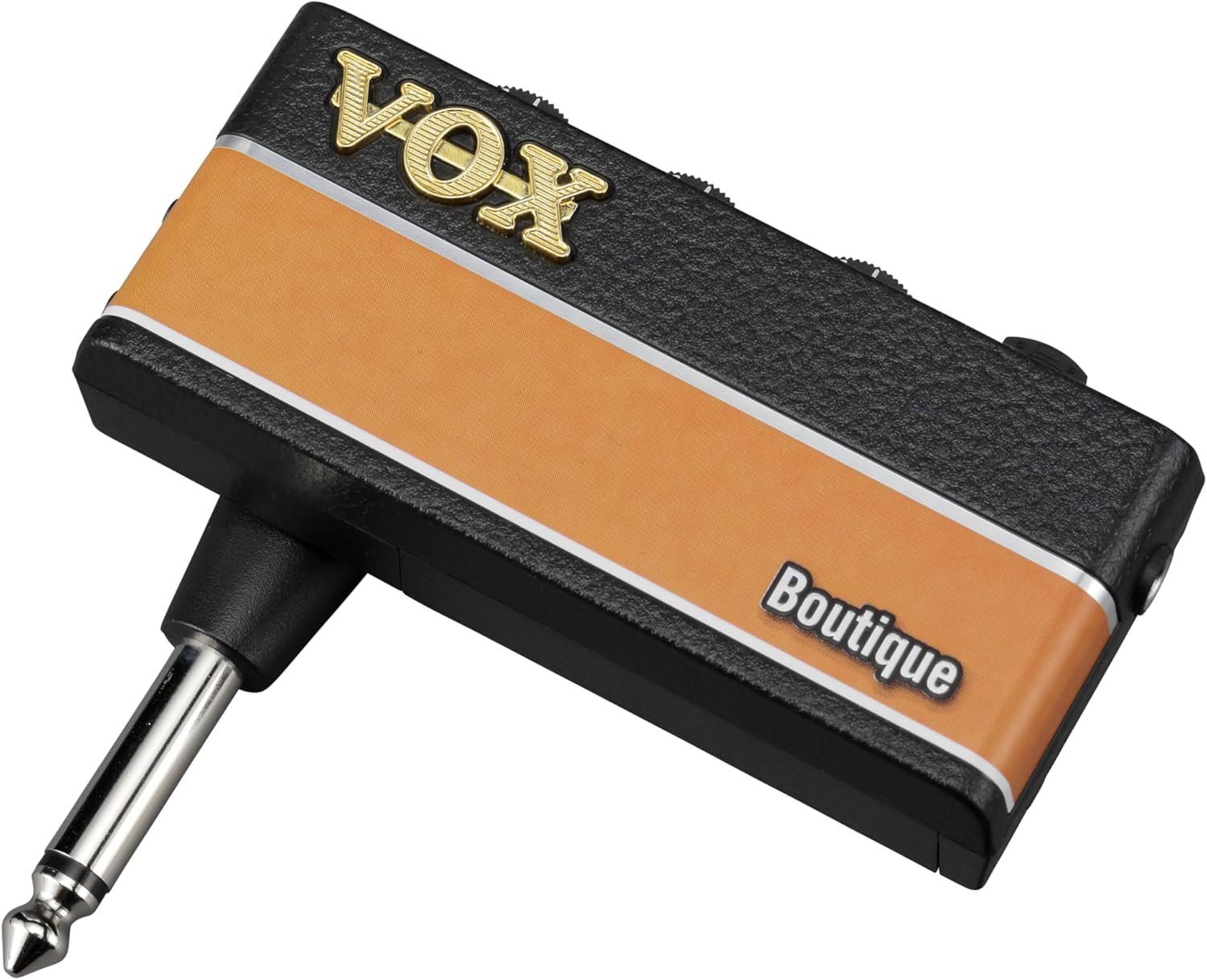
Ofbylding: Detaillearre view of the top-mounted controls on the amPlug 3, including Gain, Tone, Volume, and the FX/Rhythm button.
3. Selecting Amplifier Modes
The Boutique model offers three distinct ampLifier modes:
- Boutique OD: Provides a smooth, rich overdrive tone.
- Boutique Clean: Delivers pristine, clear tones.
- Boutique High-Gain: Offers powerful, soaring lead tones.
Refer to the product's quick start guide for specific instructions on how to switch between these modes, typically involving holding down the power button or a combination of controls.
4. Using Effects and Rhythm Patterns
Druk op de FX/RHYTHM button to cycle through the available effects (e.g., Chorus, Delay, Reverb) and nine rhythm patterns. Adjust the controls to blend the effects and rhythms with your guitar sound.
5. Hulpynfier (AUX IN)
Connect an external audio player (e.g., smartphone, MP3 player) to the 3.5mm AUX IN jack on the amPlug 3 using an audio cable. This allows you to jam along with your favorite tracks through your headphones.
Ofbylding: Side view fan de amPlug 3, clearly showing the AUX input jack and the control knobs for Gain, Tone, and Volume.
Video Demonstration: Sound and Playability
Video: A demonstration of the VOX amPlug 3's sound quality and playability, showcasing various tones and features.
Video Demonstration: AC30 Sound Through Headphones
Video: An audio demonstration of the VOX amPlug AC30 model's sound as heard through headphones, providing insight into the tonal characteristics of the amPlug series.
Video Demonstration: Up-Close Look at amPlug Features
Video: A detailed close-up video showcasing the physical features and controls of an amPlug unit, demonstrating its ease of use and portability.
Ûnderhâld
- Reiniging: Feie it apparaat ôf mei in sêfte, droege doek. Brûk gjin abrasive reinigingsmiddels of oplosmiddels.
- Opslach: Bewarje de amPlug 3 in a cool, dry place away from direct sunlight and extreme temperatures. Remove batteries if storing for extended periods to prevent leakage.
- Behanneling: Foarkom dat it apparaat falle lit of ûnderwurpen wurdt oan sterke stoten.
Troubleshooting
| Probleem | Mooglike oarsaak | Oplossing |
|---|---|---|
| Gjin lûd | Low or dead batteries; headphones not connected; volume too low; amPlug not fully inserted into guitar. | Replace batteries; ensure headphones are securely plugged in; increase volume; firmly insert amPlug into guitar jack. |
| Poor sound quality/noise | Loose connections; interference; faulty headphones. | Check all connections; move away from other electronic devices; try different headphones. |
| Ienheid giet net oan | Lege batterijen; ferkearde batterijynstallaasje. | Ferfange batterijen; soargje derfoar dat de batterijen mei de juste polariteit ynfoege binne. |
Spesifikaasjes
- Produkt Ofmjittings: 1.42" D x 5.12" W x 7.2" H
- Item Gewicht: 3.2 oz
- Model nûmer.: AP3BQ
- Batterijen: 2 AAA batteries required (up to 17 hours continuous playtime)
- Kompatibele apparaten: Gitaar
- Materiaal: Plestik
- Fabrikant: VOX
Garânsje en stipe
For warranty information and customer support, please refer to the documentation included with your product or visit the official VOX Amplifikaasje webside. Bewarje jo bewiis fan oankeap foar alle garânsjeclaims.