
1. Ynlieding
The OSD Audio DAC-X200 is a powerful 2-channel Class D stereo amplifier designed to deliver high-fidelity audio. It features a built-in Hi-Res 24bit/192khz DAC, offering superior digital audio conversion. With versatile input options including USB, Optical, and RCA, and A/B speaker switching, this amplifier is suitable for various home audio setups, from driving bookshelf speakers to powering floorstanding units.
2. Safety Ynstruksjes
- Power Boarne: Ferbine it apparaat allinich mei it oantsjutte stroomfoarsjenningsvolumetage.
- Ventilaasje: Soargje foar foldwaande fentilaasje. Blokkearje gjin fentilaasje-iepeningen.
- Wetter en focht: Stel it apparaat net bleat oan rein, focht of tefolle luchtvochtigheid.
- Heat boarnen: Hâld it apparaat fuort fan waarmteboarnen lykas radiatoren, waarmteregisters, kachels of oare apparaten dy't waarmte produsearje.
- Reiniging: Reinigje allinich mei in droege doek.
- Betsjinning: Besykje net dit produkt sels te tsjinjen. Ferwize alle service oan kwalifisearre servicepersoniel.
- Pleatsing: Place the unit on a stable, flat surface. Avoid placing heavy objects on top of the amplibbener.
3. Package Ynhâld
Kontrolearje oft alle items yn it pakket oanwêzich binne:
- OSD Audio DAC-X200 Amplibbener
- Quick Start Guide
- Power Kabel
- Ofstânsbetsjinning (as ynbegrepen by jo model)
4. Produkt Overview
4.1 Foarpaniel
The front panel provides access to essential controls for daily operation.

Ofbylding 4.1: Front view of the DAC-X200 amplifier, showing the power button, speaker selectors, balance, and volume controls.

Ofbylding 4.2: Detail of the front panel, highlighting the Power button and Speaker A/B selection buttons.

Ofbylding 4.3: Detail of the front panel, showing the Balance and Volume control knobs.
4.2 Rear Panel
The rear panel houses all input and output connections for audio sources and speakers.
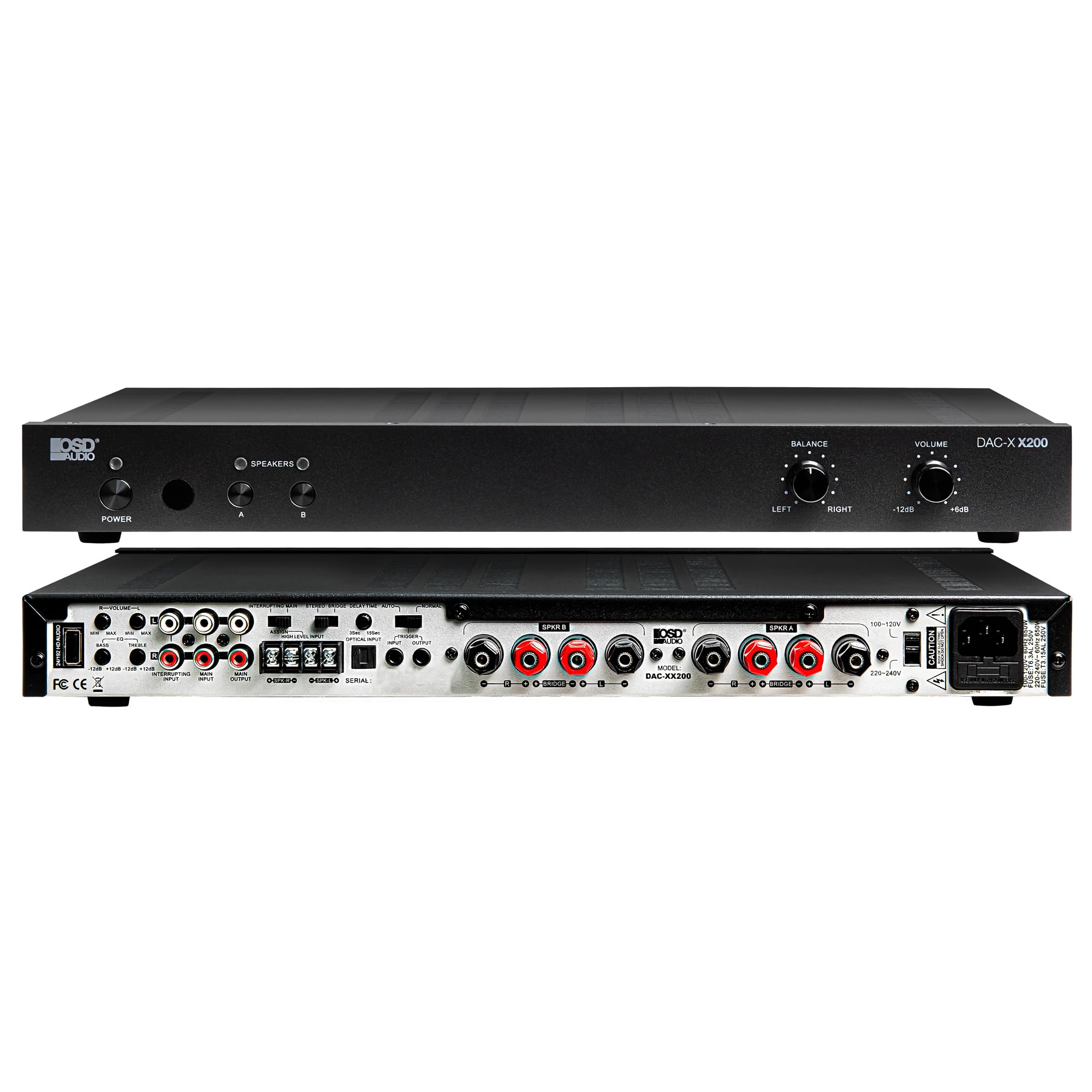
Ofbylding 4.4: Rear view of the DAC-X200 amplifier, displaying various audio inputs (USB, Optical, RCA), speaker outputs, and power input.

Ofbylding 4.5: Detail of the rear panel inputs, including USB, Optical, and RCA connections.

Ofbylding 4.6: Detail of the rear panel speaker output terminals for Speaker A and Speaker B.
5. Opsette
5.1 Pleatsing
Place the DAC-X200 on a flat, stable surface with adequate space around it for ventilation. Avoid enclosed cabinets or areas with poor airflow to prevent overheating.
5.2 Ferbine sprekkers
- Fersekerje de ampDe lifer is útskeakele en loskeppele.
- Ferbine jo passive sprekkers oan de SPREKKER A en/of SPREKER B terminals on the rear panel. Observe correct polarity (+ to + and - to -).
- For optimal performance, use high-quality speaker wire.
5.3 Audioboarnen ferbine
The DAC-X200 supports multiple input types:
- USB-ynfier: Connect a computer or other USB audio source using a Type A to Type A USB 2.0 cable.
- Optyske ynfier: Ferbine digitale audioboarnen lykas tv's of cd-spilers mei in optyske kabel.
- RCA-ynfier: Connect analog audio sources such as music streamers, turntables (with a pre-amp), or other devices using RCA cables.
5.4 Stromferbining
After all audio and speaker connections are made, connect the supplied power cable to the ampde stroomyngong fan 'e lifter en dan yn in gaadlik AC-stopkontakt.
6. Bedriuwsinstruksjes
6.1 Power On / Off
Druk op de KRÊFT knop op it foarpaniel om de amplifier on or off. The power indicator light will illuminate when the unit is on.
6.2 Input Seleksje
The DAC-X200 features smart source switching, automatically detecting and switching to an active input. If multiple inputs are active, you may need to manually select the desired input using the remote control (if applicable) or by cycling through inputs.
6.3 Volume kontrôle
Adjust the overall output volume using the FOLUME knob on the front panel. Rotate clockwise to increase volume and counter-clockwise to decrease it.
6.4 Toankontrôles
Brûk de LYKWICHT knob to adjust the left/right channel balance. The DAC-X200 also includes bass and treble adjustment knobs (located on the rear panel or accessible via remote, depending on model variation) to fine-tune the sound to your preference or room acoustics.
6.5 A/B Speaker Switching
Druk op de A or B buttons on the front panel to select which set of speakers (Speaker A, Speaker B, or both) are active. This allows for multi-room audio configurations.
7. Underhâld
- Reiniging: Brûk in sêft, droech doek te skjin de bûtenkant fan 'e ampBrûk gjin floeibere reinigingsmiddels of spuitbussen.
- Ventilaasje: Kontrolearje periodyk oft de fentilaasje-iepeningen frij binne fan stof en pún.
- Opslach: As jo it apparaat foar in langere perioade opslaan, lûk de stekker út it stopkontakt en bewarje it op in koel, droech plak.
8. Probleemoplossing
| Probleem | Mooglike oarsaak | Oplossing |
|---|---|---|
| Gjin macht | Power cable not connected; Power outlet not active; Amplibbener ôf. | Check power cable connection; Test power outlet; Press the Power button. |
| Gjin lûd | Incorrect input selected; Speaker cables loose; Volume too low; Speakers A/B not selected. | Select correct input; Check speaker connections; Increase volume; Ensure Speaker A or B is active. |
| Ferfoarme lûd | Input signal too high; Speaker impedance mismatch; Faulty cable. | Reduce source volume; Verify speaker impedance (8̣ or 4̣); Replace audio cables. |
| Input not switching automatically | Multiple active sources; Specific source not detected. | Manually select input; Ensure only one source is playing if auto-switching is desired. |
9. Spesifikaasjes
- Model: DAC-X200
- Output Power: 100W RMS per channel at 8̣; 225W RMS per channel at 4̣; 450W bridged mono
- Oantal kanalen: 2
- DAC: Hi-Res 24bit/192khz, DSD formats supported
- Ynputen: USB, Optical, RCA
- Speaker Zones: A/B Switching
- Ofmjittings (L x B x H): 16.7 x 10 x 2 inch
- Materiaal Type: Plestik
- UPC: 810074881173
10. Warranty Information
OSD Audio products are designed for reliability and performance. This product is covered by a limited warranty against defects in materials and workmanship. Please refer to the official OSD Audio webwebside of jo oankeapdokumintaasje foar spesifike garânsjebetingsten en -kondysjes, ynklusyf details oer doer en dekking. Bewarje jo bewiis fan oankeap foar garânsjeclaims.
11. Stipe
For technical assistance, troubleshooting not covered in this manual, or service inquiries, please contact OSD Audio customer support. You can find contact information, FAQs, and additional resources on the official OSD Audio website.
Website: www.osdaudio.com