
1. Ynlieding
This manual provides detailed instructions for the safe and efficient use of your Blitzwolf BW-CML5 Monitor Light Bar. Please read this manual thoroughly before operating the device and retain it for future reference.
2. Package Ynhâld
Please check the package contents upon opening to ensure all items are present and undamaged. If any items are missing or damaged, please contact customer support.
- Blitzwolf BW-CML5 Monitor Light Bar
- Wireless Remote Control
- USB macht kabel
- User Manual (dit dokumint)
3. Safety Ynstruksjes
Om feilige wurking te garandearjen en skea te foarkommen, nim dan de folgjende feilichheidsmaatregels yn acht:
- Stel it apparaat net bleat oan wetter of tefolle focht.
- Meitsje it apparaat yn 'e buert fan waarmteboarnen of yn direkte sinne te pleatsen.
- Besykje it apparaat net sels útinoar te heljen of te reparearjen. Lit alle ûnderhâldswurk oer oan kwalifisearre personiel.
- Brûk allinnich de meilevere USB-stroomkabel of in sertifisearre lykweardich.
- Hâld bûten it berik fan bern.
- Ensure the light bar is securely attached to the monitor to prevent accidental falls.
4. Opset en ynstallaasje
Follow these steps to set up your monitor light bar:
- Befestigje de ljochtbalke: Gently place the light bar on top of your monitor. The adjustable clip mechanism should securely grip the top edge of the monitor. Ensure the light source faces downwards towards your desk.
- Ferbine macht: Connect the USB power cable to the light bar's power input port. Plug the other end of the USB cable into a USB port on your computer or a compatible USB power adapter (5V/1A recommended).
- Set de ôfstânsbetsjinning: Place the wireless remote control on your desk within easy reach. The remote operates wirelessly and does not require direct line of sight to the light bar.
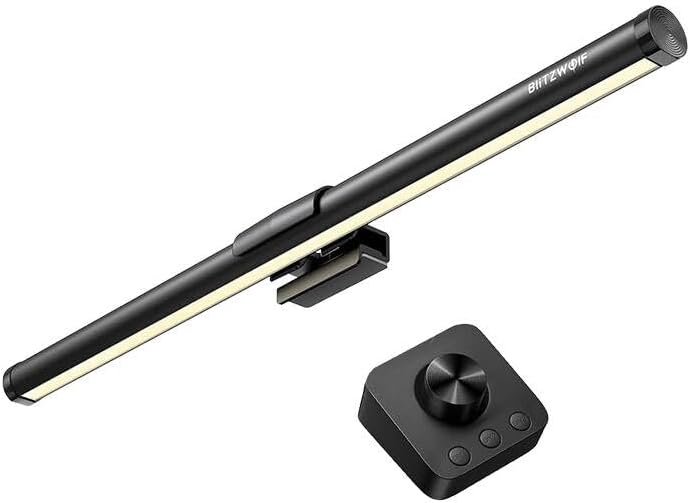
Ofbylding 1: The Blitzwolf BW-CML5 Monitor Light Bar attached to a monitor, with its wireless remote control placed on a desk. This image illustrates the typical setup of the product.
5. Bedriuwsinstruksjes
The Blitzwolf BW-CML5 is controlled via its wireless remote. Familiarize yourself with the remote's functions:
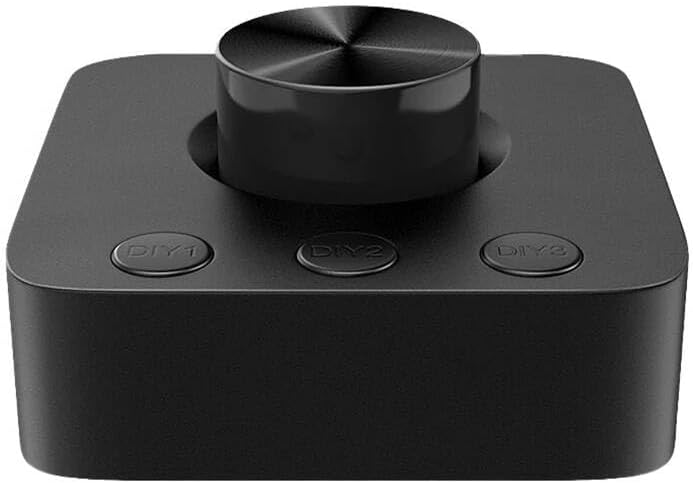
Ofbylding 2: In close-up view of the wireless remote control for the Blitzwolf BW-CML5 Monitor Light Bar, showing the central rotary knob and three "DIY" preset buttons.
- Power On/Off: Press the central rotary knob once to turn the light bar on or off.
- Helderheid oanpasse: Rotate the central knob clockwise to increase brightness and counter-clockwise to decrease brightness.
- Kleurtemperatuer oanpasse: Press and hold the central knob for approximately 2 seconds. While holding, rotate the knob to cycle through different color temperature settings (e.g., warm white, neutral white, cool white). Release the knob to set the desired temperature.
- DIY Preset Buttons (DIY1, DIY2, DIY3): These buttons allow you to save and recall your preferred brightness and color temperature settings.
- Om in foarôf ynstelde ynstelling te bewarjen: Adjust the light bar to your desired brightness and color temperature. Then, press and hold one of the DIY buttons (DIY1, DIY2, or DIY3) for approximately 3 seconds until the light blinks, indicating the setting has been saved.
- Om in foarynstelling werom te roppen: Simply press the corresponding DIY button (DIY1, DIY2, or DIY3) once to activate the saved setting.
6. Underhâld
Proper maintenance ensures the longevity of your device:
- Reiniging: Disconnect the power before cleaning. Use a soft, dry cloth to wipe the light bar and remote control. Do not use abrasive cleaners or solvents.
- Opslach: As it apparaat foar langere perioaden net brûkt wurdt, bewarje it dan op in koel, droech plak, fuort fan direkt sinneljocht en ekstreme temperatueren.
7. Probleemoplossing
If you encounter issues with your Blitzwolf BW-CML5, please refer to the following common problems and solutions:
| Probleem | Mooglike oarsaak | Oplossing |
|---|---|---|
| De ljochtbalke giet net oan. | Gjin stroom, losse ferbining, batterij fan ôfstânsbetsjinning leech. | Check USB power cable connection. Ensure USB power source is active. Replace remote control batteries if applicable (check remote manual for battery type). |
| Remote control is net reageare. | Remote battery low, interference, not paired. | Replace remote control batteries. Move remote closer to the light bar. If issues persist, refer to the remote's specific pairing instructions (if any, usually automatic for these devices). |
| Ljocht flikkert of dimt ûnferwachts. | Insufficient power supply, faulty cable. | Ensure the USB power source provides sufficient power (5V/1A recommended). Try a different USB port or power adapter. Replace the USB cable if necessary. |
If the problem persists after trying these solutions, please contact Blitzwolf customer support for further assistance.
8. Spesifikaasjes
| Model | BW-CML5 |
| Merk | BlitzWolf |
| Produkt Ofmjittings (L x B x H) | 10 x 5 x 1.27 sm |
| Produkt Gewicht | 100 g |
| Ynfier Voltage | 5V (via USB) |
| Kleur | Swart |
9. Garânsje en stipe
Blitzwolf products are designed and manufactured to the highest quality standards. For information regarding warranty coverage, technical support, or service inquiries, please refer to the warranty card included with your product or visit the official Blitzwolf website. Please have your model number (BW-CML5) and purchase information ready when contacting support.
For further assistance, you may contact Blitzwolf customer service through their official channels.