
1. Ynlieding
This manual provides detailed instructions for the installation, operation, and maintenance of the Tomzn TOVPD1-80-EC Adjustable Over/Under Voltage and Over Current Protection Device. This device is designed to protect electrical appliances and circuits from damage caused by voltage fluctuations and excessive current. Please read this manual thoroughly before use to ensure safe and correct operation.
2. Safety Information
- Ynstallaasje moat wurde útfierd troch in kwalifisearre elektricien.
- Soargje derfoar dat de stroomfoarsjenning is loskeppele foar ynstallaasje of ûnderhâld.
- Do not operate the device in wet conditions or with wet hands.
- Verify that the device's specifications match your electrical system requirements.
- Hâld bern fuort fan elektryske ynstallaasjes.
3. Produkt Overview
3.1. Key Funksjes
- Over-voltage beskerming
- Under-voltage beskerming
- Over-stream beskerming
- Automatysk herstel
- Echte tiid voltage display
- Real-time current display
- Ferstelbere voltage calibration (±10%)
- Fabryk weromsette funksje
- Error inquiry function
3.2. Apparaat Components
The device features a digital display for voltage and current, indicator lights for protection status, and control buttons for settings adjustment.
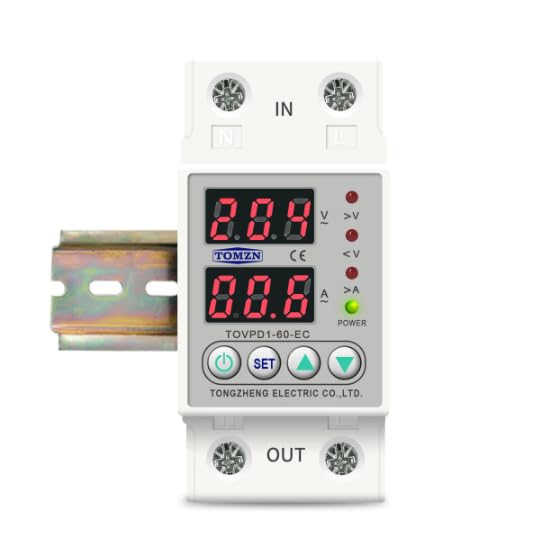
Ofbylding 1: Front view of the Tomzn TOVPD1-80-EC protection device. Note: The image displays model TOVPD1-60-EC, but the instructions apply to the TOVPD1-80-EC model with an 80 Ampere wurdearring.
The device includes input terminals (IN) and output terminals (OUT) for electrical connections, along with a power indicator and status LEDs for over-voltage (>V), under-voltage (<V), and over-current (>A).
4. Ynstallaasje
The TOVPD1-80-EC device is designed for DIN rail mounting (35mm). Follow these steps for proper installation:
- Power Disconnection: Before starting, ensure the main power supply to the circuit is completely disconnected to prevent electrical shock.
- Montage: Snap the device onto a standard 35mm DIN rail in your electrical panel.
- Wiring:
- Connect the incoming live (L) and neutral (N) wires from the power source to the "IN" terminals of the device.
- Connect the outgoing live (L) and neutral (N) wires to the load (appliances/circuit) from the "OUT" terminals of the device.
- Soargje derfoar dat alle ferbiningen strak en feilich binne.
- Ferifikaasje: Kontrolearje alle bedradingferbiningen dûbel op korrektheid en feiligens.
- Power Restoration: Restore power to the circuit. The device will power on and display the current voltage en aktuele lêzingen.
5. Gebrûksanwizings en ynstellings
The device displays real-time voltage and current. Use the control buttons to adjust protection parameters.
5.1. Knop Funksjes
- Power knop: Turns the device ON/OFF (if applicable, or for display cycling).
- SET knop: Enters/exits setting mode and cycles through parameters.
- Omheech pylkknop (▲): Fergruttet parameterwearden.
- Knop mei pylk nei ûnderen (▼): Ferleget parameterwearden.
5.2. It oanpassen fan parameters
To adjust a parameter:
- Druk op de SET button to enter the setting mode. The first parameter will flash.
- Parse SET repeatedly to cycle through the available parameters (e.g., Over-voltage protection threshold, Under-voltage protection threshold, Over-current protection threshold, recovery delays, etc.).
- When the desired parameter is flashing, use the ▲ (Omheech) en ▼ (Down) buttons to adjust its value.
- After setting the value, wait a few seconds for the device to automatically save the setting and exit the setting mode, or press SET wer om nei de folgjende parameter te gean.
5.3. Parameter Ranges and Default Values (for 220V/80A model)
| Parameter | Ferstelbere Range | Standert Wearde |
|---|---|---|
| Over-voltage beskerming (UVP) | 230V ~ 300V (OFF) | 270V |
| Over-voltage Recovery (UVR) | 225V ~ 295V | 250V |
| UVP Action Time | 0.1s ~ 30s | 0.5s |
| UVP Recovery Delay | 1s ~ 500s | 30s |
| Under-voltage Beskerming (LVP) | 140V ~ 210V (OFF) | 170V |
| Under-voltage Recovery (LVR) | 145V ~ 215V | 190V |
| LVP Action Time | 0.1s ~ 30s | 0.5s |
| LVP Recovery Delay | 1s ~ 500s | 30s |
| Over-current Protection (OCP) | 1A ~ 80A (adjustable) | 40A (Note: Default may vary based on specific model variant.) |
| OCP Action Time | 0.1s ~ 30s | 0.5s |
| OCP Recovery Delay | 1s ~ 500s | 30s |
| Power-on Delay Time | 1s ~ 500s | 10s |
Note: The over-current adjustment range is inferred to be up to 80A for the TOVPD1-80-EC model, although the provided description mentions 40A and 63A variants. Always refer to the specific markings on your device.
5.4. Factory weromsette
To restore the device to its factory default settings, press and hold the ▼ (Down) button for more than 12 seconds. The display will indicate a reset.
5.5. Error Inquiry
To inquire about past error events, press and hold the ▲ (Up) button for more than 12 seconds. The device will display error codes or logs if available.
6. Underhâld
- Regularly inspect the device for any signs of physical damage or loose connections.
- Hâld it apparaat skjin en stoffrij. Brûk in droege, sêfte doek foar it skjinmeitsjen.
- Brûk gjin abrasive skjinmakkers of solvents.
- Soargje foar goede fentilaasje om it apparaat hinne om oververhitting te foarkommen.
7. Probleemoplossing
| Probleem | Mooglike oarsaak | Oplossing |
|---|---|---|
| Apparaat giet net oan | Gjin stroomfoarsjenning; ferkearde bedrading; ynterne flater. | Kontrolearje de haadstroomfoarsjenning. Ferifiearje de bedrading. As it probleem oanhâldt, nim dan kontakt op mei de stipe. |
| Device trips frequently | Protection thresholds set too low; actual voltage/current exceeds limits. | Adjust protection parameters (UVP, LVP, OCP) to appropriate levels. Check load for faults. |
| Display toant flaterkoade | Internal error or specific fault detected. | Refer to the error inquiry function (Section 5.5) for details. If unknown, contact support. |
| Device does not recover automatically | Automatic recovery feature disabled or recovery delay too long. | Ensure automatic recovery is enabled in settings. Check recovery delay times. |
8. Spesifikaasjes
| Eigenskip | Wearde |
|---|---|
| Model Number | TOVPD1-80-EC |
| Rated Aktueel | 80 Ampere |
| Power Boarne | 220V AC 50/60Hz (Nominal) |
| Over-voltage Beskermingsberik | 230V ~ 300V (OFF) |
| Under-voltage Beskermingsberik | 140V ~ 210V (OFF) |
| Over-current Adjustment Range | 1A ~ 80A |
| Stromferbrûk | <2W |
| Elektryske libben | 100,000 kear |
| Ynstallaasje Type | DIN-railbefestiging (35mm) |
| Ofmjittings (L x B x H) | 9.3 x 7.8 x 4.5 sm |
| Gewicht | 200 gram |


