
1. Ynlieding
The Super Console X2 Pro is a versatile entertainment system combining a retro gaming console and an Android TV box. It features a dual-system setup, allowing seamless switching between Emuelec 4.5 for gaming and Android 9.0 for multimedia. This device comes pre-loaded with over 70,000 classic games on a 256GB storage card, offering extensive entertainment options.
Equipped with a Mail-G31 MP2/DDR4 GPU and an S905X2 chip, the console ensures smooth game performance and efficient temperature management. It supports 4K HD output for an immersive viewing experience on the Android system and includes 2.4G+5G dual WiFi and Bluetooth 5.0 for robust connectivity. The package includes two wireless controllers for multiplayer gaming.
2. Package Ynhâld
Kontrolearje asjebleaft oft alle hjirûnder neamde items yn jo pakket opnommen binne:
- Super Console X2 Pro Unit
- Wireless Controllers (x2)
- USB Receiver for Controllers
- Stromadapter
- HD kabel
- User Manual (dit dokumint)
- TF Card (256GB, pre-installed with games)

Figure 2.1: Super Console X2 Pro Package Contents
This image displays the Super Console X2 Pro unit, two wireless controllers, a power adapter, an HD cable, a user manual, and a TF card, illustrating all items typically found in the product package.
3. Setup Ynstruksjes
- Ferbine macht: Plug the power adapter into the DC IN port on the Super Console X2 Pro, then connect the adapter to a power outlet.
- Ferbine mei de tv: Connect one end of the provided HD cable to the HD OUT port on the console and the other end to an available HD input on your television or monitor.
- Ferbine Controllers: Insert the USB receiver for the wireless controllers into any available USB port on the console. The controllers should automatically pair.
- Power On: Press the power button on the console or the remote control to turn on the device.
- Selektearje ynfier: On your TV, select the correct HD input source corresponding to where you connected the console.
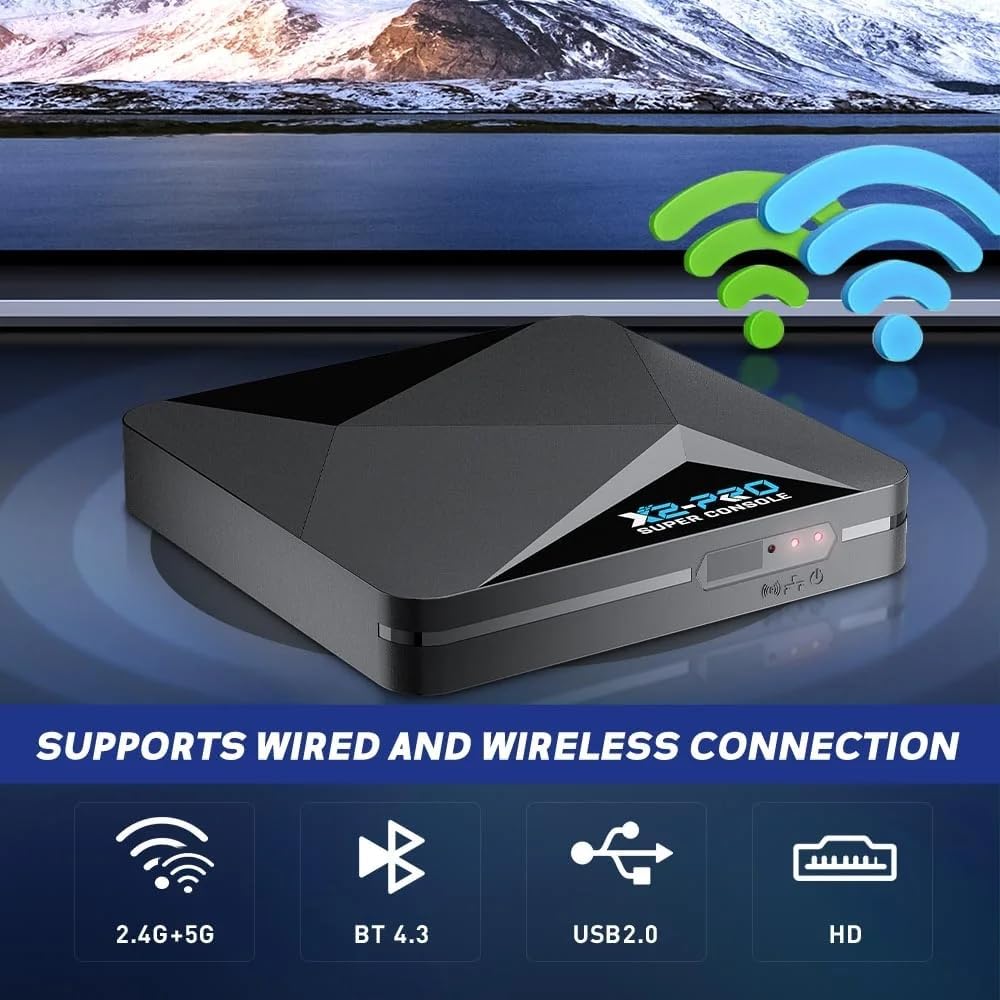
Figure 3.1: Console Connectivity Ports
This image highlights the console's connectivity options, including ports for power, HD output, USB for controllers, and indicators for 2.4G+5G WiFi and Bluetooth, essential for initial setup.
4. Bedriuwsinstruksjes
4.1 Systeemwikseling
The Super Console X2 Pro supports two main operating systems: Emuelec (for gaming) and Android (for TV/multimedia). You can switch between them as follows:
- From Gaming System (Emuelec) to Android System:
1. On your gamepad, press the "Start" button.
2. Navigate to and select "Quit".
3. Choose "Reboot From NAND".
4. Confirm by selecting "YES". The console will restart into the Android system. - From Android System to Gaming System (Emuelec):
1. Using the remote control, navigate to "My APPS".
2. Find and select "LibreELEC".
3. Press "OK".
Note: If a USB drive is connected, you may need to press the "Return" button on the remote control to access the correct menu.

Figure 4.1: Dual System Interface
This image visually represents the console's capability to run multiple systems, specifically Emuelec for gaming and Android for TV functions, highlighting the ease of switching between them.
4.2 Gaming Operation
The gaming system utilizes Emuelec 4.5, providing a straightforward and user-friendly interface. Navigate through game libraries using the included wireless controllers. The console supports up to two players simultaneously.

Figure 4.2: Two-Player Support
This image demonstrates the console's two-player capability, showing two wireless controllers connected to a single USB receiver, allowing for shared gaming experiences.
4.3 Android TV Operation
The Android 9.0 system allows you to access various multimedia applications. You can stream 4K videos, download apps from the app store, and browse the internet. Use the provided remote control for navigation within the Android interface.
5. Underhâld
- Reiniging: Brûk in sêfte, droege doek om de konsole en controllers skjin te meitsjen. Foarkom it brûken fan floeibere reinigingsmiddels of abrasive materialen.
- Opslach: Bewarje de konsole op in koel, droech plak, fuort fan direkt sinneljocht en ekstreme temperatueren.
- Ventilaasje: Ensure the console's ventilation openings are not blocked to prevent overheating.
- Krêft: Always use the original power adapter provided with the console. Disconnect power during lightning storms or when not in use for extended periods.
6. Probleemoplossing
- Gjin macht:
- Check if the power adapter is securely connected to both the console and the power outlet.
- Besykje in oar stopkontakt. - Gjin werjefte op tv:
- Ensure the HD cable is securely connected to both the console and the TV.
- Verify that your TV is set to the correct HD input source.
- Try a different HD cable or TV input port. - Kontrôleurs reagearje net:
- Ensure the USB receiver is properly inserted into the console.
- Check if the controllers have sufficient battery power.
- Re-pair the controllers by turning them off and on, or by re-inserting the USB receiver. - System Freezes or Slow Performance:
- Reboot the console by disconnecting and reconnecting the power.
- Ensure there is adequate ventilation around the console to prevent overheating.
- For Android system issues, try clearing cache for problematic apps. - Cannot Switch Systems:
- Follow the exact steps outlined in Section 4.1 for system switching.
- Ensure the remote control or gamepad is functioning correctly.
7. Spesifikaasjes
| Eigenskip | Spesifikaasje |
|---|---|
| Model Number | Super Console X2 PRO |
| Merk | XIXIMENG |
| CPU | Amlogic S905X2, Quad Core Cortex-A53 1.8GHz |
| GPU | Mail-G31 MP2 DDR4 |
| RAAM | 2GB DDR4 |
| ROM | 8GB Flits |
| Storage Kapasiteit | 256 GB (TF Card) |
| Bestjoeringssystemen | Emuelec 4.5, Android 9.0 |
| Konnektivität | 2.4G+5G Dual WiFi, Bluetooth 5.0, USB 2.0, HD |
| Video Output | 4K HD (Android System) |
| Max Spilers | 2 |
| Materiaal | Plestik |
| Kleur | Swart |
| Ofmjittings (L x B x H) | 10 x 10 x 10 mm |

Figure 7.1: Internal Chipset and Performance
Dizze ôfbylding jout in detaillearre view of the console's internal hardware, including the Amlogic S905X2 CPU and Mail-G31 MP2 GPU, which contribute to its smooth performance, especially for 3D games.
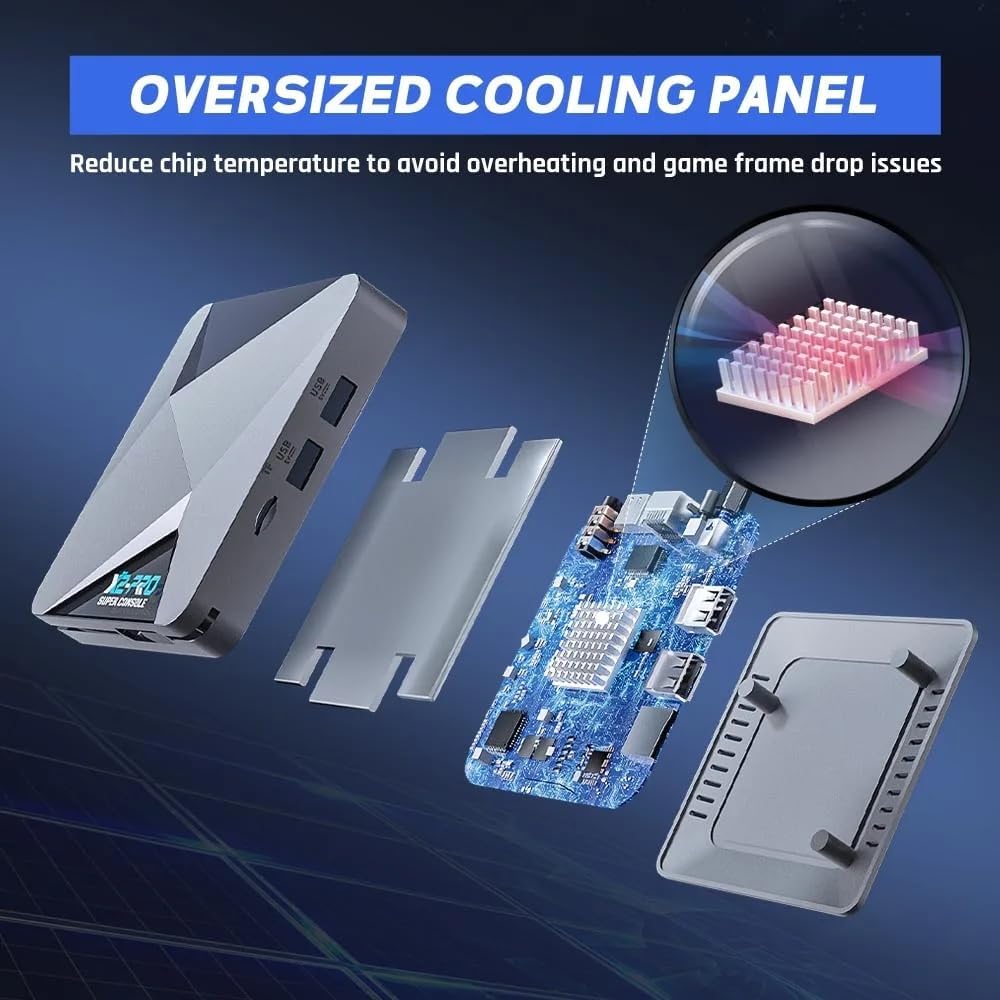
Figure 7.2: Cooling System
This image illustrates the console's internal cooling design, featuring an oversized cooling panel intended to dissipate heat effectively and maintain optimal operating temperatures.
8. Garânsje en stipe
For warranty information, technical support, or service inquiries, please refer to the contact details provided with your purchase documentation or visit the official XIXIMENG webside. Bewarje jo bewiis fan oankeap foar garânsjeclaims.