
Mytrix G901
Mytrix Tac Master Draadloze Gaming Headset brûkershânlieding
Model: G901
Ynlieding
The Mytrix Tac Master Wireless Gaming Headset is designed to provide a high-quality audio experience for gaming across multiple platforms. Featuring 2.4GHz lossless wireless technology, Bluetooth 5.3, and a 3.5mm wired connection, this headset offers versatile connectivity, low latency, and immersive surround sound. The detachable noise-canceling microphone ensures clear communication, while the ergonomic design and long battery life provide comfort for extended use.
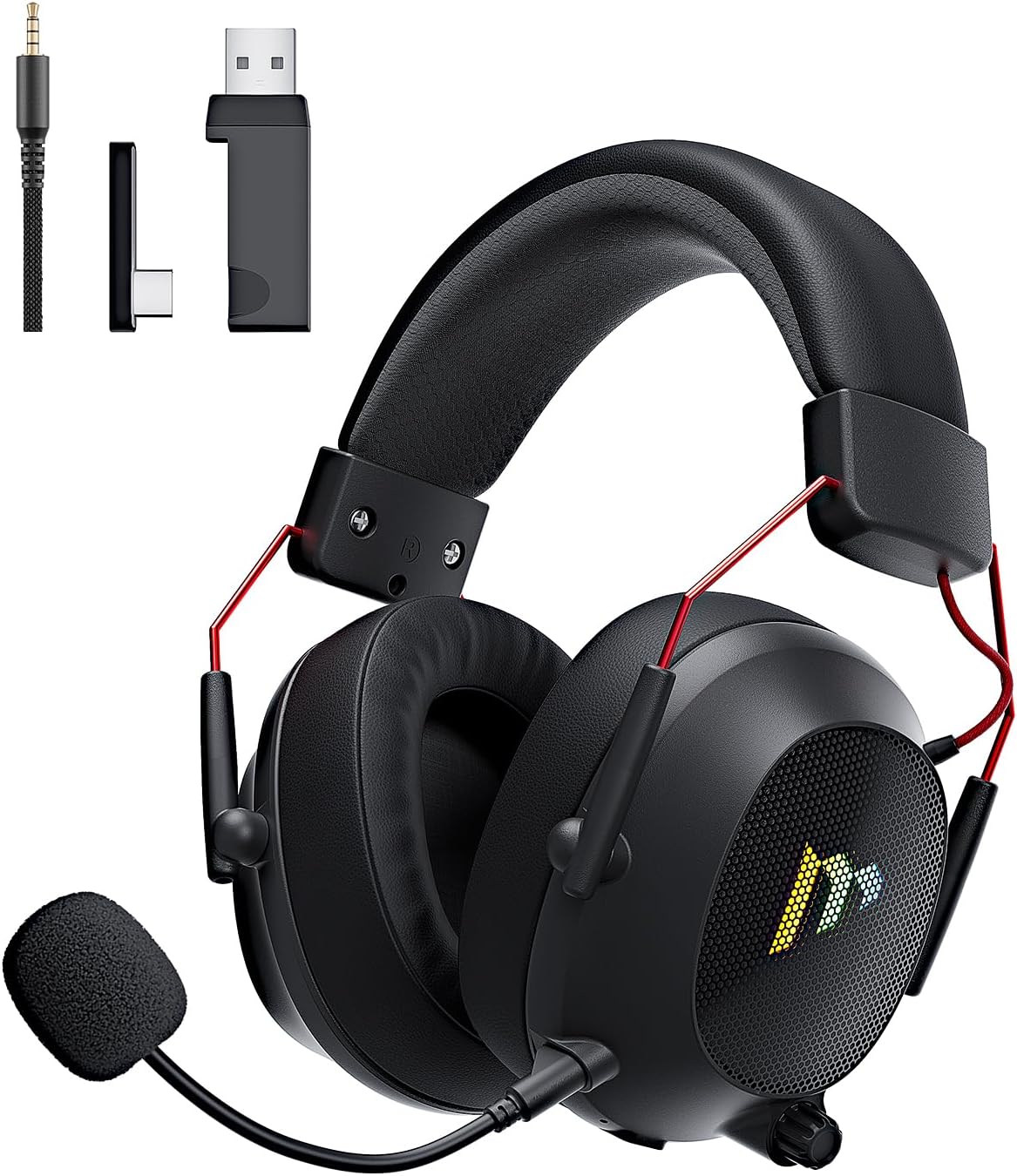
Image: The Mytrix Tac Master Wireless Gaming Headset, showcasing its sleek black design with red accents, detachable microphone, and included USB dongle and Type-C adapter.
Pakketynhâld
Kontrolearje asjebleaft oft alle hjirûnder neamde items yn jo pakket opnommen binne:
- Mytrix Tac Master Wireless Gaming Headset
- Ofnimbere lûdsûnderdrukkende mikrofoan
- 2.4GHz USB-A Wireless Dongle
- USB Type-C Transmitter
- 3.5 mm audiokabel
- USB-oplaadkabel (USB-A nei USB-C)
- User Manual (dit dokumint)
Headset Controls and Components
Familiarize yourself with the various controls and components of your Mytrix Tac Master headset:

Image: Diagram illustrating the location and function of controls on the Mytrix Tac Master headset, including power button, volume wheel, microphone mute button, and mode switch.
- Power knop: Press and hold for 3 seconds to turn on/off. Single press to pause/play audio.
- Modusknop (M): Single press to toggle microphone on/off. Double press to switch between Bluetooth and 2.4G wireless modes. Press and hold for 3 seconds to turn RGB lights on/off.
- Volume Wheel: Rotate up to increase volume, rotate down to decrease volume.
- Mikrofoanpoarte: Foar it befestigjen fan 'e ôfneembere mikrofoan.
- 3.5mm Audio Jack: Foar bedrade ferbining.
- USB-C oplaadpoarte: Foar it opladen fan de headset.
- RGB ferljochting: Located on the earcups.
Opsette
1. It opladen fan de Headset
Before first use, fully charge the headset. Connect the USB charging cable to the headset's USB-C port and the other end to a USB power source (e.g., computer USB port, USB wall adapter). The LED indicator will show charging status and turn off when fully charged. A full charge takes approximately 3 hours and provides up to 48 hours of battery life.

Image: Visual representation of the headset's long-lasting battery life, indicating approximately 50 hours of use and a 3-hour charging time.
2. De mikrofoan oanslute
Insert the detachable microphone into the microphone port on the left earcup. Ensure it is securely seated. The microphone is flexible and omni-directional, allowing for angle adjustment.
3. Konnektivität opsjes
The Mytrix Tac Master headset offers multiple connection methods for broad compatibility:

Image: Diagram illustrating the four connection modes: 2.4GHz Dongle (USB-A and USB-C), Bluetooth 5.3, and 3.5mm Wired, along with compatible devices for each mode.
3.1. 2.4GHz Wireless Connection (Recommended for PC, PS4, PS5, Switch Docked Mode)
- Identify the appropriate dongle for your device:
- For devices with a USB-A port (PC, PS4, PS5, Switch Docked): Use the 2.4GHz USB-A dongle.
- For devices with a USB-C port (Switch Handheld, Laptops, Tablets): Use the USB Type-C transmitter.
- Plug the selected 2.4GHz dongle/transmitter into an available USB port on your device.
- Skeakelje de headset oan troch de oan/út-knop 3 sekonden yn te drukken en yn te hâlden.
- Ensure the headset is in 2.4GHz mode. If not, double-press the 'M' button to switch modes until the headset connects to the dongle. The headset will automatically pair with the dongle.
- On your device, select the headset as the audio output and input device.
3.2. Bluetooth 5.3 Connection (Recommended for Mobile Phones, Tablets, Laptops)
- Skeakelje de headset oan troch de oan/út-knop 3 sekonden yn te drukken en yn te hâlden.
- Double-press the 'M' button to switch the headset to Bluetooth pairing mode. The LED indicator will flash, indicating it's ready to pair.
- On your device, enable Bluetooth and search for "Mytrix Tac Master" in the list of available devices.
- Select "Mytrix Tac Master" to connect. Once connected, the LED indicator will stop flashing.
3.3. 3.5mm Wired Connection (Recommended for Xbox, Game Console Controllers, Devices without USB/Bluetooth)
- Ferbine it iene ein fan 'e 3.5mm audiokabel mei de 3.5mm-jack fan 'e headset.
- Connect the other end of the 3.5mm audio cable to the audio jack on your device (e.g., Xbox controller, phone).
- In wired mode, the headset's microphone and RGB lighting functions are not active.
Operating Instructions
Power On/Off
- Om oan te setten: Press and hold the Power button for approximately 3 seconds until the headset powers on.
- Om út te skeakeljen: Press and hold the Power button for approximately 3 seconds until the headset powers off.
Volume Control
- Volume ferheegje: Rotate the Volume wheel upwards.
- Volume ferminderje: Rotate the Volume wheel downwards.
Mikrofoan kontrôle
- Mikrofoan dempe/oansette: Single press the 'M' button.
- The detachable microphone features noise cancellation for clear voice chat.
RGB Lighting Control
- Turn RGB Lights On/Off: Press and hold the 'M' button for approximately 3 seconds.
Kontrôle foar audioôfspieljen
- Audio ôfspylje/pauzearje: Druk ien kear op de oan/út-knop.
Surround Sound
The headset features 7.1 stereo surround sound for an immersive audio experience, allowing for precise positioning of sound details in games.

Ofbylding: In eksplodearre view of the headset's 50mm drivers, illustrating the components that contribute to its 7.1 stereo surround sound capability.
Ûnderhâld
- Reiniging: Use a soft, dry cloth to clean the headset. Do not use abrasive cleaners or solvents. For earcups, gently wipe with a damp doek en lit it folslein oan 'e loft droegje foar gebrûk.
- Opslach: Store the headset in a cool, dry place away from direct sunlight and extreme temperatures. If storing for an extended period, ensure the battery is partially charged (around 50%) to preserve battery health.
- Batterij soarch: Avoid fully discharging the battery frequently. Charge the headset regularly, even if not in constant use, to maintain battery longevity.
- Mikrofoansoarch: Handle the detachable microphone gently. Avoid excessive bending or twisting.
Troubleshooting
| Probleem | Mooglike oarsaak | Oplossing |
|---|---|---|
| Gjin lûd út headset. | Headset not powered on, low battery, incorrect audio output selected, connection issue. | Ensure headset is powered on and charged. Check device's audio settings to confirm "Mytrix Tac Master" is selected as output. Re-establish 2.4GHz or Bluetooth connection. For wired mode, ensure cable is fully inserted. |
| Mikrofoan wurket net. | Microphone muted, not properly attached, incorrect audio input selected, wired mode limitation. | Single press the 'M' button to unmute. Ensure microphone is securely attached. Check device's audio settings to confirm "Mytrix Tac Master" is selected as input. Note: Microphone does not function in 3.5mm wired mode. |
| Kin gjin ferbining meitsje fia 2.4GHz draadloos. | Dongle not recognized, headset not in 2.4GHz mode, interference. | Ensure dongle is fully inserted into a working USB port. Double-press 'M' button to switch headset to 2.4GHz mode. Try a different USB port. Move closer to the dongle to reduce interference. |
| Kin gjin ferbining meitsje fia Bluetooth. | Headset net yn koppelingsmodus, Bluetooth útskeakele op apparaat, al ferbûn mei in oar apparaat. | Double-press 'M' button to enter Bluetooth pairing mode (LED flashes). Ensure Bluetooth is enabled on your device. Disconnect from other Bluetooth devices if necessary. |
| RGB-ljochten wurkje net. | Lights turned off, low battery, wired mode limitation. | Press and hold the 'M' button for 3 seconds to toggle RGB lights. Ensure headset has sufficient battery. Note: RGB lights do not function in 3.5mm wired mode. |
Spesifikaasjes
| Eigenskip | Detail |
|---|---|
| Model Namme | Gaming Headset (G901) |
| Konnektivität Technology | 2.4GHz Draadloos, Bluetooth 5.3, 3.5mm Bedrade |
| Koptelefoon Jack | 3.5 mm jack |
| Triedleaze berik | Up to 50 feet (in open spaces) |
| Wachttiid | ≤20ms (2.4GHz) |
| Audio Driver Type | 50mm Dynamic Drivers |
| Sound Features | 7.1 Stereo Surround Sound |
| Mikrofoan | Detachable, Omni-directional, Noise-Canceling |
| Batterij Life | Oant 48 oeren |
| Oplaadtiid | Ca. 3 oeren |
| Batterij Type | 1 Lithium Ion batterij (ynbegrepen) |
| Earpiece Foarm | Oer Ear |
| Special Features | Ergonomic Design, RGB Lighting, Foldable & Portable |
| Produkt Ofmjittings | 5.91 x 3.94 x 5.91 inch |
| Item Gewicht | 13.4 oz |
| Fabrikant | Mytrix |
Garânsje en stipe
Mytrix products are manufactured to high quality standards. For information regarding warranty coverage, technical support, or service inquiries, please refer to the warranty card included with your product or visit the official Mytrix website. You may also contact Mytrix customer support directly for assistance with your Tac Master Gaming Headset.
Foar fierdere help, besykje asjebleaft de Mytrix Store on Amazon.
Wichtige feiligens ynformaasje
- Stel de headset net bleat oan ekstreme temperatueren, fochtigens of floeistoffen.
- Foarkom dat de headset falle lit of oan sterke stoten bleatsteld wurdt.
- Do not attempt to disassemble or repair the headset yourself. This will void the warranty.
- Harkje op matige folumenivo's om gehoarskea te foarkommen. Langere bleatstelling oan lûde lûden kin permanint gehoarferlies feroarsaakje.
- Hâld bûten it berik fan bern.
Ask a question about this manual
Ask about setup, troubleshooting, compatibility, parts, safety, or missing instructions. Manuals+ will review the question and use this page’s manual context to help answer it.