
Mesqool CR1025
Mesqool Alarm Clock CR1025 Instruction Manual
Model: CR1025
Ynlieding
This manual provides detailed instructions for the Mesqool Alarm Clock with Bluetooth Speaker, FM Radio, USB Chargers, Dimmer, Snooze, and Battery Backup (Model CR1025). Please read this manual thoroughly before operating the device to ensure proper use and optimal performance.
The Mesqool CR1025 is a versatile bedside device combining multiple functions:
- Alarm Clock with 2 optional sounds (radio or buzzer) and 9-minute snooze.
- Bluetooth 5.0 Speaker for wireless audio streaming.
- Digital FM Radio (87.5-108MHz) with auto-scan and 20 station presets.
- Adjustable Night Light.
- Dual USB Charging Station (Type-C & USB-A, 5V/1A each).
- Large LED display with 5-level dimmer and 12/24H time format.
- Battery backup for settings retention during power outages.

Image: The Mesqool Alarm Clock highlighting its five main features: Alarm Clock, Bluetooth V5.0, FM Radio, Night Light, and 2 USB Chargers.
Opsette
Stroomferbining en batterijreservekopy
The Mesqool CR1025 operates on AC power. Connect the provided power adapter to the DC IN port on the back of the unit and plug it into a standard wall outlet. The device also includes a battery backup feature (1 AAA battery included) to retain time and alarm settings during a power interruption. The battery does not power the display or alarm functions during an outage.

Image: The alarm clock connected to power, demonstrating its compact design suitable for a bedside table.
Initial Time Setting
- Druk op de Tiid 12/24 knop. De oere sifers sille begjinne te knipperjen.
- Rotate the right knob (Scan) to adjust the hour.
- Druk op de Tiid 12/24 knop nochris. De minutensifers sille knipperje.
- Rotate the right knob (Scan) to adjust the minute.
- Druk op de Tiid 12/24 button once more to confirm the time setting.
Video: Demonstrates how to set the time on the Mesqool Alarm Clock by pressing the Time button and rotating the knob to adjust hours and minutes.
12/24 oere tiidformaat
To switch between 12-hour and 24-hour time formats, press and hold the Tiid 12/24 button for 2 seconds. The display will change between AM/PM indicators for 12-hour format and no indicator for 24-hour format.
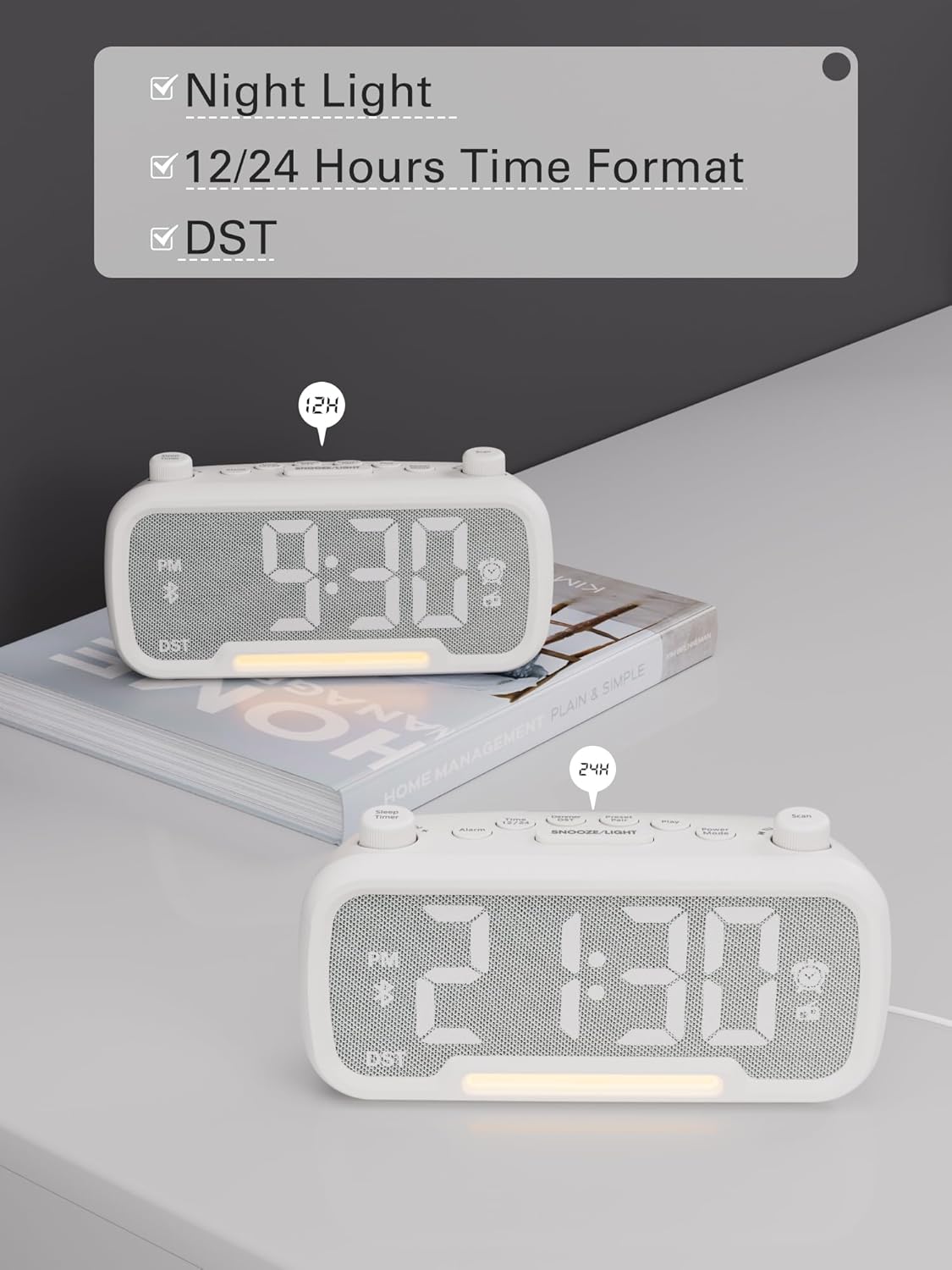
Image: The alarm clock displaying time in both 12-hour (with PM indicator) and 24-hour formats, also showing the DST indicator.
Daylight Saving Time (DST) Mode
To activate or deactivate Daylight Saving Time (DST), press the Dimmer DST button. The time will adjust by one hour forward or backward, and the "DST" indicator will appear or disappear on the display.
Video: Demonstrates how to activate or deactivate DST mode by pressing the DST button, showing the time adjustment.
Operating Instructions
Alarmynstelling
- Druk en hâld de Alarm button for 2 seconds. The hour digits will flash.
- Rotate the left knob (Sleep Timer) to adjust the hour.
- Druk op de Alarm knop nochris. De minutensifers sille knipperje.
- Rotate the left knob (Sleep Timer) to adjust the minute.
- Druk op de Alarm button again to select the alarm sound: bell or last radio channel.
- Rotate the left knob (Sleep Timer) to adjust the alarm volume (L01-L16).
- Druk op de Alarm button once more to complete the alarm setting.
Video: Illustrates the steps to set the alarm time, choose the alarm sound (bell or radio), and adjust the alarm volume.
It alarm annulearje
To cancel the alarm, press the Alarm button. The alarm icon on the display will turn off, indicating that the alarm has been canceled.
Snooze Funksje
As it alarm klinkt, druk dan op de SNOOZE / LJOCHT button to activate the snooze function. The alarm will pause for 9 minutes and then sound again.

Image: The alarm clock with the SNOOZE/LIGHT button clearly marked, explaining its 9-minute snooze function.
Bluetooth Speaker Operaasje
- Druk op de Power Mode button repeatedly until "bt" appears on the display. The Bluetooth icon will start flashing, indicating it's ready for pairing.
- On your mobile device, search for Bluetooth devices and select "CR1025" to connect.
- Once connected, the Bluetooth icon will stop flashing. You can now stream audio from your device.
Video: Shows how to enter Bluetooth mode and pair the alarm clock with a mobile device, indicated by the flashing and solid Bluetooth icon.

Image: The alarm clock wirelessly connected to a smartphone, demonstrating its Bluetooth 5.0 audio streaming capability.
FM Radio Operaasje
- Druk op de Power Mode button repeatedly until the radio icon lights up and a frequency is displayed.
- Automatysk scannen: Druk op de Scan button to automatically search for and store up to 20 FM stations (P01-P20).
- Hânlieding sykjen: Rotate the right knob (Scan) to browse frequencies manually.
- Saving a Station: While listening to a desired station, press and hold the Preset Pair button for 2 seconds. Use the right knob (Scan) to select a preset number (P01-P20), then press Preset Pair wer te rêden.
- In foarôf ynstelde ynstelling weromhelje: Druk koart op de Preset Pair knop om troch opsleine stasjons te blêdzjen.
- Volume oanpasse: Rotate the left knob (Sleep Timer) to control the volume (16 levels).
Video: Demonstrates how to operate the FM radio, including auto-scanning, manual tuning, saving presets, and adjusting volume.

Image: The alarm clock showing an FM radio frequency, illustrating its use as a radio.
Sleep Timer ynstelling
When using the FM radio or Bluetooth speaker functions, you can set a sleep timer to control playback duration before the device automatically turns off.
- Druk op de Sleep Timer button on the top left.
- Rotate the left knob (Sleep Timer) to select the desired duration: 15, 30, 60, 90, or 120 minutes. You can also select "OFF" to disable the sleep timer.
Video: Demonstrates how to set the sleep timer for the FM radio or Bluetooth speaker, showing available duration options.
Dimmer werjaan
The LED display has 5 levels of brightness. To adjust the brightness, press the Dimmer DST button repeatedly to cycle through the levels (L01-L05).
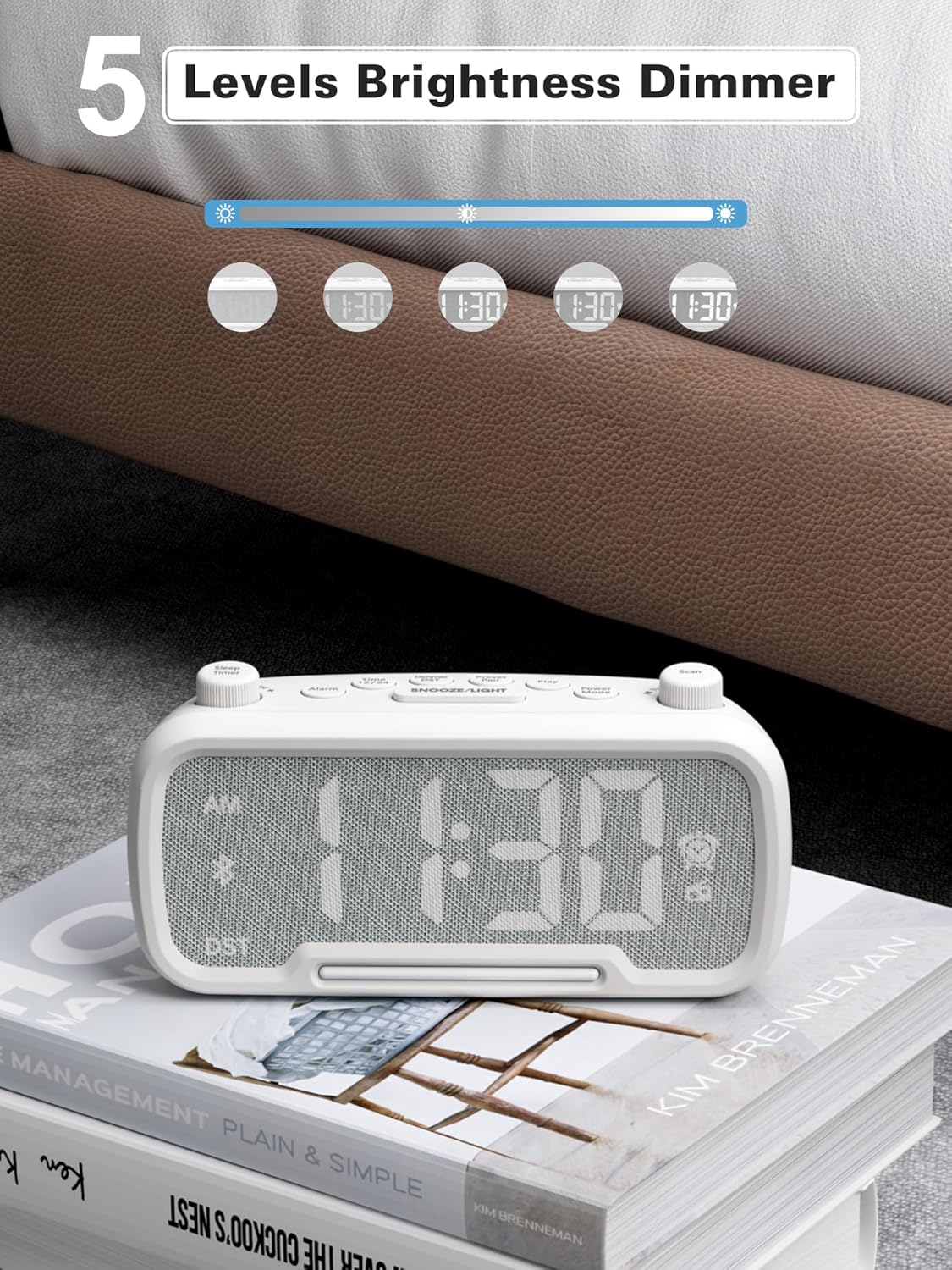
Image: The alarm clock illustrating the five different brightness levels for its LED display.
Nachtljocht
The alarm clock features a gentle fixed night light. To turn the night light on or off, press the SNOOZE / LJOCHT button. This light creates a sleep-friendly environment.

Image: The alarm clock's warm night light glowing, positioned next to a teddy bear, suggesting its use in a child's room.
USB-oplaadpoarten
The device includes two USB charging ports: one Type-C and one USB-A. Both ports provide 5V/1A output, allowing you to conveniently charge your smartphone, tablet, or other USB-powered devices simultaneously.

Image: The alarm clock with a smartphone connected to its Type-C port and a smartwatch to its USB-A port, demonstrating simultaneous charging.
Ûnderhâld
- Reiniging: Brûk in sêfte, droege doek om it oerflak fan 'e wekker skjin te meitsjen. Brûk gjin floeibere skjinmakkers of skurende materialen.
- Opslach: As jo it apparaat foar in langere perioade opslaan, koppel it dan los fan 'e stroom en ferwiderje de reservebatterij. Bewarje op in koel, droech plak.
- Foarkom focht: Keep the device away from water, high humidity, and direct sunlight to prevent damage.
Troubleshooting
| Probleem | Mooglike oarsaak | Oplossing |
|---|---|---|
| Gjin skerm/Apparaat giet net oan | Stroomadapter net oansletten of defekt stopkontakt. | Ensure the power adapter is securely plugged into the device and a working wall outlet. Test the outlet with another device. |
| Alarm klinkt net | Alarm not set, alarm volume too low, or alarm canceled. | Verify alarm time is set correctly, alarm icon is visible, and volume is adequate. Ensure the alarm was not accidentally canceled. |
| Bluetooth makket gjin ferbining | Device not in pairing mode, out of range, or already connected to another device. | Ensure the clock is in Bluetooth pairing mode ("bt" flashing). Move your mobile device closer. Disconnect from other Bluetooth devices. |
| Slechte FM-radio-ûntfangst | Swak sinjaal, antenne net útlutsen. | Fully extend the FM antenna. Try repositioning the clock for better reception. Perform an auto-scan again. |
| USB opladen wurket net | Cable issue, device not compatible, or device already fully charged. | Check the USB cable for damage. Ensure your device is compatible with 5V/1A charging. Verify the device requires charging. |
Spesifikaasjes
- Merk: Mesqool
- Model Oantal: CR1025
- Kleur: Wyt
- Display Type: LED
- Power Boarne: Corded Electric (AC power)
- Batterij-reservekopy: 1 AAA-batterij (ynbegrepen)
- Produkt Ofmjittings: 3.31"W x 2.32"H (Note: Length is 6.61" from feature bullets)
- Item Gewicht: 7.7 oz
- Materiaal: Fabric, Acrylonitrile Butadiene Styrene
- FM-radiofrekwinsje: 87.5-108 MHz
- USB-útfier: Type-C & USB-A, 5V/1A each
- Alarm lûden: Bell, FM Radio
- Display helderheid: 5 nivo's
- Tiidformaat: 12H/24H
- Spesjale eigenskippen: Bluetooth 5.0, Night Light, DST adjustment, Snooze
Garânsje en stipe
For warranty information or technical support, please refer to the contact details provided with your purchase or visit the official Mesqool website. Hâld jo oankeapbewiis foar garânsjeclaims.
Ask a question about this manual
Ask about setup, troubleshooting, compatibility, parts, safety, or missing instructions. Manuals+ will review the question and use this page’s manual context to help answer it.