
1. Ynlieding
Thank you for choosing the Acouto Programmable LED Display. This flexible, IP65 water-resistant LED panel features 16x96 pixels, offering a versatile solution for displaying custom messages, patterns, and animations. Powered by a standard USB 5V connection, it is designed for ease of use and portability. This manual provides essential information for the proper setup, operation, and maintenance of your LED display.
2. Safety Information
- Ensure the power supply is 5V/2A. Using an incorrect power supply may damage the device.
- Stel it apparaat net bleat oan ekstreme temperatueren of direkt sinneljocht foar langere perioaden.
- Avoid bending the panel excessively or sharply, as this may damage the internal circuitry.
- Keep the device away from open flames and heat sources.
- Although IP65 water-resistant, avoid submerging the device in water.
- Besykje net te disassemble of reparearje it apparaat sels. Nim kontakt op mei klantstipe foar assistinsje.
3. Produkt Overview
Key Features:
- Oanpasbere werjefte: Personalize with text, patterns, animations, doodles, and musical rhythms. Adjust brightness and speed.
- High-Intensity Light Output: Equipped with 1536 RGB lamp beads for bright color effects with low energy consumption.
- IP65 Wetterbestindichheid: Durable design suitable for various environments.
- Portable ûntwerp: Thin and lightweight with a USB interface for easy folding and bending.
- Eco-friendly Control: Powered by the ipixel color app, eliminating the need for batteries.
- Alsidige gebrûk: Ideal for festive gatherings, weddings, bars, trade shows, offices, and holiday decorations.
Pakketynhâld:
- 1 x Acouto Programmable LED Display (16x96 Pixels)
- 1 x USB kabel
- 1 x Remote Control (with 1 CR2025 200mAh battery included)
- Adhesive Strips for mounting
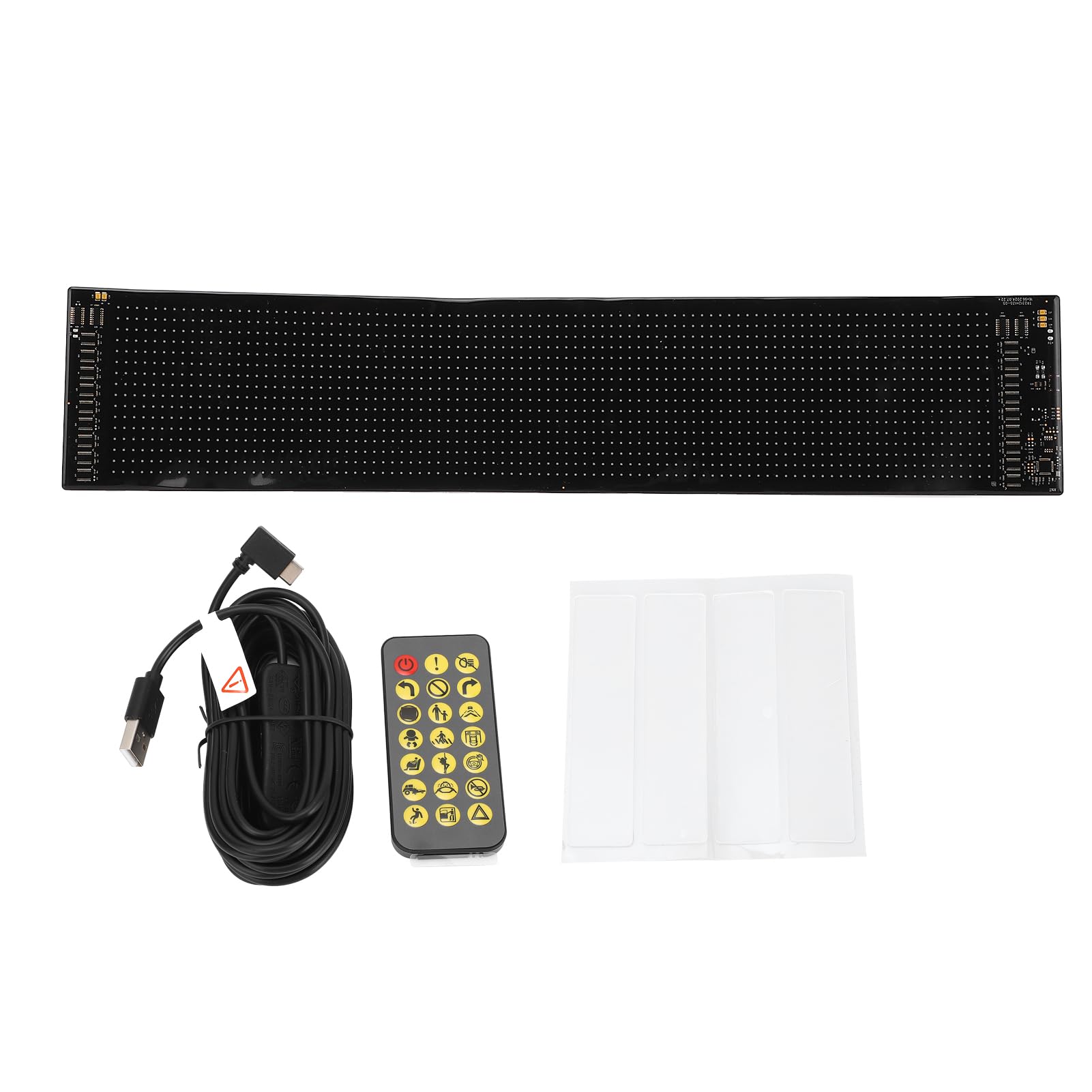
Image 3.1: The Acouto Programmable LED Display, showcasing its flexible design.

Image 3.2: Included USB cable and remote control for the LED display.
4. Opsette
4.1 Stromferbining
- Unroll the LED display carefully.
- Connect the provided USB cable to the display's USB port.
- Plug the other end of the USB cable into a 5V/2A USB power source (e.g., a wall adapter, power bank, or computer USB port). The display should power on.

Ofbylding 4.1: Close-up view of the LED display's connection area, showing the USB port.
4.2 App ynstallaasje
- Download de "ipixel color" application from your smartphone's app store (iOS or Android).
- Ynstallearje de applikaasje op jo apparaat.
- Open the app and follow the on-screen instructions to connect to your LED display via Bluetooth.
4.3 It skerm montearje
The display is lightweight and flexible, allowing for various mounting options:
- Adhesive Tape: Use the provided adhesive strips to attach the display to smooth, clean surfaces like walls, windows, or other objects. Ensure the surface is dry and free of dust before application.
- Folding/Bending: The flexible design allows it to conform to curved surfaces or be folded for storage.

Image 4.2: Adhesive strips provided for easy mounting of the LED display.
5. Bedriuwsinstruksjes
5.1 Using the ipixel color App
The ipixel color app is the primary interface for customizing your LED display.
- Ferbine: Ensure your display is powered on and Bluetooth is enabled on your smartphone. Open the ipixel color app and connect to your device.
- Tekst werjefte: Enter custom text messages. You can adjust font, size, color, scrolling direction, and speed.
- Patterns & Animations: Select from pre-loaded patterns or animations, or create your own.
- Doodles: Use the app's doodle feature to draw custom images or designs directly on the display.
- Muzyk ritme: Synchronize the display's patterns with music played through your phone.
- Brightness & Speed: Adjust the overall brightness of the display and the scrolling speed of text/animations within the app settings.

Image 5.1: The LED display showcasing a custom text message, controlled via the app.

Image 5.2: The LED display presenting a dynamic pattern, customizable through the app.
5.2 Mei help fan de ôfstânsbetsjinning
The included remote control provides quick access to basic functions:
- Power knop: Turn the display On/Off.
- Modus seleksje: Cycle through different display modes (e.g., text, patterns, animations).
- Oanpassing fan helderheid: Increase or decrease display brightness.
- Faasje oanpassing: Control the scrolling speed of text or animations.
- Rjochtingskontrôle: Change the scrolling direction.
6. Underhâld
- Reiniging: Gently wipe the display surface with a soft, dry cloth. Do not use abrasive cleaners or solvents.
- Opslach: When not in use, store the display in a cool, dry place. Avoid sharp folds or heavy objects on top of it.
- Batterijferfanging (ôfstânsbetsjinning): If the remote control stops responding, replace the CR2025 battery. Ensure correct polarity.
7. Probleemoplossing
- Skerm giet net oan:
- Check if the USB cable is securely connected to both the display and the power source.
- Ensure the USB power source is providing 5V/2A. Try a different USB port or adapter.
- App Not Connecting to Display:
- Soargje derfoar dat it display is ynskeakele.
- Soargje derfoar dat Bluetooth ynskeakele is op jo smartphone.
- Restart the ipixel color app and try connecting again.
- If issues persist, try restarting both your smartphone and the LED display.
- Remote Control wurket net:
- Check if the remote control battery (CR2025) needs replacement.
- Ensure there are no obstructions between the remote and the display.
- Display Content Not Updating:
- Verify that the app is successfully connected to the display.
- Confirm that you have saved and sent the new content from the app to the display.
8. Spesifikaasjes
| Eigenskip | Spesifikaasje |
|---|---|
| Item Type | Programmable LED Display |
| Model Number | Acoutomgf4in3x68 |
| Materiaal | Silicone, PCB |
| Skerm piksels | 16 x 96 |
| Útfolde ôfmjittings (L x B) | Approx. 59.4 cm x 4.7 cm (23.4 x 1.85 inches) |
| Oantal LEDs | 1536 stiks |
| Streamtafier | USB 5V |
| Power Ynfier | 5V, 2A, 10W |
| Wetter Resistance Rating | IP65 |
| Remote Control Batterij | 1 x CR2025 200mAh (included) |
| Control Applikaasje | ipixel color app |
| Fabrikant | Acouto |
| Produkt Gewicht | 418g wy |
| Lân fan oarsprong | Sina |
9. Garânsje en stipe
Acouto products are designed for reliability and performance. For warranty information or technical support, please refer to the documentation provided with your purchase or contact your retailer. If you encounter any issues not covered in this manual, please reach out to Acouto customer service for assistance.