
1. Ynlieding
Tankewol foar de oankeapasing the MLWSHR Digital LED Alarm Clock Model 8808. This device combines a digital alarm clock with a thermo-hygrometer, offering dual alarms, snooze function, date and year display, 12/24 hour switch, weekday settings, Daylight Saving Time (DST) functionality, auto-dimmable display with three brightness levels, and a convenient 5V1A USB output for charging other devices. Please read this manual carefully to ensure proper use and maintenance of your new alarm clock.
2. Safety Information
- Hâld it apparaat fuort fan wetter en omjouwings mei hege fochtigens.
- Stel it apparaat net bleat oan ekstreme temperatueren of direkt sinneljocht foar langere perioaden.
- Use only the provided USB Type-C cable for power.
- Besykje it apparaat net sels útinoar te heljen of te reparearjen. Nim kontakt op mei klanttsjinst as der problemen ûntsteane.
- Ensure proper ventilation when using the USB output to charge other devices.
3. Package Ynhâld
- MLWSHR Digital LED Alarm Clock Model 8808
- USB Type-C Power Kabel
- User Manual
4. Produkt Overview
Meitsje josels bekend mei de wichtichste ûnderdielen en kontrôles fan jo wekker.
This image displays the front of the MLWSHR Digital LED Alarm Clock, highlighting the time display, weekday indicators, temperature in Celsius, humidity percentage, and dual alarm icons. It also points to the Daylight Saving Time (DST) indicator.

This image illustrates the side and back of the alarm clock, detailing the USB Type-C input for primary power, the battery compartment for 3x AAA backup batteries (not included), and the USB-A output (5V1A) for charging other devices. It also shows the control buttons located on the top edge.
Kontrôles:
- SET knop: Enters setting mode for time, date, and alarms.
- UP (+) Button: Fergruttet wearden tidens it ynstellen, past helderheid oan.
- DOWN (-) Button: Ferleget wearden tidens it ynstellen, past helderheid oan.
- SNOOZE/LIGHT-knop: Activates snooze, adjusts display brightness.
- ALARM 1 Button: Activates/deactivates Alarm 1, enters Alarm 1 setting.
- ALARM 2 Button: Activates/deactivates Alarm 2, enters Alarm 2 setting.
- 12/24HR Button: Switches between 12-hour and 24-hour time formats.
- °C/°F knop: Switches between Celsius and Fahrenheit temperature display.
5. Opsette
5.1 Stromforsyning
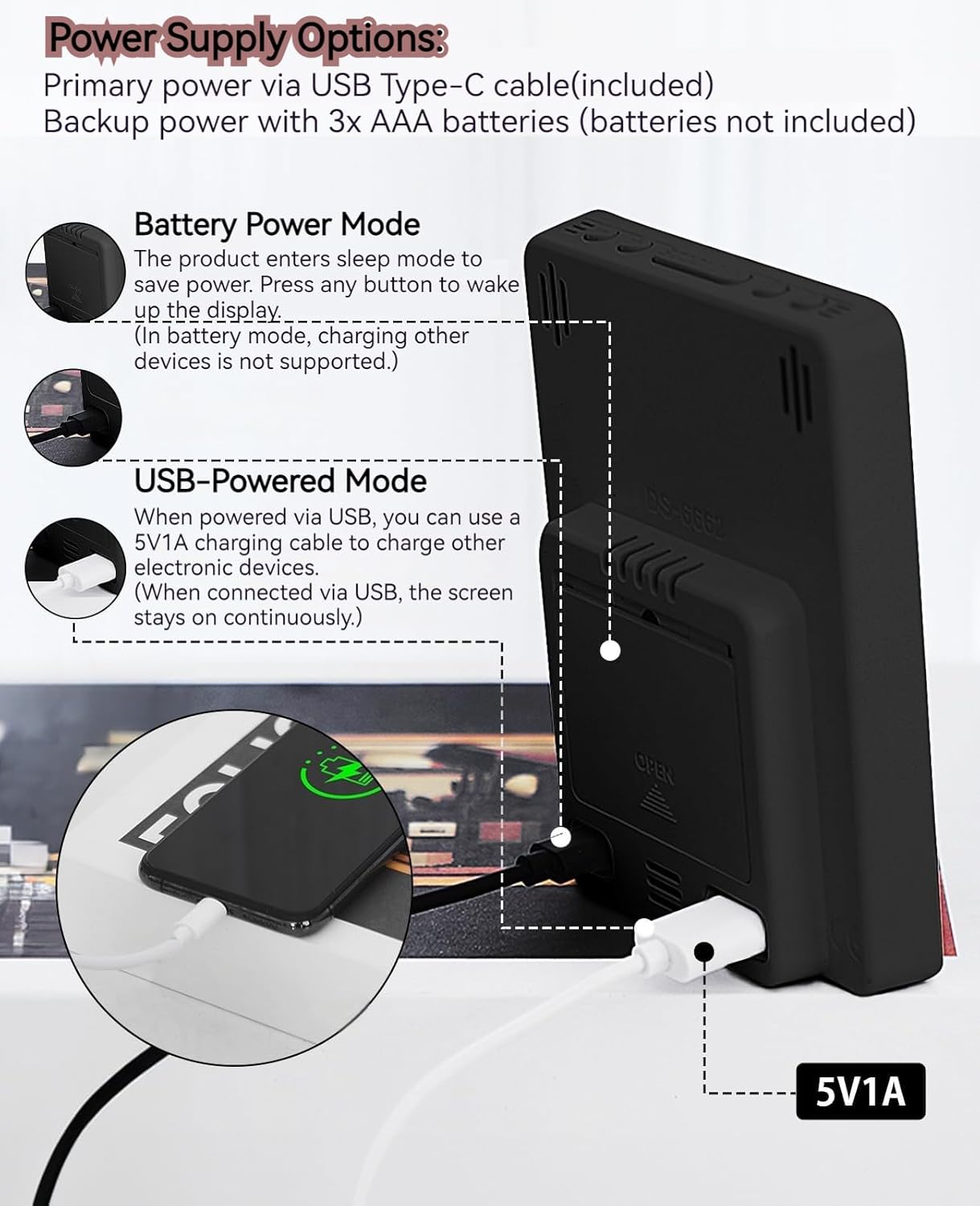
The MLWSHR Digital LED Alarm Clock can be powered in two ways:
- Primary Power (USB Type-C): Connect the provided USB Type-C cable to the clock's input port and plug the other end into a 5V1A USB power adapter (not included). When powered via USB, the display will remain continuously on.
- Backup Power (3x AAA Batteries): Insert 3 AAA batteries (not included) into the battery compartment on the back of the clock. In battery-only mode, the display will enter sleep mode to conserve power. Press any button to temporarily activate the display. Note that the USB output for charging other devices is not supported when operating on battery power alone.
5.2 Ynstellings foar earste tiid en datum
After connecting power, the clock will typically display a default time. To set the correct time and date:
- Druk en hâld de SET knop 3 sekonden yndrukt om de tiidynstellingsmodus yn te gean. De oere sifers sille knipperje.
- Brûk de OP (+) or DOWN (-) knoppen om it oere oan te passen.
- Parse SET nochris om it oere te befêstigjen en nei de minuten-ynstelling te gean. De minutensifers sille knipperje.
- Brûk de OP (+) or DOWN (-) knoppen om de minuten oan te passen.
- Trochgean te drukken SET to cycle through and set the Year, Month, and Day using the OP (+) or DOWN (-) buttons for adjustment.
- After setting the Day, press SET ien lêste kear om de ynstellingsmodus te ferlitten.
6. Bedriuwsinstruksjes
6.1 12/24 oere formaatwiksel
Druk op de 12/24 oere button to toggle between 12-hour (with AM/PM indicator) and 24-hour time formats.
This video demonstrates various features of the MLWSHR Digital LED Alarm Clock, including the time, temperature, humidity, weekday display, auto/manual brightness adjustment, 12/24 hour switch, and the easy-to-use buttons and USB-C input/USB-A output.
6.2 Alarms ynstelle (Alarm 1 & Alarm 2)
The clock features two independent alarms. Each alarm can be set for specific days of the week (Monday-Friday, Monday-Saturday, or Monday-Sunday).

This image illustrates the dual alarm functionality, showing how each alarm can be customized to ring on specific days of the week: Monday to Friday, Monday to Saturday, or every day. It highlights the alarm icons and weekday indicators on the display.
- Druk op de ALARM 1 or ALARM 2 button to select the desired alarm. The alarm icon will appear on the display.
- Druk en hâld de selektearre ALARM button for 3 seconds to enter alarm setting mode. The hour digits will flash.
- Brûk de OP (+) or DOWN (-) knoppen om de wekker oere oan te passen.
- Druk op de ALARM button again to confirm the hour and move to minute setting.
- Brûk de OP (+) or DOWN (-) knoppen om de alarmminuten oan te passen.
- Druk op de ALARM button again to set the alarm frequency (e.g., Mon-Fri, Mon-Sat, Mon-Sun). Use OP (+) or DOWN (-) te selektearjen.
- Druk op de ALARM knop ien lêste kear om de ynstellingsmodus foar it alarm te ferlitten.
- To turn an alarm ON or OFF, simply press the corresponding ALARM 1 or ALARM 2 button briefly. The alarm icon will appear (ON) or disappear (OFF) from the display.
6.3 Snooze -funksje
When an alarm sounds, you can activate the snooze function for a temporary delay.

This image shows the clock's snooze button and how it functions. When the alarm rings, a brief press of the snooze button will delay the alarm for 5 minutes. Holding the button for more than two seconds will turn off the alarm for that day.
- As it alarm rinkelt, druk op de SNOOZE / LJOCHT button briefly. The alarm will pause and ring again after 5 minutes.
- To turn off the alarm for the current day, press and hold the SNOOZE / LJOCHT button for more than 2 seconds, or press any other button (except SNOOZE / LJOCHT).
6.4 Helderheid Oanpassing
The clock features an auto-dimmable display and three manual brightness levels.
- Automatysk dimmen: The built-in light sensor automatically adjusts the display brightness based on ambient light conditions. This is the default setting.
- Manual Brightness: Druk koart op de SNOOZE / LJOCHT button to cycle through 3 manual brightness levels (L-01, L-02, L-03).
- To return to auto-dimmable mode, continue pressing the SNOOZE / LJOCHT button until 'L-AU' appears on the display.
6.5 Thermometer & Hygrometer
The clock displays indoor temperature and humidity levels.

This image highlights the temperature and humidity readings on the clock's display. It also provides guidance on ideal humidity levels and suggests actions (humidifier/dehumidifier) if levels are too low or too high. The temperature detection range is 23°F to 122°F (-5°C to 50°C) with an error margin of ±2°F.
- Temperatuer Unit Switch: Druk op de ° C / ° F. button to switch between Celsius and Fahrenheit temperature display.
- The temperature range is 23°F to 122°F (-5°C to 50°C) with an error margin of ±2°F.
- The humidity measurement error is within ±5%.
6.6 USB Power Output (5V1A)
The clock features a USB-A output port (5V1A) that can be used to charge other electronic devices.

This image demonstrates the use of the clock's USB-A output port to charge a smartphone. The clock provides a 5V1A output, making it a convenient charging station. This feature is only available when the clock is powered via its USB Type-C input.
- Connect your device's charging cable to the USB-A output port on the back of the alarm clock.
- Ensure the alarm clock is powered via its USB Type-C input for this feature to function. The USB output is not active when the clock is running on battery power alone.
6.7 Simmertiid (DST)
The clock supports Daylight Saving Time adjustment.
- To activate or deactivate DST, press and hold the DST button (if available, or refer to the SET button sequence for DST in specific models). The DST indicator will appear or disappear.
7. Underhâld
- Meitsje de klok skjin mei in sêfte, droege doek. Brûk gjin abrasive reinigingsmiddels of oplosmiddels.
- As de klok foar in langere perioade net brûkt wurdt, ferwiderje dan de AAA-batterijen om lekkage te foarkommen.
- Keep the USB ports free from dust and debris.
8. Probleemoplossing
| Probleem | Mooglike oarsaak | Oplossing |
|---|---|---|
| Display is off or intermittent. | Running on battery power in sleep mode, or no power. | Press any button to activate display in battery mode. Connect USB Type-C cable for continuous display. Check USB power source. |
| USB output not charging devices. | Clock is running on battery power, or USB cable is faulty. | Ensure the clock is connected to primary USB Type-C power. Try a different USB cable. |
| It alarm giet net ôf. | It alarm is net aktivearre of ferkeard ynsteld. | Check if the alarm icon is displayed. Re-set the alarm time and frequency. |
| Temperatuerlêzing is ûnkrekt. | Environmental factors or sensor error. | Allow time for the sensor to stabilize. Ensure the clock is not near heat sources or vents. Note the ±2°F error margin. |
| Kin tiid/datum net ynstelle. | Not in setting mode, or buttons are unresponsive. | Press and hold the SET button for 3 seconds. Ensure the clock has stable power. |
9. Spesifikaasjes
- Merk: MLWSHR
- Model Oantal: 8808
- Display Type: LED
- Power Boarne: USB Type-C (5V1A) / 3x AAA Batteries (backup)
- Produkt Ofmjittings: 3.54"B x 4.72"H
- Funksjes: Dual Alarms, Snooze, Thermo-Hygrometer, Date & Year Display, 12/24 Hour Switch, Weekdays, DST, Auto Dimmable (3 levels), USB Output (5V1A)
- Materiaal: Eco-friendly Plastic
- Binnen / bûtengebrûk: Binnen
10. Garânsje & Support
The MLWSHR Digital LED Alarm Clock Model 8808 comes with a 2-Arige garânsje fanôf de datum fan oankeap. Dizze garânsje dekt produksjefouten en storingen by normaal gebrûk.
For technical support, warranty claims, or any questions regarding your product, please contact MLWSHR customer service through the retailer's platform or visit our official webside foar kontaktgegevens. Hâld jo oankeapbewiis en modelnûmer by de hân as jo kontakt opnimme mei stipe.