
1. Ynlieding
The FNIRSI 2C53T is a versatile 3-in-1 handheld device designed for electronic testing and measurement. It integrates the functionalities of a digital oscilloscope, a true RMS multimeter, and a signal generator into a single, portable unit. This manual provides detailed instructions for the safe and effective use of your device.

Ofbylding 1.1: The FNIRSI 2C53T handheld device, showcasing its compact design and integrated display.
2. Produkt Overview
The FNIRSI 2C53T combines three essential tools for electrical and electronic work:
- Digital Oscilloscope: 2 channels, 50MHz bandwidth, 250MS/s real-time sampde koers.
- True RMS Multimeter: 4.5 digits, 19999 counts, capable of measuring voltage, current, resistance, capacitance, diode, continuity, and temperature.
- Signal Generator: Outputs 13 types of waveforms with adjustable frequency (0-50KHz), amplitude (0-3V), and duty cycle (0-100%).
The device features a robust hardware architecture (ARM + FPGA + ADC) for enhanced performance and flexibility. It also includes a 2.8-inch wide-angle display for clear readability.

Ofbylding 2.1: Front view of the FNIRSI 2C53T, showing the display, control buttons, and input terminals.
Ynbegrepen komponinten:
- FNIRSI 2C53T Main Unit
- P6100 Heech folumetage Probe (x2)
- Alligator Clip (x1)
- Test Probe (x1)
- Type-C oplaadkabel (x1)
- Opslachtas (x1)
- Hânlieding (x1)
- Pakdoaze (x1)
3. Opsette
3.1 It apparaat opladen
The 2C53T has a built-in rechargeable lithium polymer battery. Before first use, fully charge the device using the provided Type-C charging cable and a compatible USB power adapter (not included). The charging port is located on the side of the device.
- Connect the Type-C cable to the device's charging port.
- Ferbine it oare ein fan 'e kabel oan in USB macht boarne.
- De batterij-yndikator op it skerm sil de oplaadstatus sjen litte.
- A full charge provides approximately 6 hours of standby time.
3.2 Yn-/útskeakelje
Druk op de oan/út-knop (meastal markearre mei in oan/út-symboal) en hâld dy yndrukt om it apparaat oan of út te skeakeljen.
3.3 Sondes ferbine
Depending on the function you intend to use (oscilloscope or multimeter), connect the appropriate probes to the designated input terminals on the device. Ensure connections are secure.

Ofbylding 3.1: Illustrations of the Type-C charging port, internal battery, and the integrated stand for convenient placement.
4. Bedriuwsinstruksjes
The FNIRSI 2C53T offers three primary operating modes: Oscilloscope, Multimeter, and Signal Generator. Please note that these three functions cannot be used simultaneously.
4.1 Oscilloskoopfunksje
The oscilloscope mode allows for the visualization and analysis of electrical signals.
- Kanalen: The device features 2 input channels.
- Bânbreedte: 50 MHz.
- SampLe Rate: 250MS/s real-time.
- Triggermodi: Select from Auto, Normal, or Single trigger modes to stabilize waveforms.
- Fertikale gefoelichheid: Adjustable from 200mv/div to 10v/div.
- Maksimum ynfier Voltage: 400V.
- Werjemodi: Choose between Y-T (standard time-domain display), Roll (for slow-changing signals), and X-Y (for Lissajous figures).
- Avansearre funksjes: Includes mathematical operations, cursor measurement, FFT spectrum analysis, and persistence display for detailed waveform analysis.

Ofbylding 4.1: Examples of oscilloscope display features, including mathematical operations, cursor measurements, persistence display, and X-Y mode for Lissajous figures.
4.2 Multimeterfunksje
The multimeter mode provides precise digital measurements of various electrical parameters.
- Skerm: 4.5 digits with 19999 counts.
- Echte RMS: Biedet krekte lêzingen foar net-sinusfoarmige golffoarmen.
- Mjitmooglikheden: DC/AC Voltage, DC/AC Current, Resistance, Capacitance, Diode, Continuity Check, and Temperature.
- Maximum Measurements: AC 750V, DC 1000V.
- Auto-berik: Automatically selects the appropriate measurement range; simply press the AUTO button.

Ofbylding 4.2: The multimeter interface displaying various measurement options such as voltage, stroom, wjerstân en kapasitans.
4.3 Funksje fan sinjaalgenerator
The signal generator mode allows you to output various waveforms for testing circuits.
- Golffoarmtypen: Outputs 13 types of parameter-variable waveforms, including Sine, Square, Pulse, Ramp, Noise, and DC.
- Utfierfrekwinsje: Adjustable from 0 to 50KHz.
- Utfier Amplitude: Adjustable from 0 to 3V.
- Output Duty Cycle: Ferstelber fan 0% oant 100%.
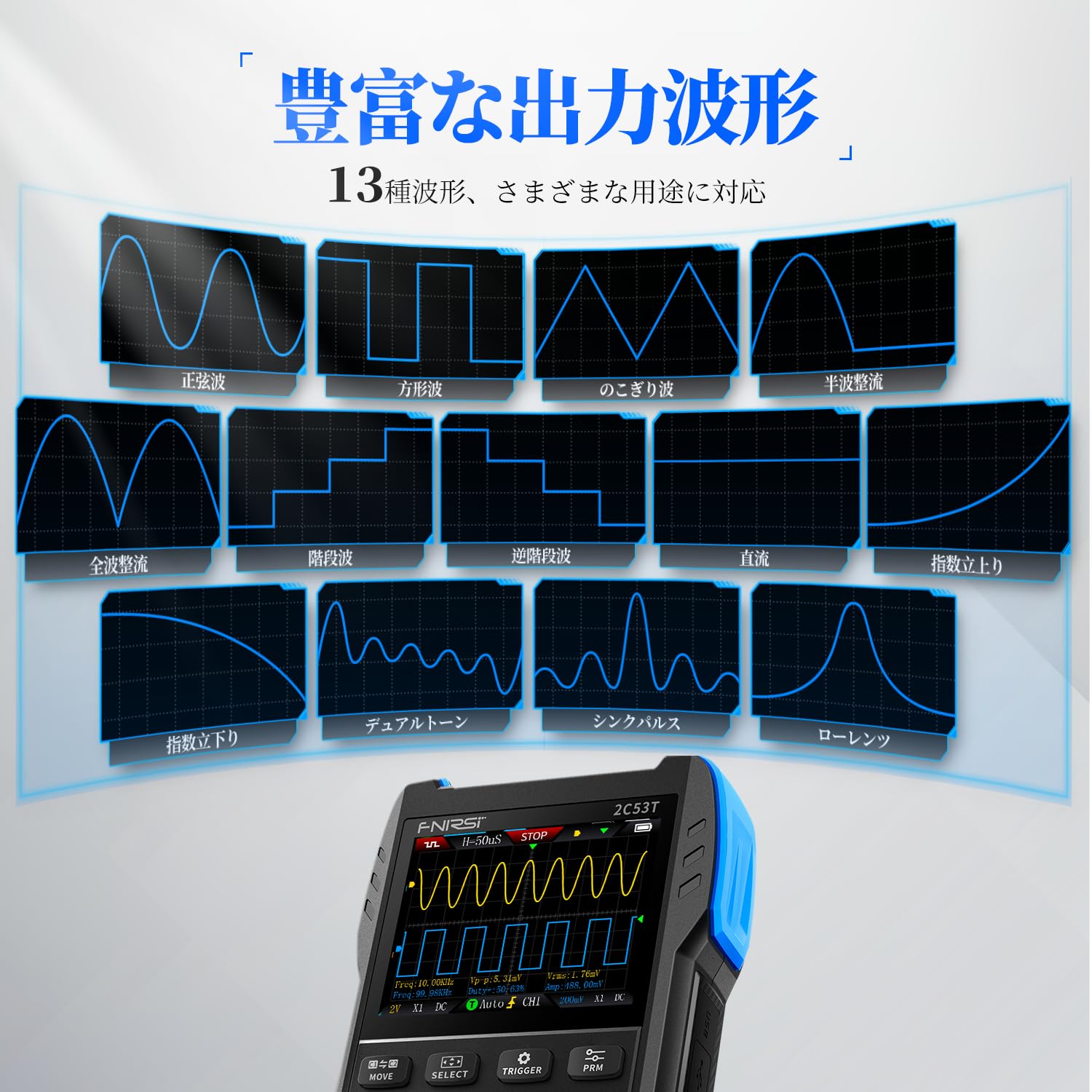
Ofbylding 4.3: The signal generator interface showing examples of different output waveforms such as sine, square, and pulse waves.
5. Underhâld
Proper maintenance ensures the longevity and accuracy of your FNIRSI 2C53T.
- Reiniging: Use a soft, dry cloth to clean the device. Do not use abrasive cleaners or solvents. Ensure no liquids enter the device.
- Batterij soarch: To prolong battery life, avoid fully discharging the device frequently. If storing for extended periods, charge the battery to approximately 50% and recharge every few months.
- Opslach: Store the device in a cool, dry place away from direct sunlight, extreme temperatures, and high humidity. Use the provided storage bag to protect it from dust and physical damage.
- Sonde soarch: Inspect probes and cables regularly for any signs of wear or damage. Replace damaged components immediately to ensure safety and accurate measurements.

Ofbylding 5.1: In eksplodearre view illustrating the internal components and the durable ABS+silicon construction of the FNIRSI 2C53T, designed for stable performance and protection.
6. Probleemoplossing
If you encounter issues with your FNIRSI 2C53T, refer to the following common troubleshooting steps:
- Apparaat wurket net oan: Soargje derfoar dat de batterij genôch opladen is. Ferbine it apparaat mei in stroomboarne mei de Type-C-kabel en besykje it opnij.
- Ferkearde lêzingen: Verify that probes are correctly connected and not damaged. Ensure the correct measurement mode is selected for the task. Check probe compensation for oscilloscope measurements.
- Unstabile golffoarm: Adjust the trigger settings (level, mode) in oscilloscope mode. Ensure the input signal is within the device's specifications.
- Functions Not Working Simultaneously: Remember that the oscilloscope, multimeter, and signal generator functions cannot be used at the same time. Switch between modes as needed.
- Problemen mei PC-ferbining: Ensure the Type-C cable is properly connected. Check your computer's device manager to see if the device is recognized.
Foar oanhâldende problemen of problemen dy't hjir net behannele wurde, nim dan kontakt op mei klanttsjinst.
7. Spesifikaasjes
| Eigenskip | Spesifikaasje |
|---|---|
| Fabrikant | FNIRSI |
| Model Number | 2C53T |
| Item Gewicht | 300 g |
| Produkt Ofmjittings (L x B x H) | 8.9 x 3.5 x 16.7 sm |
| Batterij Type | 1 Lithium Polymer batterij (ynbegrepen) |
| Measurement Accuracy | +/-5% |
| Oscilloskoop Bânbreedte | 50MHz |
| Oscilloscope Sample Rate | 250 MS/s |
| Multimetertellingen | 19999 |
| Signal Generator Frequency Range | 0-50 kHz |
| Datum Earste Beskikber | 2024/11/28 |
8. Garânsje en stipe
FNIRSI Technology Co., Ltd. is committed to providing high-quality measuring instruments. For any inquiries, technical assistance, or warranty claims, please contact our support team.
- E-post foar klantstipe: stipe@fnirsi.com
- Online boarnen: A PDF user manual may be available for download on the product's detail page or the official FNIRSI website.
- Merkwinkel: Visit the official FNIRSI store for more products and information: FNIRSI Amazon Store