
1. Ynlieding
This manual provides essential information for the proper setup, operation, maintenance, and troubleshooting of your Meizu mblu 21 4G LTE smartphone. Please read this manual thoroughly before using your device to ensure optimal performance and longevity.
The Meizu mblu 21 features a 6.79-inch HD display, a 13MP dual camera system, and runs on Android 14. It is designed for efficient performance and reliable connectivity.
2. Opsette
2.1 Pakketynhâld
Kontrolearje dat jo pakket de folgjende items befettet:
- Meizu mblu 21 Smartphone
- Stromadapter
- Fluchstartgids (as ynbegrepen)
2.2 Ynstallearjen fan SIM-kaart en MicroSD-kaart
The Meizu mblu 21 supports Dual Nano SIM cards and a MicroSD card for expandable storage.
- Sykje de SIM-kaartlade oan 'e kant fan jo apparaat.
- Insert the SIM ejector tool (not included, use a thin pin if necessary) into the small hole on the SIM tray to eject it.
- Place your Nano SIM card(s) and/or MicroSD card into the designated slots on the tray, ensuring proper orientation.
- Doch de SIM-kaartlade foarsichtich werom yn 'e tillefoan oant er fêstklikt.
2.3 Initial Power On and Network Configuration
- Press and hold the power button until the Meizu logo appears.
- Folgje de ynstruksjes op it skerm om de earste ynstelling te foltôgjen, ynklusyf taalseleksje, Wi-Fi-ferbining en ynstelling fan Google-akkount.
- For cellular connectivity, ensure your SIM card is active. This device is an international version and in the USA market, it operates exclusively on T-Mobile's 4G LTE network. Outside the USA, it is compatible with various carriers worldwide.
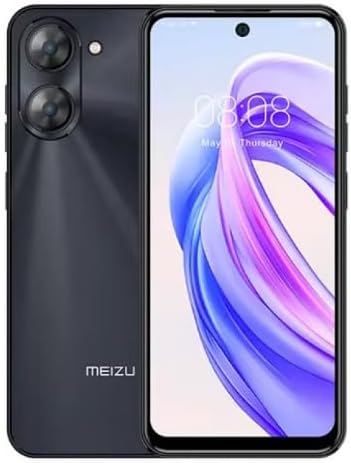
Ofbylding 2.3.1: Foar- en efterkant view of the Meizu mblu 21 smartphone. The front displays the screen with a punch-hole camera, while the rear shows the dual camera module and the Meizu branding.
3. Bedriuwsinstruksjes
3.1 Basisnavigaasje (Android 14)
Your Meizu mblu 21 runs on Android 14, offering an intuitive user experience. Use gestures or on-screen navigation buttons to move between apps, access settings, and manage notifications.
3.2 Kameragebrûk
The device features a 13MP Smart Camera on the rear and an 8MP front camera. Open the Camera app to capture photos and videos. Utilize various modes and settings for optimal results.
3.3 Feiligensfunksjes
Unlock your device using the side-mounted fingerprint sensor for instant access or the 8MP front camera for Smart Face Unlock.
3.4 Konnektivität
- Wi-Fi: Supports Dual-Band Wi-Fi (2.4GHz and 5GHz) for stable internet access.
- Bluetooth: Bluetooth 5.0 for connecting to wireless accessories.
- VoLTE: Enjoy clearer voice calls with VoLTE HD Calls.

Ofbylding 3.4.1: Visual representation of key connectivity and operating system features, including Android 14, Dual-Band Wi-Fi, Bluetooth 5.0, and VoLTE HD Calls.
4. Underhâld
4.1 Algemiene soarch
- Hâld jo apparaat droech en fuort fan ekstreme temperatueren.
- Meitsje it skerm en de behuizing skjin mei in sêfte, pluisfrije doek. Foarkom skealike gemikaliën.
- Beskermje it skerm mei in skermbeskermer en de lichem mei in beskermjende hoes om krassen en skea te foarkommen.
4.2 Batterij Management
The 4900mAh battery is designed for all-day performance. To prolong battery life:
- Foarkom it faak folslein ûntladen fan 'e batterij.
- Use the provided power adapter for charging.
- Optimize background app usage and screen brightness in settings.

Ofbylding 4.2.1: In ynterne view of the Meizu mblu 21 smartphone highlighting the 4900mAh battery, emphasizing its capacity for extended use.
5. Probleemoplossing
5.1 Mienskiplike problemen en oplossings
- Apparaat giet net oan: Soargje derfoar dat de batterij opladen is. Ferbine mei de stroomadapter en besykje it opnij.
- Problemen mei netwurkferbining: Check if your SIM card is properly inserted and active. Verify network settings and ensure you are within T-Mobile's coverage area in the USA.
- Trage prestaasjes: Slút ûnnedige eftergrûnapplikaasjes. Wiskje cache en tydlike applikaasjes. files. Restart the device.
- Batterij drain fluch: Reduce screen brightness, disable unused features like Bluetooth or GPS, and check for power-intensive apps.
If problems persist, consider performing a factory reset (back up your data first) or contacting customer support.
6. Spesifikaasjes
| Model Number | M416L |
| Bestjoeringssysteem | Android 14 |
| Skerm | 6.79 Inches HD, 2340 x 1080 Resolution, 90Hz Adaptive Refresh Rate |
| Prozessor | Octa Core 1.6GHz ARM Mali-G57 |
| Oantinken | 64 GB Internal Storage, 4 GB RAM |
| Batterij | 4900mAh (4.9E+3 Milliamp Hours) Lithium Polymer |
| Rear Kamera | 13MP Smart Camera, 5P Precision Lens |
| Front Kamera | 8 MP |
| Cellular Technology | 4G LTE FDD: 2,3,4,5,7,8,12,17,26,28,66; 3G WCDMA: 2/4/5/8; 2G Quad Band |
| SIM Type | Dual Nano SIM + MicroSD |
| Wi-Fi | Dual-Band (2.4GHz & 5GHz) |
| Bluetooth | 5.0 |
| Audio Jack | USB Type C |
| Item Gewicht | 14 oz |
| FCC ID | 2ANQ6-M416L |

Ofbylding 6.1: The Meizu mblu 21 smartphone presented in its Titan Black color variant, showcasing syn ûntwerp.
7. Garânsje en stipe
For warranty information, please refer to the warranty card included with your product or consult the retailer where the device was purchased. Meizu provides support for its products. For further assistance, please visit the official Meizu website of nim kontakt op mei harren klanteservice.