
Ynlieding
Thank you for choosing the Ensenior 52 Inch Smart Ceiling Fan with Light. This manual provides detailed instructions for the safe installation, operation, and maintenance of your new ceiling fan. Please read this manual thoroughly before installation and keep it for future reference.
Fideo: Oerview of the Ensenior 52 Inch Smart Ceiling Fan with Light, showcasing its features and design in a living space.
Opset en ynstallaasje
This ceiling fan is designed for easy installation. Follow the steps below carefully. Professional installation is recommended if you are unsure about any part of the process.
Pre-ynstallaasje ôfwagings
- The fan includes 6-inch and 10-inch downrods to accommodate various ceiling heights.
- It supports angled mounts for sloped ceilings up to 10 degrees.
- Ensure the mounting location can support the fan's weight (approximately 12.97 pounds).
Ynstallaasje Stappen
- Ynstallearje de ophangbeugel: Securely attach the hanger bracket to your ceiling's electrical box. Ensure it is firmly mounted to a structural beam.
- Assemble Fan Components: Attach the downrod to the motor housing. Feed the wires through the downrod.
- Ynstallearje fan fentilatorblêden: Secure each of the five fan blades to the motor housing using the provided screws. The blades are reversible, offering a choice between a dark wood grain and a solid black finish.
- Ynstallearje it LED-ljocht: Connect the LED light module to the fan's wiring and secure it to the bottom of the motor housing.
- Bedrading fan 'e fan: Connect the fan's electrical wires to your household wiring according to local electrical codes. Ensure all connections are secure.
- Hang it befestigingsmiddel op: Carefully lift the fan assembly and hang it onto the installed hanger bracket. Secure the canopy to cover the wiring.

Image: Step-by-step visual guide for installing the Ensenior 52 Inch Smart Ceiling Fan.
Video: Detailed installation guide for the Ensenior 52 Inch Smart Ceiling Fan.

Image: Downrod options and sloped ceiling compatibility for installation.

Image: Reversible fan blades, allowing choice between dark wood grain and black finishes.
Operating Instructions
Your Ensenior Smart Ceiling Fan offers multiple convenient control methods to enhance your comfort.
Control Metoaden
- Remote Control: Use the included remote for direct control over fan speeds, light settings, and timer functions.
- Smart App Control: Connect the fan to the Smartlife/Tuya app (2.4GHz Wi-Fi required) for comprehensive control from your smartphone or tablet.
- Stim kontrôle: Integrate with Alexa or Google Assistant for hands-free operation. Simply say, "Alexa, turn on the fan."

Image: Three ways to control your smart ceiling fan: App, Alexa, and Remote.
Video: Demonstrates the various control options for the Ensenior Ceiling Fan, including remote, app, and voice commands.
Ventilatorfunksjes
- 6-Speed Reversible DC Motor: Adjust airflow with six fan speeds. The reversible motor allows for downdraft (cooling in summer) and updraft (circulating warm air in winter) modes.
- Stille operaasje: The DC motor operates at less than 35dB, ensuring a quiet environment.

Image: Fan speed settings and reversible motor function for year-round comfort.
Lighting Features
- Ferstelbere kleurtemperatuer: Choose from 3000K (warm white), 4000K (natural white), and 6000K (clear white) to set the desired ambiance.
- Dimbere helderheid: Adjust the light brightness from 1% to 100% (2500 lumens) to suit your needs.
- Light Memory Funksje: The fan remembers your last light setting when turned off and on.
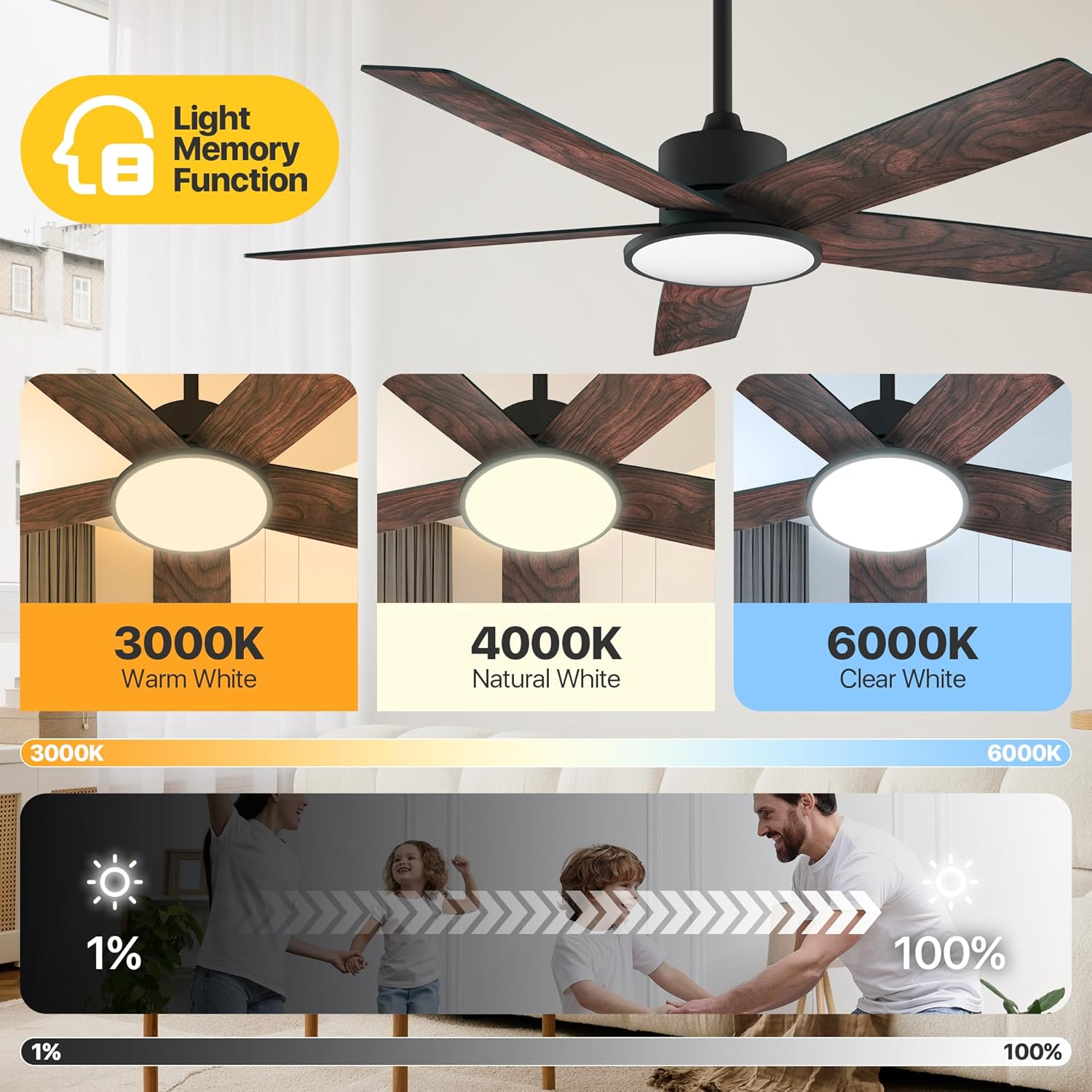
Image: Adjustable color temperatures and dimmable brightness for the integrated LED light.
Timer ynstelling
Utilize the timer function via the remote or app to schedule fan and light operation, promoting energy efficiency and convenience.

Image: App interface for setting the fan's timer and illustrating quiet operation.
Ûnderhâld
Regelmjittich ûnderhâld soarget foar optimale prestaasjes en in lange libbensdoer fan jo plafondventilator.
- Reiniging: Stof de fentilatorblêden en motorhúsfesting periodyk ôf mei in sêfte, damp cloth. Avoid using abrasive cleaners that may damage the finish.
- Bladdichtheid: Check blade screws annually to ensure they are secure. Loose blades can cause wobbling and noise.
- Ljocht boarne: The integrated LED light module is designed for long-term use and typically does not require replacement.
Troubleshooting
If you encounter issues with your fan, refer to the following common solutions:
| Probleem | Mooglike oarsaak | Oplossing |
|---|---|---|
| Fan start net | No power supply; Loose wiring; Remote/App not paired. | Check circuit breaker; Verify all wire connections; Re-pair remote/app. |
| Fan wibbelt | Losse messkroeven; Unbalansearre messen; Losse montagebeugel. | Tighten all blade screws; Use balancing kit (if included); Ensure mounting bracket is secure. |
| Ljocht wurket net | Loose light wiring; Faulty LED module. | Check light connections; Contact customer support if LED module is faulty. |
| Remote wurket net | Dead batteries; Remote not paired. | Replace batteries; Re-pair the remote with the fan. |
As it probleem oanhâldt nei it besykjen fan dizze oplossingen, nim dan kontakt op mei klanttsjinst.
Spesifikaasjes
Detailed technical specifications for the Ensenior 52 Inch Smart Ceiling Fan.
| Eigenskip | Detail |
|---|---|
| Merk | Ensenior |
| Model Namme | Ceiling Fan mei ljocht |
| Item Model Number | ZF2-52-5Y-SM |
| Grutte | 52 ynch |
| Produkt Ofmjittings | 51.97" D x 51.97" W x 17.99" H |
| Item Gewicht | 12.97 pyk |
| Oantal Blades | 5 |
| Motor Type | DC |
| Oantal Power Levels | 6 |
| Luchtstreamkapasiteit | 5500 kubike fuotten per minút |
| Noise Level | 35 Desibel |
| Wattage | 33 watt |
| Control Metoade | App, ôfstân, stim |
| Special Features | App Operable, LED Light, Quiet Reversible DC Motor, Remote Controlled, Timer |
| Ljocht kleurtemperatuer | 3000K-6000K Dimmable LED |
| Ynbegrepen komponinten | Ljochtkit |
| Binnen / bûtengebrûk | Binnen |
| Mounting Type | Plafond Mount |
| Power Boarne | AC/DC |
| UPC | 769044681834 |

Image: Product dimensions and recommended room size for the 52-inch fan.

Image: Benefits of the high-efficiency DC motor, including energy savings and quiet operation.
Garânsje en stipe
The Ensenior 52 Inch Smart Ceiling Fan is backed by a 3-jierrige garânsje. For any questions, technical assistance, or warranty claims, please contact our professional customer support team. Refer to your purchase documentation for specific contact details.