
Ynlieding
This manual provides essential information for the safe and effective use of your Minolta MNB5Z 56MP Dual Lens Point & Shoot Digital Camera. Please read this manual thoroughly before using the camera and keep it for future reference. The Minolta MNB5Z is designed to capture high-quality photos at 56MP and record videos in 5K Ultra HD, featuring a 5x optical zoom and a user-friendly 2.8-inch IPS touchscreen.
Safety Information
- Stel de kamera net bleat oan wetter of focht. Dizze kamera is net wetterbestindich.
- Foarkom dat de kamera falle lit of ûnderwurpen wurdt oan sterke stoten.
- Keep the camera away from direct sunlight, high temperatures, and dusty environments.
- Use only specified batteries and accessories.
- Besykje de kamera net útinoar te heljen of te feroarjen. Lit alle ûnderhâldswurk oer oan kwalifisearre personiel.
- Hâld bûten it berik fan bern.
Pakketynhâld
Kontrolearje oft alle items yn jo pakket oanwêzich binne:
- Minolta MNB5Z 56MP Digital Camera
- USB-oplaadkabel
- Oplaadbare Lithium-Ion-batterij
- MicroSDHC Ultra 64GB Memory Card
- Flexible Vlogging Tripod
- Geheugenkaartportefeuille
- USB Card Reader (SD/microSD)
- Kamerataske
- Cleaning Kit
- Corel Photo, Video, & Art Suite Deluxe Software (Download information may be included)
Opsette
1. Batterij Ynstallaasje
- Sykje it deksel fan it batterijfak oan 'e ûnderkant fan' e kamera.
- Skuif de dekselfergrendeling om it fak te iepenjen.
- Insert the Lithium-Ion battery according to the polarity indicators (+/-).
- Slút it deksel fan it batterijfak goed oant it fêstklikt.
2. Ynstallearjen fan ûnthâldkaart
The Minolta MNB5Z supports microSD and microSDHC cards up to 256GB.
- Open the battery compartment cover. The microSD card slot is usually located near the battery.
- Insert the microSD card with the gold contacts facing down, gently pushing until it clicks into place.
- Om te ferwiderjen, druk de kaart wer yn oant er derút springt.
- Slút it deksel fan it batterijfak.
3. It opladen fan de batterij
- Connect the small end of the USB charging cable to the camera's USB port.
- Ferbine it oare ein fan 'e USB-kabel mei in USB-stroomadapter (net ynbegrepen) of de USB-poarte fan in kompjûter.
- The charging indicator light (CHG) will illuminate during charging and turn off when fully charged.
4. Earste ynskeakeling
- Druk en hâld de ON/OFF knop dy't oan 'e boppekant fan' e kamera leit.
- The camera will power on, and the display screen will activate.
- Folgje alle oanwizings op it skerm foar de earste ynstelling, lykas it ynstellen fan de datum en tiid.
Bedriuwen fan de kamera
1. Kamera-yndieling en kontrôles
Familiarize yourself with the camera's buttons and touchscreen interface.

Ofbylding: Efterkant view of the Minolta MNB5Z camera, highlighting the touchscreen display and physical control buttons for navigation and function selection.
- ON/OFF knop: Skeakelt de kamera oan of út.
- Shutter knop: Druk healwei yn om te fokusjen, folslein yn om in foto te meitsjen.
- Zoomhendel: Kontrolearret de 5x optyske zoom.
- Mode knop: Switches between different shooting modes (Photo, Video, Playback, etc.).
- Directional Pad (DISP/OK): Navigearret troch menu's en befêstiget seleksjes.
- Playback knop: Giet oer nei de ôfspielmodus view foto's en fideo's.
- Menuknop: Jout tagong ta kamera-ynstellingen en opsjes.
- 2.8-inch IPS-touchscreen: For intuitive navigation and reviewynhâld.
2. Nim Photos
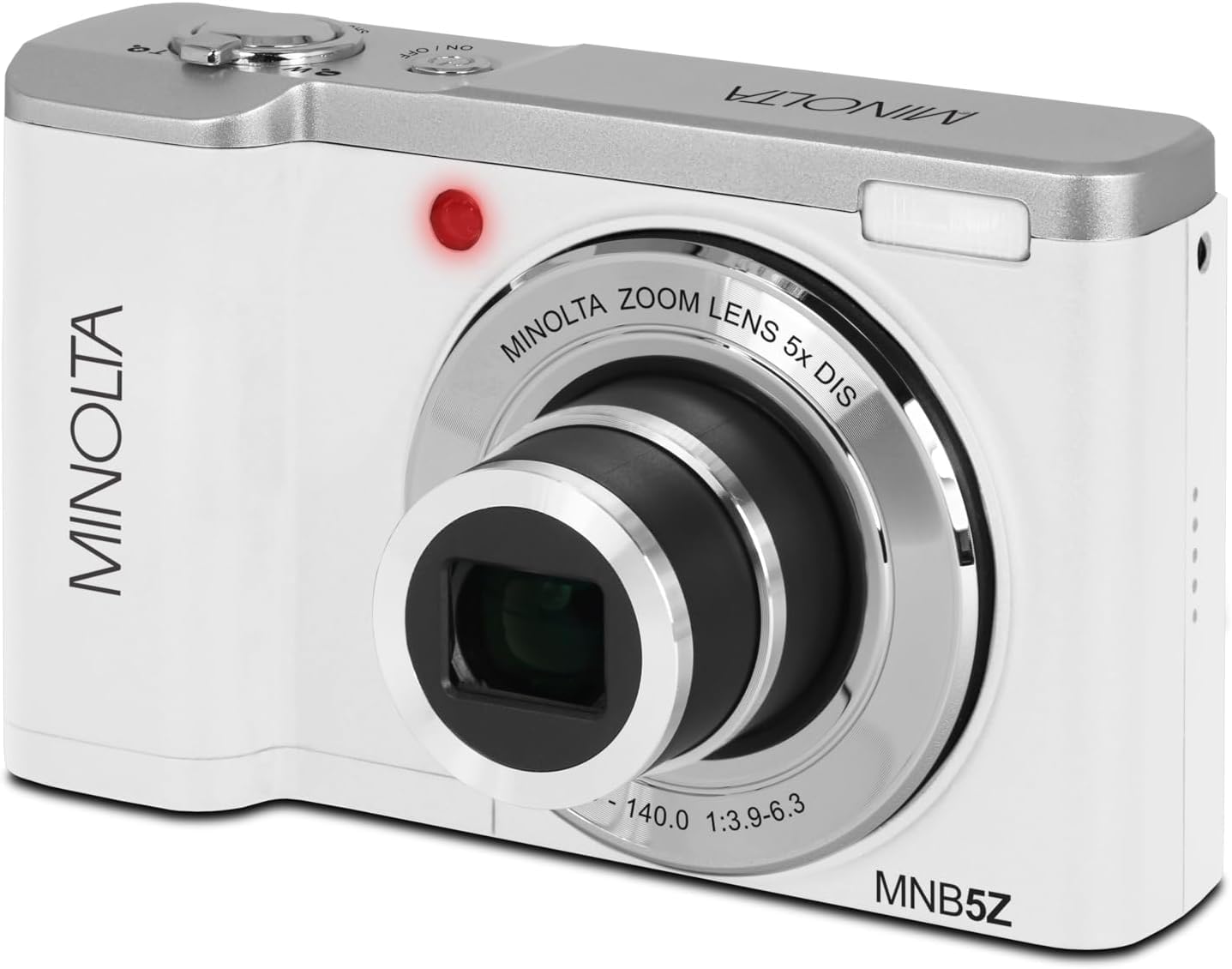
Ofbylding: Front view of the Minolta MNB5Z camera, showing the lens extended for capturing images, with the Minolta branding visible.
- Turn on the camera and ensure it is in Photo mode.
- Frame your shot using the 2.8-inch IPS touchscreen.
- Brûk de zoomhendel om de 5x optyske zoom oan te passen.
- Druk de sluterknop healwei yn om de kamera te litten fokusje. De fokusindikator sil de fokus befêstigje.
- Press the shutter button fully to capture the photo.
- Flash: The built-in flash can be set to Auto, On/Fill, or Off via the menu.
- Sjitmodi: Access various modes like Photo Burst, Time-Lapse, and Slow Motion via the Mode button or touchscreen menu.
3. Recording Videos
- Skeakelje de kamera oan en wikselje nei de fideomodus mei de knop Modus.
- Frame your subject on the touchscreen.
- Press the shutter button to start recording. A recording indicator will appear on the screen.
- Druk nochris op de sluterknop om it opnimmen te stopjen.
- The camera records in 5K Ultra HD resolution and includes a built-in microphone for audio capture.
4. Wiedergabe
- Druk op de knop Ofspielje om de ôfspielmodus yn te gean.
- Use the directional pad or swipe on the touchscreen to browse through your photos and videos.
- Druk op de OK knop om view in fideo of ynzoomje op in foto.
- Press the Playback button again to exit playback mode.
5. Kamera ynstellings
- Press the Menu button to access camera settings.
- Use the directional pad or touchscreen to navigate through options such as resolution, white balance, ISO, exposure compensation, and color filters.
- Select an option and press OK to confirm or adjust.
- Druk nochris op de Menu knop om it menu te ferlitten.
6. Ferbine mei in kompjûter (USB)
- Soargje derfoar dat de kamera is útskeakele.
- Ferbine de kamera mei jo kompjûter mei de levere USB-kabel.
- Turn on the camera. It should be recognized as a removable disk or media device.
- Jo kinne no foto's en fideo's oerdrage nei jo kompjûter.
7. Wi-Fi Konnektivität
The Minolta MNB5Z features Wi-Fi connectivity for wireless transfer of images and remote control via a compatible smartphone application (if available). Refer to the camera's on-screen menu for Wi-Fi setup instructions and pairing with your device.
Ûnderhâld
1. Skjinmeitsjen fan de kamera
- Brûk in sêfte, pluisfrije doek om de kamerabody skjin te meitsjen.
- For the lens and screen, use a specialized lens cleaning cloth and solution. Avoid harsh chemicals.
- Gently blow away dust from the lens surface before wiping.
2. Opslach

Ofbylding: Front view of the Minolta MNB5Z camera with its lens retracted, demonstrating its compact form factor for easy storage in the included camera bag.
- When not in use, store the camera in the provided camera bag to protect it from dust and scratches.
- Fuortsmite de batterij as de kamera sil net brûkt wurde foar in langere perioade.
- Bewarje op in koel, droech plak, fuort fan ekstreme temperatueren en fochtigens.
Troubleshooting
| Probleem | Oplossing |
|---|---|
| Kamera giet net oan. | Ensure the battery is correctly inserted and fully charged. Try charging the battery for at least 2 hours. |
| Kin gjin foto's/fideo's meitsje. | Check if the memory card is inserted correctly and has sufficient free space. Ensure the camera is in the correct mode (Photo/Video). |
| Ofbyldings binne wazig. | Ensure the lens is clean. Press the shutter button halfway to allow the camera to focus before fully pressing. Use digital image stabilization in shaky conditions. |
| Flash is not working. | Check flash settings in the menu to ensure it is not set to 'Off'. |
| De kamera befriest of reagearret net mear. | Remove the battery, wait a few seconds, and reinsert it to reset the camera. |
Spesifikaasjes
| Eigenskip | Detail |
|---|---|
| Model Namme | MNB5Z |
| Foto Resolúsje | 56 Megapixels |
| Video Resolúsje | 5K Ultra HD (30 FPS) |
| Optyske zoom | 5x |
| Image Stabilisaasje | Digitaal |
| Skermgrutte | 2.8 inch IPS-touchscreen |
| Unthâld Card Support | microSD, microSDHC (up to 256GB) |
| Konnektivität | USB, Wi-Fi |
| Batterij Type | Lithium Ion |
| Flash | Built-In (Auto, On/Fill) |
| Soart sensor | CMOS |
| Minimum Shutter Speed | 1/4000 sek |
| Stipe File Formaten | JPEG (Foto's), MP4 (Fideo's) |
| Item Gewicht | 2.37 pûn sterling |
Garânsje en stipe
Minolta products are manufactured to the highest quality standards. For information regarding your product's warranty, please refer to the warranty card included in your package or visit the official Minolta support website. For technical assistance, troubleshooting, or service inquiries, please contact Minolta customer support.
Online stipe: Visit the official Minolta webside foar FAQ's, stjoerprogramma-downloads en kontaktgegevens.
Klanttsjinst: Refer to your product packaging or the Minolta webside foar kontaktgegevens fan klanttsjinst.