
Ynlieding
The Trust Gaming GXT 498B Forta Gaming Headset is officially licensed for PlayStation 5 and PlayStation 4 consoles, designed to provide an immersive audio experience. This wired over-ear headset features 50mm drivers for powerful sound, a detachable microphone with a pop filter for clear communication, and comfortable ear pads for extended gaming sessions. This manual provides instructions for setup, operation, maintenance, and troubleshooting to ensure optimal performance of your headset.
Wat is yn 'e doaze
- Trust Gaming GXT 498B Forta Gaming Headset
- Detachable Microphone with Pop Filter
- 1.2m Audio Cable (3.5mm jack)
- User Manual

Image: The retail packaging for the Trust Gaming GXT 498B Forta Gaming Headset, showing the headset and included accessories.
Setup Ynstruksjes
- Ferbine de audiokabel: Locate the 3.5mm audio jack on your PlayStation 5 DualSense wireless controller or PlayStation 4 DualShock 4 wireless controller. Insert the 3.5mm audio cable from the headset firmly into the controller's audio jack.
- Befestigje de mikrofoan: The microphone is detachable. Align the microphone's connector with the port on the left earcup of the headset and push it in until it clicks securely into place. Ensure the pop filter is correctly positioned over the microphone for optimal voice clarity.
- Headset-passing oanpasse: Extend or retract the adjustable padded headband to fit comfortably over your head. The earcups are moveable to ensure a snug fit over your ears.
- Configure Audio Settings (PlayStation):
- Foar PS5: Gean nei Ynstellings > Sound > Audio útfier. Selektearje Headphones as the output device. Adjust the volume and microphone levels as needed.
- Foar PS4: Gean nei Ynstellings > Apparaten > Audio Apparaten. Selektearje Headset ferbûn mei Controller as the input and output device. Adjust the volume and microphone levels.
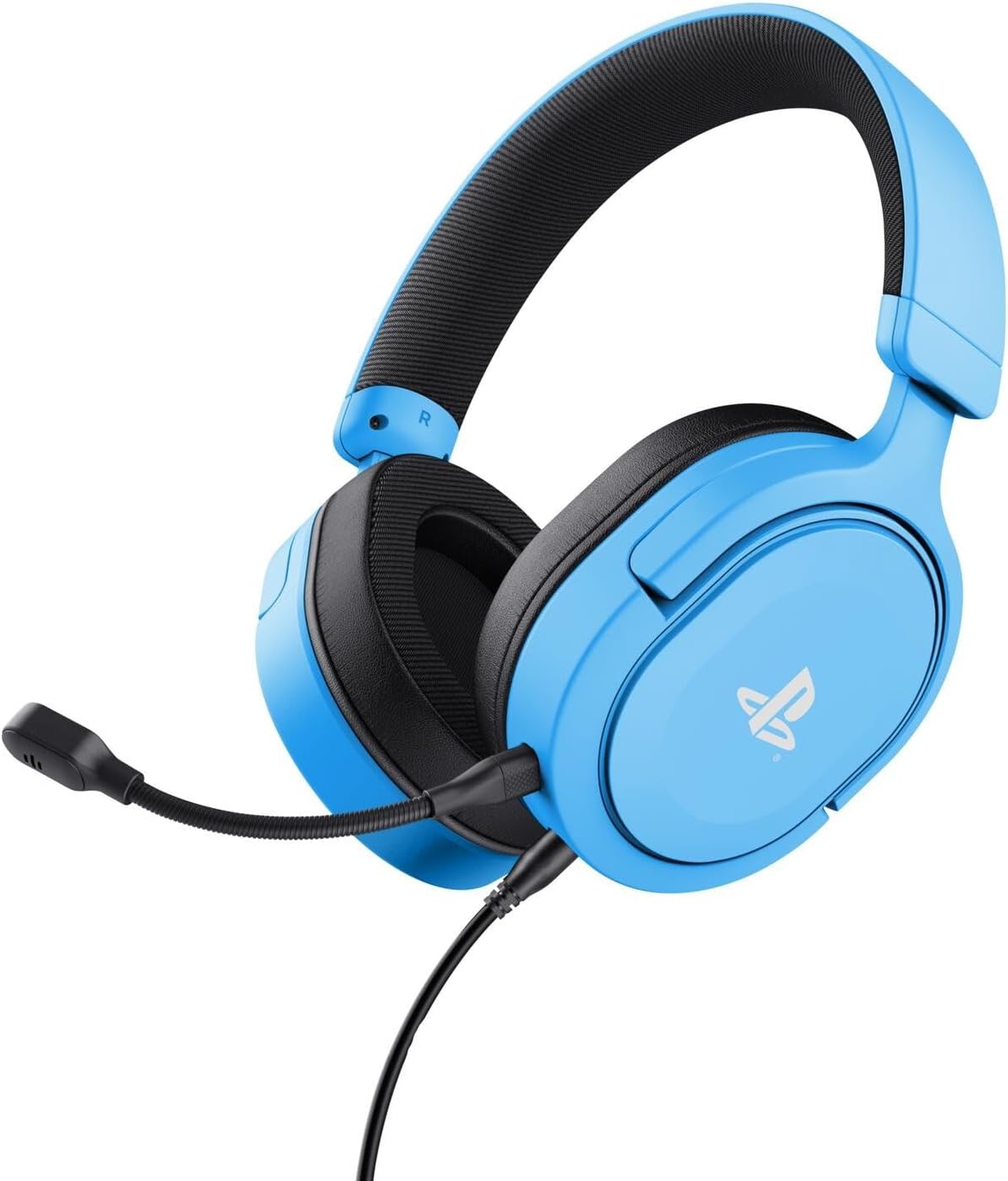
Image: The Trust Gaming GXT 498B Forta Gaming Headset, showcasing its design and detachable microphone.
Operating Instructions
- Volume kontrôle: The headset features an in-line volume control wheel on the audio cable. Rotate the wheel up or down to adjust the audio output level.
- Mikrofoan mute: An in-line mute switch is located on the audio cable. Slide the switch to mute or unmute the microphone.
- 3D-lûd: The headset supports 3D Audio on compatible PlayStation 5 games, providing an enhanced spatial sound experience. Ensure 3D Audio is enabled in your PS5 sound settings for optimal immersion.
- Útnimbere mikrofoan: The microphone can be detached when not in use for a more streamlined headset profile. Store it safely to prevent loss or damage.

Ofbylding: In close-up view of the Trust Gaming GXT 498B Forta headset, highlighting the earcups and the attached audio cable with controls.
Ûnderhâld
- Reiniging: Brûk in sêfte, droege doek om de headset skjin te meitsjen. Foar earpads, in bytsje damp In doek kin brûkt wurde, mar soargje derfoar dat der gjin focht yn 'e sprekkerroosters komt. Brûk gjin agressive gemikaliën of skurende reinigingsmiddels.
- Opslach: Bewarje de headset op in koel, droech plak, fuort fan direkt sinneljocht en ekstreme temperatueren. Foarkom it pleatsen fan swiere objekten op 'e headset.
- Kabelsoarch: Avoid sharp bends or kinks in the audio cable. Do not pull the cable forcefully when disconnecting.
- Mikrofoansoarch: Handle the detachable microphone with care. When not in use, detach it and store it safely to prevent damage.
Troubleshooting
- Gjin lûd fan headset:
- Ensure the 3.5mm audio cable is fully inserted into both the headset and the controller.
- Check the in-line volume control wheel on the cable and turn it up.
- Verify audio settings on your PlayStation console (refer to "Setup Instructions" section).
- Test the headset with another device (e.g., smartphone, PC) to determine if the issue is with the headset or the console.
- Mikrofoan wurket net:
- Soargje derfoar dat de ôfneembere mikrofoan feilich oan 'e headset fêstmakke is.
- Check the in-line microphone mute switch and ensure it is in the "unmute" position.
- Verify microphone input settings on your PlayStation console (refer to "Setup Instructions" section).
- Ensure the pop filter is not obstructing the microphone's input.
- Sound Quality Issues (Distortion, Low Volume):
- Adjust the volume levels on both the headset's in-line control and your console's settings.
- Soargje derfoar dat de audiokabel net skansearre of knikt is.
- Try connecting the headset to a different audio source to rule out console-specific issues.
Spesifikaasjes
| Model Namme | GXT 498B Forta |
| Model Number | 25556 |
| Konnektivität | Bedraad (3.5mm Jack) |
| Kabel Lengte | 1.2 meter |
| Driver Grutte | 50 mm |
| Frekwinsjeberik | 20 Hz - 20,000 Hz |
| Impedânsje | 32 ohms |
| Gefoelichheid | 90 dB |
| Mikrofoan Type | Detachable with Pop Filter |
| Ear Placement | Oer-ear |
| Item Gewicht | 253g wy |
| Kompatibele apparaten | PlayStation 5, PlayStation 4, PC |
| Materiaal | Plastic (up to 65% recycled) |
Garânsje en stipe
This Trust Gaming GXT 498B Forta Gaming Headset is covered by the manufacturer's standard warranty. For detailed warranty information, please refer to the documentation included with your purchase or visit the official GXTrust website. For technical support, troubleshooting assistance beyond this manual, or warranty claims, please contact GXTrust customer service through their official support channels.
Bewarje jo bewiis fan oankeap foar garânsjedoelen.