
1. Produkt Overview
The Insoma Smart WiFi Sprinkler Timer is an automatic irrigation system controller designed for lawns and yards. It features two independent outlets, allowing for separate watering schedules for different zones. This device is compatible with smart home assistants like Alexa, offering convenient voice control. The timer is built with a brass inlet and plastic outlets for durability and ease of connection.
Key Features:
- Kontrôle mei dûbele sône: Manage two separate watering areas independently.
- Smart App Control: Program and monitor watering schedules from your smartphone.
- Kompatibiliteit fan Voice Assistant: Works with Alexa and Google Assistant for hands-free operation.
- Funksje foar reinfertraging: Pause watering for 1-7 days to conserve water.
- Duorsume konstruksje: Features a brass inlet, UV-proof, corrosion-proof, and IP55 waterproof design.
- Multiple Watering Modes: Supports Timed and Cyclical irrigation schedules.
2. Setup Ynstruksjes
Follow these steps to set up your Insoma Smart WiFi Sprinkler Timer and connect it to the Smart Life App.
2.1 Pakketynhâld
Soargje derfoar dat alle ûnderdielen oanwêzich binne foardat jo begjinne:
- Sprinkler Timer Unit
- Thread Sealing Tape
- Threaded Connectors (2)
- User Manual
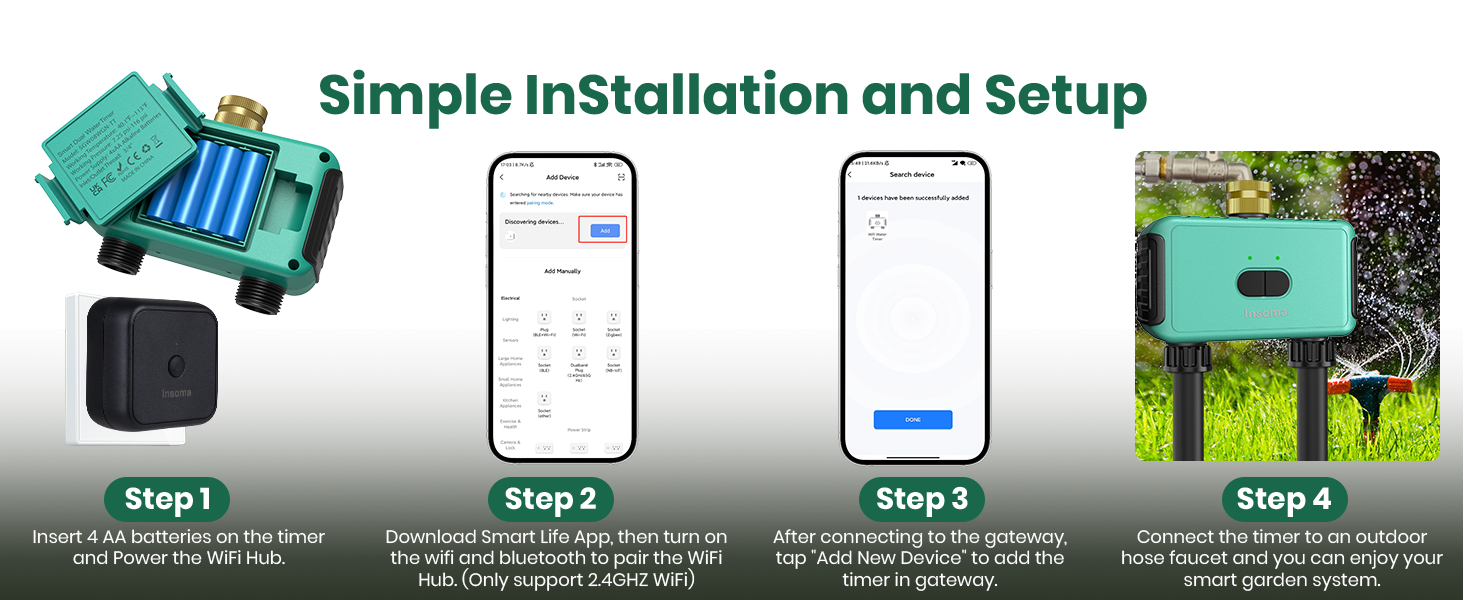
Image: Contents of the Insoma Smart WiFi Sprinkler Timer package.
2.2 Batterij Ynstallaasje
- Locate the battery compartment on the timer unit.
- Open the compartment and insert 4* AAA 1.5V Alkaline batteries (not included). Ensure correct polarity.
- Close the battery compartment securely. The compartment has a built-in sealing strip to prevent water entry.

Image: Battery installation in the Insoma Sprinkler Timer, highlighting the sealed compartment.
2.3 App Download and Gateway Pairing
The Insoma Sprinkler Timer uses the Smart Life app. A WiFi hub (gateway) is required to connect the timer to your home network.
- Download de "Smart Life"-app fan 'e appwinkel fan jo smartphone.
- Ensure your phone's WiFi (2.4GHz only) and Bluetooth are enabled.
- Plug in the WiFi Hub (gateway) and long-press its button until the indicator light flashes.
- Open the Smart Life app, click the "+" icon to add a device, and select to add the gateway. Follow the in-app instructions to connect the gateway to your 2.4GHz WiFi network.
Video: Demonstrates how to connect the Insoma WiFi Water Timer and Gateway to the Smart Life App, including enabling WiFi and Bluetooth, pairing the gateway, and adding the timer.
2.4 Timer Pairing
- Once the gateway is added, in the Smart Life app, navigate to the gateway page and click "Add device" or "Sykje nei Apparaten".
- On the sprinkler timer, long-press both buttons for 5 seconds until the indicator lights flash. This puts the timer into pairing mode.
- The app should discover the "Smart Dual Water Timer". Click "Add" and then "Done" to complete the pairing process.
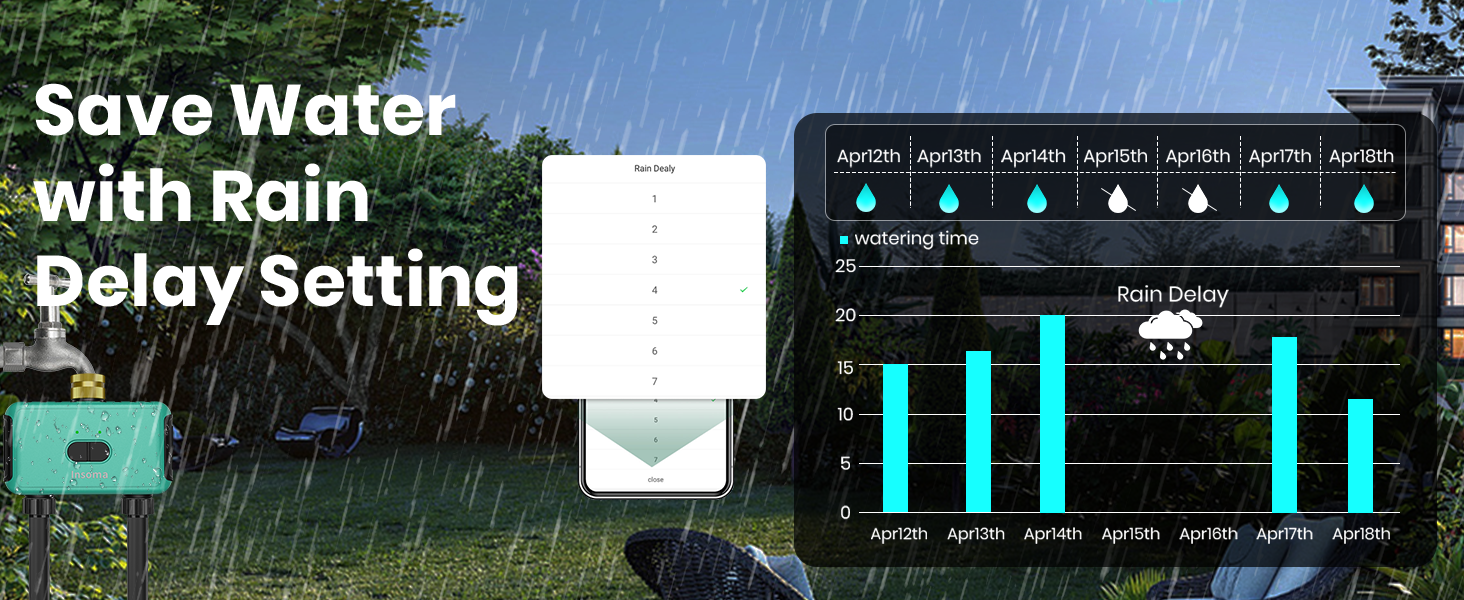
Image: Visual guide for the installation and setup process, from battery insertion to app connection and physical installation.
2.5 Fysike ynstallaasje
- Apply thread sealing tape to the threads of your outdoor faucet.
- Screw the brass inlet of the sprinkler timer onto the faucet. Ensure a tight fit to prevent leaks.
- Connect your garden hoses to the two plastic outlets at the bottom of the timer.

Image: The upgraded anti-leak design featuring a brass swivel connector for a secure fit.
3. Bedriuwsinstruksjes
Control your watering schedules and monitor your garden using the Smart Life app.
3.1 Setting Watering Schedules
The timer supports two main types of watering schedules:
- Timed Irrigation: Water at specific times of the day.
- Cyclical Irrigation: Water within a set start and end time, with customizable duration and interval.

Image: App interface displaying options for setting timed and cyclical watering schedules.
- Open the Smart Life app and select your Insoma Sprinkler Timer.
- For each zone (Zone 1 or Zone 2), tap "Set Time" to create a new watering plan.
- Choose between "Timed Watering Schedule" or "Cyclical Watering Schedule".
- Configure the start time, duration, and frequency (e.g., specific days, odd/even days, every few days) for Timed Irrigation.
- For Cyclical Irrigation, set the start and end times, irrigation duration, and interval time. This allows the soil to absorb water between cycles.
- Save your settings. Each zone can have up to 20 different watering schedules.

Image: App screen demonstrating the setup for Cyclical Irrigation Water Saving Mode.
3.2 Hânlieding wettering
You can manually turn on or off watering for a specific duration without affecting your programmed schedules.
- On the main timer screen in the app, locate the "Turn on/off" toggle for the desired zone.
- Tap the toggle to activate manual watering.
- Stel de winske doer yn foar hânmjittich wetterjaan.

Image: App interface for manual watering, allowing temporary irrigation without altering schedules.
3.3 Rain Delay Setting
To prevent overwatering during rainy periods, use the rain delay function.
- On the main timer screen in the app, find the "Rain and snow delay" option.
- Select the number of days (1-7) you wish to delay watering.
- The timer will automatically resume its schedule after the selected delay period.

Image: App interface for setting a rain delay, showing the timer pausing during rain and resuming watering later.
3.4 Stim kontrôle
Integrate your Insoma Sprinkler Timer with Alexa or Google Assistant for convenient voice commands.
- Ensure your timer is successfully connected to the Smart Life app and your smart assistant is linked to your Smart Life account.
- Use commands such as: "Alexa, open the Smart Dual Water Timer" or "Hey Google, turn on Zone 1 for 10 minutes."

Image: Demonstrates voice control functionality with Alexa, showing a user interacting with the smart speaker to manage watering.
3.5 Watering History and Notifications
The app provides real-time notifications and a record of past irrigation events.
- Check the "Irrigation record" section in the app to view the time and duration of each watering session.
- Receive notifications for watering start/end, low battery, or connection issues.

Image: App screen displaying the irrigation history, detailing past watering events.
Fideo: Oerview of the Insoma WiFi Sprinkler Timer's features, including smart app control, dual-zone watering, cyclical schedules, rain delay, manual watering, and real-time notifications.
4. Underhâld
Proper maintenance ensures the longevity and optimal performance of your sprinkler timer.
- Batterij ferfanging: Replace the 4* AAA batteries approximately once a year, or when the app indicates low battery.
- Reiniging: Meitsje de bûtenkant fan 'e timer periodyk skjin mei advertinsjesamp doek. Brûk gjin abrasive cleaners.
- Winterisaasje: Foardat de temperatueren ûnder it friespunt komme, koppelje de timer los fan 'e kraan, ferwiderje de batterijen en bewarje it apparaat binnen op in droech, beskerme plak.
- Lekprevinsje: Regularly check hose connections for tightness. The brass inlet is designed for durability, but ensure plastic outlets are not overtightened to prevent damage.
5. Probleemoplossing
If you encounter issues with your Insoma Smart WiFi Sprinkler Timer, refer to the following common problems and solutions.
- Timer loses connection frequently:
- Ensure the WiFi gateway is within range of your home router and the sprinkler timer. Obstacles like thick walls can interfere with the signal.
- Verify your home WiFi network is 2.4GHz. The device does not support 5GHz networks.
- Check for firmware updates for the gateway and timer in the Smart Life app. - Batterij rint fluch leech:
- Ensure you are using high-quality alkaline AAA batteries.
- Extreme temperatures can affect battery life. If operating in very cold conditions, battery life may be reduced.
- Check for any continuous operation or frequent connection attempts that might be draining power. - Plastic outlet leaks or is damaged:
- Avoid overtightening metal hose connectors onto the plastic outlets, as this can strip threads or crack the plastic.
- Use thread sealing tape on hose connections to improve the seal.
- If the outlet is damaged, contact customer support for assistance. - Timer does not follow scheduled watering:
- Verify that the schedules are correctly set and enabled in the Smart Life app.
- Check if a rain delay is active. - App shows incorrect status or lag:
- Ensure your smartphone has a stable internet connection.
- Restart the Smart Life app.
- Check the gateway's connection status. The gateway must be online for the app to communicate with the timer.
6. Spesifikaasjes
| Eigenskip | Detail |
|---|---|
| Merk | Insoma |
| Model Number | SGW08W-T-01-04-YS-H |
| Kleur | Swart |
| Materiaal | Metal (Inlet), Plastic (Outlets) |
| Produkt Ofmjittings | 5.94" D x 2.6" W x 5.7" H |
| Oantal ynstellings | 20 per sône |
| Konnektivität | WiFi (allinich 2.4GHz) |
| Power Boarne | 4* AAA 1.5V Alkaline batteries (not included) |
| Waterproof Rating | IP55 |
7. Garânsje en stipe
For warranty information, technical support, or any inquiries regarding your Insoma Smart WiFi Sprinkler Timer, please refer to the contact details provided on the product packaging or visit the official Insoma website. Hâld jo oankeapbewiis foar garânsjeclaims.