
1. Ynlieding
This manual provides instructions for the setup, operation, and maintenance of your Retroid Pocket Classic handheld gaming console. The Retroid Pocket Classic is a portable Android-based gaming device featuring a 3.92-inch OLED touchscreen, designed for a versatile gaming experience.

Image 1.1: Retroid Pocket Classic consoles in white and yellow.
2. Wat sit der yn 'e doaze
Kontrolearje oft alle items yn it pakket oanwêzich binne:
- Retroid Pocket Classic Gaming Console
- Oplaadkabel (USB-C)
- User Manual (dit dokumint)
3. Apparaat oerview
Familiarize yourself with the physical components and controls of your Retroid Pocket Classic.
3.1 Foarside View

Ofbylding 3.1: Front view of the Retroid Pocket Classic.
- 3.92-inch OLED Touchscreen: The primary display for all operations and gaming.
- D-Pad: Directional input for navigation and gameplay.
- Aksjeknoppen: (A, B, X, Y or similar layout) for in-game actions.
- Start/Select Buttons: For game and system functions.
- Speaker Grilles: Audio útfier.
3.2 Top and Back View

Ofbylding 3.2: Boppe view showing shoulder buttons and ports.
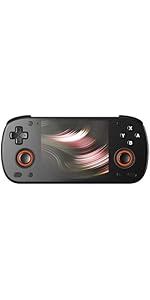
Image 3.3: Curved back design and trigger buttons.
- Skouderknoppen (L1, R1): Located on the top edge.
- Trigger Buttons (L2, R2): Located on the back, below the shoulder buttons.
- USB-C-poarte: Foar opladen en gegevens oerdracht.
- 3.5mm Audio Jack: Foar it ferbinen fan koptelefoan.
- Micro SD Card Slot: Foar útwreiding fan opslach.
- Power knop: Om it apparaat oan/út te skeakeljen of yn sliep te setten.
- Volume knoppen: To adjust audio output.
3.3 Internal Components (Cooling)

Image 3.4: Integrated active cooling system.
The Retroid Pocket Classic features an integrated active cooling system designed to maintain optimal performance and manage heat during extended use.
4. Opsette
4.1 Initial Charging
Before first use, fully charge the device. Connect the provided USB-C charging cable to the console's USB-C port and the other end to a compatible USB power adapter (not included). The device has a 5000mAh battery.
4.2 Yn-/útskeakelje
- Om oan te setten: Druk en hâld de oan/út-knop yndrukt oant it skerm opljochtet.
- Om út te skeakeljen: Press and hold the Power button, then select "Power Off" from the on-screen options.
- Om te sliepen/wekker te wurden: Druk koart op de knop Power.
4.3 Wi-Fi Ferbining
To access online features and download applications, connect to a Wi-Fi network:
- Gean nei Ynstellings.
- Selektearje Netwurk en ynternet.
- Tap Wi-Fi en set it oan.
- Selektearje jo winske netwurk út 'e list en fier it wachtwurd yn as jo dêrom frege wurde.
4.4 Ynstelling fan Google-akkount
The Retroid Pocket Classic runs Android 14 and supports the Google Play Store. To download apps and games, you will need to sign in with a Google account during the initial setup process or later via the Settings menu.
4.5 Ynstallearjen fan Micro SD-kaart
To expand the device's storage (128GB internal), insert a Micro SD card into the designated slot. Ensure the card is inserted correctly until it clicks into place. The device supports various Micro SD card capacities.
5. Bedriuwsinstruksjes
5.1 Navigearje troch de Android-ynterface
The device operates on Android 14. Use the touchscreen for navigation, tapping icons to open applications, swiping to scroll, and using gestures for system controls. The D-pad and action buttons can also be used for navigation within compatible applications and games.
5.2 Downloading and Installing Applications
Applications and games can be downloaded from the Google Play Store. Open the Play Store app, search for your desired content, and follow the on-screen prompts to download and install.
Note: The Retroid Pocket Classic does not come with preloaded games. Users are responsible for acquiring and installing their own game content.
5.3 Opslach beheare
Nei view and manage internal and external storage, go to Ynstellings> Opslach. Here you can see storage usage and manage files. For optimal performance, ensure sufficient free space is available.
5.4 Bluetooth-ferbining
The device supports Bluetooth 5.1 for connecting wireless accessories such as headphones or external controllers.
- Gean nei Ynstellings.
- Selektearje Ferbûne apparaten.
- Tap Koppel nij apparaat and select your accessory from the list.
6. Underhâld
6.1 It apparaat skjinmeitsje
Use a soft, dry, lint-free cloth to clean the device's exterior. For the screen, a screen cleaner specifically designed for electronics can be used. Avoid using harsh chemicals or abrasive materials.
6.2 Batterij Soarch
Om de batterijlibben te ferlingjen:
- Avoid ekstreme temperatueren.
- Untlaad de batterij net faak folslein.
- Bewarje it apparaat mei in dielde lading as it langere perioaden net brûkt wurdt.
6.3 Software Updates
Kontrolearje regelmjittich op systeemupdates en ynstallearje se om optimale prestaasjes en feiligens te garandearjen. Gean nei Ynstellings > Systeem > Systeemupdate om te kontrolearjen op beskikbere updates.
7. Probleemoplossing
7.1 Apparaat giet net oan
- Ensure the device is sufficiently charged. Connect it to a power source for at least 30 minutes.
- Try holding the Power button for 10-15 seconds to force a restart.
7.2 Problemen mei Wi-Fi-ferbining
- Kontrolearje oft Wi-Fi ynskeakele is yn Ynstellings.
- Start jo Wi-Fi-router op 'e nij.
- Forget the network and reconnect, ensuring the password is correct.
7.3 Applikaasjes dy't crashje of befrieze
- Slút en iepenje de applikaasje opnij.
- Wiskje de cache en gegevens fan 'e app fia Ynstellings > Apps > [Appnamme] > Opslach en cache.
- Soargje derfoar dat de applikaasje bywurke is nei de lêste ferzje.
- Restart it apparaat.
7.4 Skerm reagearret net
- Start it apparaat opnij troch de oan/út-knop yndrukt te hâlden.
- Soargje derfoar dat it skerm skjin en frij fan pún is.
8. Spesifikaasjes

Image 8.1: Retroid Pocket Classic detailed specifications.
| Eigenskip | Detail |
|---|---|
| Model Namme | RP CLASSIC |
| Prozessor | G1 Gen2 (8-Core Kryo CPU, 2 Performance Cores, 6 Efficiency Cores) |
| GPU | Adreno A12 |
| RAAM | 6GB LPDDR4x @2133M |
| Opslach | 128GB EMMC 5.1 (expandable via Micro SD card) |
| Skerm | 3.92-inch AMOLED, 1240x1080 @60fps |
| Bestjoeringssysteem | Android 14 |
| Wi-Fi | Wi-Fi 5 |
| Bluetooth | Bluetooth 5.1 |
| Ynterface | USB-C / 3.5mm Audio Jack / TF Card Slot |
| Video Output | N/A |
| Batterij | 5000 mAh |
| Oplaadsnelheid | 27 watt |
| Ofmjittings | 138 x 89.8 x 26 mm (5.43 x 3.53 x 1 inch) |
| Gewicht | 223g (7.9 ounces) |
9. Garânsje en stipe
For warranty information and technical support, please refer to the official Retroid Pocket webside of nim kontakt op mei harren klanttsjinst. Bewarje jo bewiis fan oankeap foar garânsjeclaims.
Online resources and community forums may also provide helpful information and troubleshooting tips.