
1. Ynlieding
Thank you for choosing the Schneider 43A1 4K UHD LED TV. This television combines advanced display technology with smart features to provide an immersive viewing experience. Featuring a 4K Ultra High Definition display, QLED-LCD technology with Direct LED backlighting, and the VIDAA Smart TV platform, your new TV offers vibrant colors, deep blacks, and access to a wide range of entertainment.
This manual provides essential information for the safe and efficient use of your television. Please read it thoroughly before operating the device and retain it for future reference.
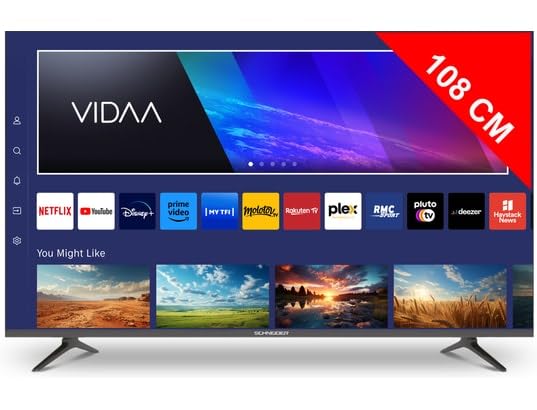
Ofbylding 1.1: Front view of the Schneider 43A1 TV with VIDAA interface.
2. Safety Information
Om feilige wurking te garandearjen en skea te foarkommen, nim dan de folgjende feilichheidsmaatregels yn acht:
- Pleatsing: Position the TV on a stable, level surface. Avoid placing it in direct sunlight, near heat sources, or in environments with high humidity or dust.
- Ventilaasje: Ensure adequate ventilation around the TV. Do not block ventilation openings. Maintain a minimum distance of 10 cm from walls or other objects.
- Streamtafier: Brûk allinnich de oantsjutte Netzteil voltage. Ensure the power cord is not pinched or walked on. Disconnect the power plug during lightning storms or when unused for extended periods.
- Reiniging: Doch de stekker fan 'e tv út it stopkontakt foardat jo it skjinmeitsje. Brûk in sêfte, droege doek. Brûk gjin floeibere reinigingsmiddels of spuitbussen.
- Fluids: Do not expose the TV to dripping or splashing liquids. Do not place objects filled with liquids, such as vases, on the TV.
- Bern: Supervise children to ensure they do not climb on the TV or furniture.
- Wall montage: If wall-mounting, use a VESA compatible bracket (200 x 200 mm) and ensure proper installation by qualified personnel to prevent injury.
3. Package Ynhâld
Kontrolearje asjebleaft oft alle items oanwêzich binne en yn goede steat binne:
- Schneider 43A1 4K UHD LED TV
- Remote Control
- Power Kabel
- TV-meubel (2 stikken)
- Skroeven foar tv-standert
- User Manual (dit dokumint)
4. Opsette
4.1 Útpakke
Carefully remove the TV from its packaging. It is recommended to keep the original packaging for potential future transport or service needs.
4.2 Stand Ynstallaasje
If you are not wall-mounting the TV, attach the included stand pieces to the bottom of the TV using the provided screws. Ensure the stand is securely fastened before placing the TV upright.
4.3 Muurbefestiging (Opsjoneel)
The Schneider 43A1 is compatible with VESA 200 x 200 mm wall mounts. For safe installation, it is highly recommended to use a professional installer. Refer to your wall mount's instructions for specific details.
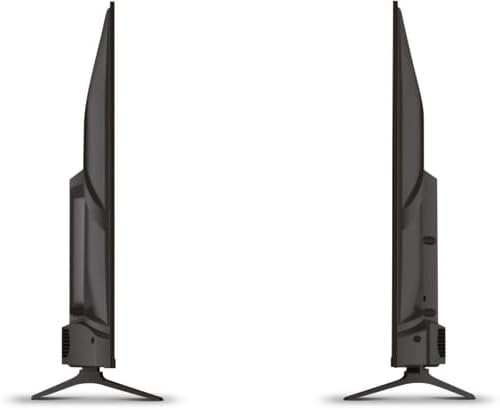
Ofbylding 4.1: Side view of the Schneider 43A1 TV, illustrating its profile for placement or wall mounting.
4.4 Eksterne apparaten ferbine
Dyn tv biedt ferskate ferbiningsopsjes:
- HDMI: Connect up to three HDMI 2.0 devices (e.g., Blu-ray player, game console, set-top box) to the HDMI ports.
- USB: Twa USB-poarten binne beskikber foar it ferbinen fan USB-opslachapparaten om media ôf te spyljen.
- AV/Audio Input: Foar âldere apparaten dy't kompositfideo en stereo-audio nedich binne.
- Koaksiale útfier: Foar it ferbinen mei in ekstern audiosysteem.
- Antenne/kabelynfier: Connect your antenna or cable TV signal for DVB-T/T2/C/S2 reception.
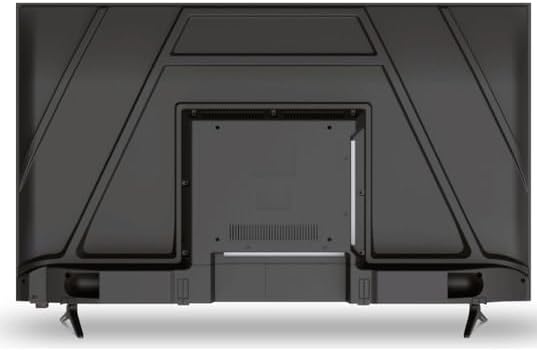
Ofbylding 4.2: Efterkant view of the Schneider 43A1 TV, highlighting connection ports.
4.5 Ferbine Power
Plug the power cable into the TV's power input, then into a suitable wall outlet.
4.6 Wizard foar earste ynstallaasje
Upon first power-on, the TV will guide you through an initial setup process. This includes selecting your language, connecting to a Wi-Fi network, and scanning for available channels (DVB-T/T2/C/S2).
5. Bestjoeren
5.1 Remote Control Funksjes
The remote control allows you to navigate the TV's features:
- Power knop: Skeakelt de TV oan of út.
- Volume omheech / omleech: Pas it lûdsnivo oan.
- Kanaal omheech / omleech: Feroaret tv-kanalen.
- Ynfier/boarne: Selects the input source (HDMI, USB, TV Tuner).
- Navigaasjeknoppen: Foar menunavigaasje.
- Smart TV-knoppen: Direct access to popular apps like Netflix, Prime Video, YouTube.
5.2 Smart TV (VIDAA)
The integrated VIDAA Smart TV platform provides access to a variety of applications and streaming services. Connect your TV to the internet via Wi-Fi to enjoy features like Netflix, Prime Video, and YouTube. Bluetooth connectivity allows for wireless connection to compatible audio devices.

Ofbylding 5.1: Skeakele foarkant view of the Schneider 43A1 TV, displaying the VIDAA Smart TV interface.
5.3 Input Seleksje
Press the 'Input' or 'Source' button on your remote control to switch between connected devices (HDMI 1, HDMI 2, HDMI 3, USB, AV, TV Tuner).
5.4 Ynstellings foar byld en lûd
Access the TV's menu to adjust picture and sound settings. The 4K UHD resolution, QLED-LCD technology, and Direct LED backlighting ensure a high-quality visual experience. The TV also features upscaling to enhance lower-resolution content. Audio is delivered via 2 x 8 W RMS stereo speakers with Dolby Audio support.
5.5 PC Monitor Mode
The TV can be used as a PC monitor by connecting your computer via an HDMI cable. This mode optimizes the display for computer use.
6. Underhâld
6.1 De tv skjinmeitsje
Before cleaning, ensure the TV is unplugged from the power outlet.
- Skerm: Feie it skerm foarsichtich ôf mei in sêfte, pluisfrije doek. Foar koppige plakken, dûbje it lichtjesampmeitsje de doek skjin mei wetter of in spesjalisearre skermreiniger (spuite net direkt op it skerm).
- Eksterieur: Brûk in sêfte, droege doek om de tv ôf te feegjenasing. Foarkom skuurmiddels of oplosmiddels.
6.2 Software Updates
Your TV may receive software updates to improve performance and add new features. Ensure your TV is connected to the internet to receive these updates automatically or check for them manually through the settings menu.
7. Probleemoplossing
As jo problemen hawwe mei jo tv, sjoch dan nei de folgjende faak foarkommende problemen en oplossingen:
- Gjin macht:
- Check if the power cable is securely plugged into the TV and the wall outlet.
- Soargje derfoar dat it stopkontakt wurket (test mei in oar apparaat).
- Druk op de oan/út-knop op 'e ôfstânsbetsjinning of op 'e tv sels.
- Gjin ôfbylding/lûd:
- Kontrolearje oft de juste ynfierboarne selektearre is (bygelyks, HDMI 1, TV).
- Kontrolearje alle kabelferbiningen tusken de tv en eksterne apparaten.
- Soargje derfoar dat it folume net mute is of op minimaal ynsteld is.
- If using an antenna, check the antenna connection and perform a channel scan.
- Remote Control wurket net:
- Ferfang de batterijen yn 'e ôfstânsbetsjinning.
- Soargje derfoar dat der gjin obstakels binne tusken de ôfstânsbetsjinning en de IR-sensor fan 'e tv.
- Smart TV/Network Issues:
- Kontrolearje jo Wi-Fi-router en ynternetferbining.
- Go to the TV's network settings to re-connect to your Wi-Fi network.
- Start de tv en jo router opnij op.
As it probleem oanhâldt nei it besykjen fan dizze oplossingen, nim dan kontakt op mei klanttsjinst.
8. Spesifikaasjes
| Eigenskip | Spesifikaasje |
|---|---|
| Model | Schneider 43A1 |
| Display Grutte | 109 sm (43 inch) |
| Resolúsje | 4K Ultra HD (3840 x 2160 piksels) |
| Display Technology | QLED-LCD with Direct LED Backlight |
| Kontrast Ratio | 1100:1 |
| Helderheid | 200 cd/m² |
| Audio útfier | 2 x 8 W RMS Stereo |
| Audio Technology | Dolby Audio |
| HDMI havens | 3 (HDMI 2.0) |
| USB Ports | 2 |
| Oare yngongen | AV/Audio Input |
| Útgongen | Koaksiale útfier |
| Tuner | DVB-T/T2/C/S2 |
| Smart TV Platfoarm | VIDAA (Netflix, Prime Video, YouTube) |
| Triedleaze ferbining | Wi-Fi, Bluetooth |
| VESA-kompatibiliteit | 200 x 200 mm |
| Gewicht | 7.5 kilogram |