
1. Wichtige Safety Ynstruksjes
Lês alle ynstruksjes goed troch foardat jo dit apparaat brûke en bewarje se foar takomstige referinsje. It net folgjen fan dizze ynstruksjes kin liede ta elektryske skok, brân of slim persoanlik letsel.
- Soargje derfoar dat de macht oanbod voltage komt oerien mei it wurdearringslabel op it apparaat.
- Brûk de fentilator net mei in beskeadige snoer of stekker. As it snoer beskeadige is, moat it ferfongen wurde troch de fabrikant, har serviceagent, of ferlykber kwalifisearre persoanen om gefaar te foarkommen.
- Haal de stekker fan 'e fentilator altyd út it stopkontakt foardat jo him skjinmeitsje, ûnderhâlde of ferpleatse.
- Stek gjin fingers of oare objekten yn it fentilatorrooster as it yn wurking is.
- Keep the fan away from water or other liquids. Do not use it in wet or damp omjouwings.
- Dit apparaat is allinich foar binnen gebrûk. Brûk it net bûten.
- Do not place the fan near heat sources such as radiators, heat registers, stoves, or other appliances that produce heat.
- Kontrolearje bern om te soargjen dat se net boartsje mei it apparaat.
- Brûk de fentilator net yn gebieten dêr't benzine, ferve of brânbere floeistoffen opslein wurde.
2. Produkt Overview
The Altus AL 40 TFB is a sleek and efficient tower air cooler designed for indoor use. It features a compact design, multiple speed settings, and easy-to-use push-button controls.
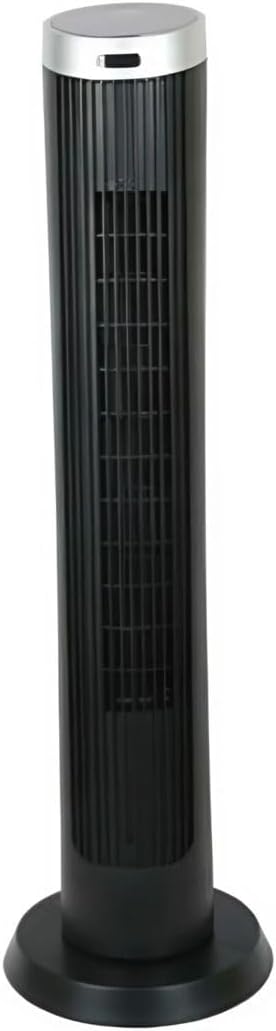
Ofbylding 2.1: Front view of the Altus AL 40 TFB Tower Air Cooler. This image shows the tall, slender black body of the fan with its air outlet grille and a stable round base.
Komponinten:
- Control Panel: Located on the top of the unit for easy access to all functions.
- Loftútlaatrooster: Vertical grille on the front for air dispersion.
- Basis: Stable round base for secure placement.
- Stromkabel: Leit oan 'e efterkant fan 'e ienheid.

Ofbylding 2.2: Detaillearre view of the control panel on top of the Altus AL 40 TFB Tower Air Cooler. The panel features a digital display showing '28' and several push buttons for various functions.
3. Opsette
Follow these steps to set up your Altus AL 40 TFB Tower Air Cooler:
- Utpakke: Carefully remove the fan from its packaging. Retain the packaging for future storage or transport.
- Basisassemblage (as nedich): Some models may require minor base assembly. If your unit's base is detached, align the base sections and secure them according to the diagrams in the packaging. Ensure it is firmly attached.
- Pleatsing: Place the fan on a firm, level surface. Ensure there is adequate space around the fan for proper airflow, at least 30 cm (12 inches) from walls or furniture. This appliance is designed for indoor use only.
- Power Connection: Plug the power cord into a standard electrical outlet. Ensure the outlet meets the voltage easken spesifisearre op it produkt label.
4. Bedriuwsinstruksjes
Your Altus AL 40 TFB Tower Air Cooler is equipped with user-friendly push-button controls on the top panel.
Funksjes fan kontrôlepaniel:
- Power knop (⏻): Press once to turn the fan ON, press again to turn it OFF.
- Snelheidsknop (💨): Press repeatedly to cycle through the 3 available fan speeds: Low, Medium, and High. The current speed setting may be indicated on the digital display.
- Modusknop (M): If available, press to select different operating modes (e.g., Normal, Natural, Sleep). Refer to the digital display for the active mode.
- Oscillaasjeknop (↔): Press to activate or deactivate the oscillation function, which allows the fan to rotate from side to side to distribute air over a wider area.
- Timerknop (🕒): If available, press to set an automatic shut-off timer. Each press typically increases the timer duration by a set increment (e.g., 1 hour).
Algemiene operaasje:
- Stek de fan yn in geskikt stopkontakt.
- Druk op de Power knop (⏻) to turn on the fan.
- Select your desired fan speed using the Speed Button (💨).
- Activate oscillation if desired by pressing the Oscillation Button (↔).
- To turn off the fan, press the Power Button (⏻) wer.
5. Underhâld
Regular maintenance ensures optimal performance and extends the lifespan of your Altus AL 40 TFB Tower Air Cooler.
Reiniging:
- Skeakelje de fan altyd út foar it skjinmeitsjen.
- Eksterne reiniging: Feie de bûtenste oerflakken fan 'e fentilator ôf mei in sêfte, damp cloth. Do not use abrasive cleaners, waxes, or polishes as they may damage the finish.
- Loftynlaat/útlaatroosters: Use a vacuum cleaner with a brush attachment to gently remove dust and debris from the air inlet and outlet grilles. Do not attempt to disassemble the fan for cleaning.
- Soargje derfoar dat de fentilator folslein droech is foardat jo him wer yn it stopkontakt stekke en yn gebrûk nimme.
Opslach:
When not in use for extended periods, store the fan in a cool, dry place. It is recommended to store it in its original packaging to protect it from dust and damage.
6. Probleemoplossing
If you encounter any issues with your Altus AL 40 TFB Tower Air Cooler, please refer to the following common problems and solutions:
- Fan giet net oan:
- Kontrolearje oft it netsnoer goed yn in wurkjend stopkontakt sit.
- Ensure the power button on the control panel has been pressed.
- Verify that the household circuit breaker or fuse has not tripped.
- Swakke luchtstream:
- Check if the fan speed is set to a higher setting.
- Ensure the air inlet and outlet grilles are not blocked by dust or obstructions. Clean them if necessary.
- Ungewoane lûd:
- Soargje derfoar dat de fentilator op in stabyl, flak oerflak pleatst wurdt.
- Check for any foreign objects that might have fallen into the fan grilles.
- As it lûd oanhâldt, stopje dan mei gebrûk en nim kontakt op mei klanttsjinst.
If the problem cannot be resolved using the above steps, please contact Altus customer support.
7. Spesifikaasjes
Detailed technical specifications for the Altus AL 40 TFB Tower Air Cooler:
| Eigenskip | Spesifikaasje |
|---|---|
| Merk | Altus |
| Model Namme | AL 40 TFB |
| Kleur | Swart |
| Elektryske Fan Design | Floor Fan (Tower Type) |
| Power Boarne | Corded elektryske |
| Produkt Ofmjittings (D x B x H) | 29D x 29B x 101H sm |
| Mounting Type | Floor Mount |
| Finish Type | Skildere |
| Binnen / bûtengebrûk | Binnen |
| Control Metoade | Drukknop |
| Oantal Power Levels | 3 |
| Wireless | Nee |
8. Garânsje en stipe
Altus provides comprehensive support for its products. For any assistance or warranty-related inquiries, please contact our customer service.

Ofbylding 8.1: Altus customer service and warranty information. The image displays the Altus logo, a message about service availability, and a contact number for support.
Our services are always available for your Altus products. You can benefit from our door-to-door service by calling our support line for any assistance you may need.
Arçelik Service Warranty: For products under warranty, our home product pickup service is provided free of charge.
Customer Support Line: 0850 210 0 888
Please have your product model number (AL 40 TFB) and purchase details ready when contacting support.