
bmani T16
bmani Wireless Earbuds User Manual
Model: T16
Brand: bmani
Ynlieding
Welcome to the bmani Wireless Earbuds user manual. These Bluetooth headphones are designed for comfort and performance, featuring a secure over-ear fit, long battery life, and intuitive controls. This manual will guide you through setting up, operating, and maintaining your new earbuds.
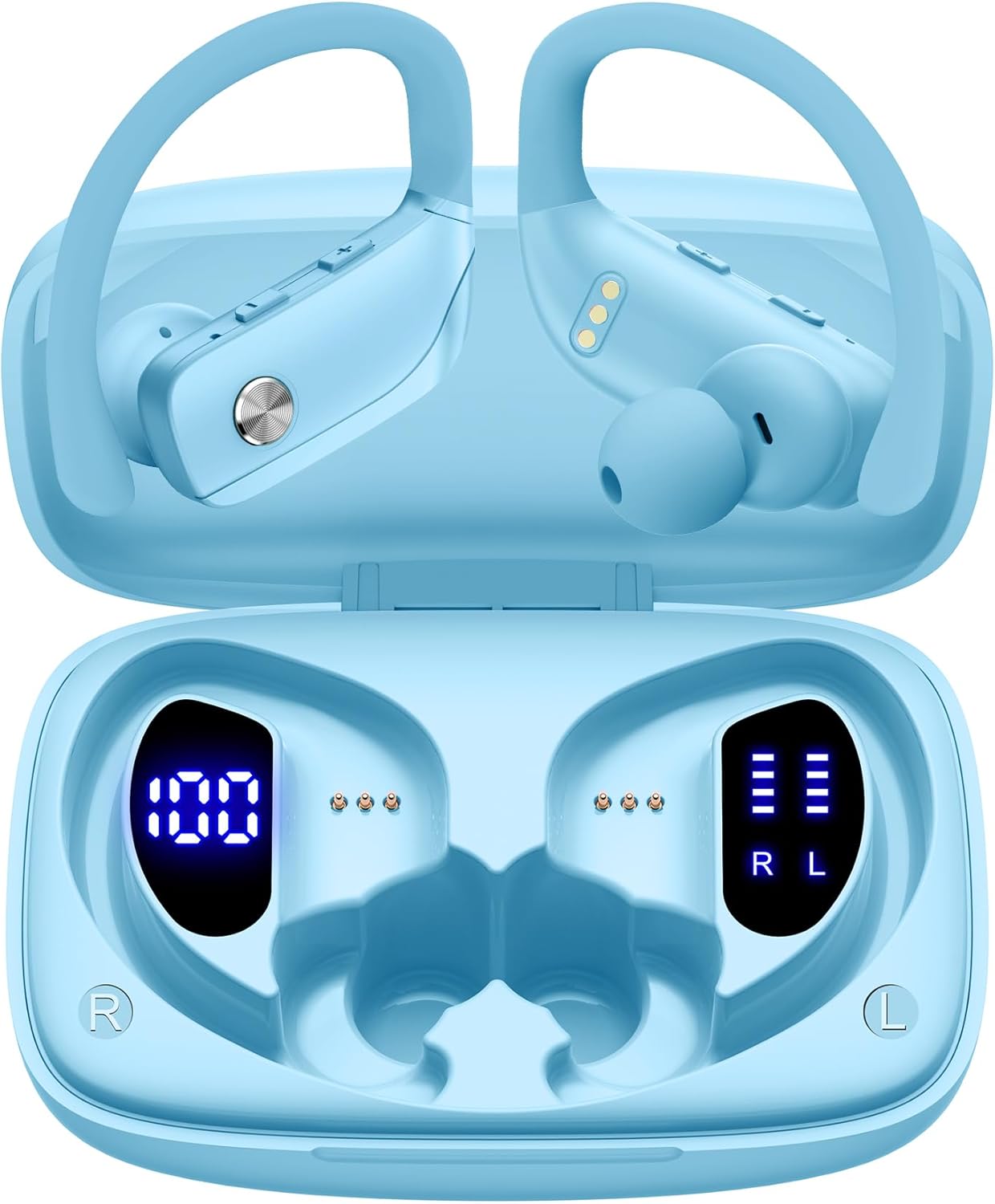
Image: The bmani Wireless Earbuds in their open sky blue charging case, showcasing the earbuds and the case's interior.
Wat is yn 'e doaze
- Draadloze earbuds
- Opladen Case
- Eartips (three size options: L, M, S)
- Type-C kabel
- User Manual (dit dokumint)

Image: This image displays all the items included in your bmani Wireless Earbuds package: the two wireless earbuds, their charging case, a set of three different sized eartips (L, M, S), a Type-C charging cable, and the user manual.
Produkt oerview & Funksjes
The bmani Wireless Earbuds are engineered for an exceptional audio experience with user-friendly features.
Dual LED Displays Charging Case
The charging case features dual LED displays. The left display shows the remaining battery power of the case in percentage. The right side indicates the charging process of each earbud with four grids, each representing 25% of the bud's power. The LED indicator light will flash during charging.

Image: This image highlights the dual LED digital display on the charging case. The left screen shows the charging case's battery capacity as a percentage, while the right screen displays the power status of the left (L) and right (R) earbuds using four bars each.
Lange batterijlibben
Enjoy extended listening sessions with up to 8 hours of music time per earbud and an additional 40 hours provided by the 600mAh charging case, totaling 48 hours of playback.

Image: This diagram illustrates the impressive battery life: 8 hours of music time per earbud (50mAh each) and an additional 40 hours of listening time provided by the 600mAh charging case, totaling 48 hours of playback.
Bluetooth 5.0 and Hi-Fi Stereo Sound Quality
Equipped with advanced Bluetooth 5.0 technology, these earbuds provide a clear and smooth connection with extended range and fewer dropouts, ensuring crystal-clear calls and uninterrupted music listening. The 10mm speakers deliver Hi-Fi stereo sound.

Image: This image visually represents the 10mm speakers within the earbuds, emphasizing their capability to deliver Hi-Fi stereo sound.

Image: This image emphasizes the Bluetooth 5.0 technology, offering extended range and fewer dropouts, and the integration with voice assistants like Siri.
Designed for Sports (IPX5 Water Resistant)
These sport headphones are designed to stay securely in place during long hours of training, preventing shifting or falling out. They come with flexible earhooks and three pairs of ear caps (S, M, L) to ensure a comfortable and suitable fit, even during intense activities like camping, running, or working out. They are also IPX5 water-resistant, protecting them from splashes and sweat.

Image: This image shows a woman wearing the earbuds during exercise, highlighting their secure fit. An inset graphic demonstrates the flexible earhooks and the three included eartip sizes (L, M, S) for personalized comfort.

Image: This infographic summarizes key features: Dual LED Battery Display, 600mAh Charging Case, Anti-skid Earhooks, IPX5 Waterproof rating, Hi-Fi Stereo sound, and Voice Assistant compatibility.
Opsette
De earbuds en case opladen
Laad foar it earste gebrûk sawol de oordopjes as de oplaadkoffer folslein op.
- Connect the provided Type-C cable to the charging port on the back of the case.
- Stek it oare ein yn in USB macht boarne.
- It LED-display op 'e kast sil de oplaadfoarútgong sjen litte.
- Once fully charged, the display will show 100% for the case and full bars for both earbuds.
Pairing with Your Device (One-step Pairing)
The bmani earbuds feature automatic pairing for convenience.
- Open the charging case and take out both earbuds. They will automatically power on and attempt to pair with each other.
- Skeakelje Bluetooth yn op jo apparaat (smartphone, tablet, laptop, ensfh.).
- Sykje nei "T16" in the list of available Bluetooth devices and select it to connect.
- Sadree't de ferbining is foltôge, hearre jo in audioprompt en binne de earbuds klear foar gebrûk.
- De earbuds sille automatysk opnij ferbine mei it lêst keppele apparaat as se út 'e hoes helle wurde.

Image: This image demonstrates the one-step pairing process, showing the earbuds connected to a smartphone. It also highlights their wide compatibility with various Bluetooth-enabled devices, including notebooks, TVs, desktops, smartwatches, and tablets.
Operating Instructions
It dragen fan de earbuds
For optimal sound and comfort, ensure the earbuds are worn correctly.
- Put the ear hook over the back of your ear.
- Stek de earkap yn jo eargong.
- Adjust by twisting the earbud for a comfortable and secure fit.

Image: This visual guide provides three simple steps for wearing your earbuds: 1. Place the ear hook over your ear. 2. Insert the ear cap into your ear. 3. Adjust the earbud by twisting it for a secure and comfortable fit.
Kontrôles
The bmani earbuds feature intuitive button controls.
| Aksje | Funksje |
|---|---|
| Klik ien kear | Muzyk spielje/pauzearje, oprop beantwurdzje/einigje |
| Quick Double-click (R) | Folgjende Track |
| Quick Double-click (L) | Foarige Track |
| Press "+" Button | Volume omheech |
| Press "-" Button | Volume del |
| Quick Triple-click | Aktivearje Voice Assistant |
| Hâlde | Power On/Off |

Image: This image illustrates the dual audio controls on the earbuds. It shows the physical volume buttons (+/-) and a diagram explaining single click for play/pause, double click for track navigation, and holding the button for power on/off.

Image: This infographic details the various controls: single click for call answer/end and play/pause, double click for next/previous track, pressing +/- for volume, and triple click for voice assistant.
Ûnderhâld
To ensure the longevity and optimal performance of your bmani Wireless Earbuds, follow these maintenance guidelines:
- CleaningMeitsje de earplugs en it oplaadkoffer regelmjittich skjin mei in sêfte, droege, pluisfrije doek. Brûk gjin agressive gemikaliën of skurende materialen.
- Eartips: Remove and clean the eartips periodically. You can gently wash them with mild soap and water, then ensure they are completely dry before reattaching.
- Wetter Resistance: The earbuds are IPX5 water-resistant, meaning they can withstand splashes and sweat. Do not submerge them in water or expose them to heavy rain. Ensure they are dry before placing them back in the charging case.
- Opslach: When not in use, store the earbuds in their charging case to protect them from dust and damage.
- Opladen: Use only the provided Type-C cable for charging. Avoid extreme temperatures during charging and storage.
Troubleshooting
If you encounter any issues with your bmani Wireless Earbuds, please refer to the following common solutions:
Earbuds not pairing with each other or with device:
- Soargje derfoar dat beide earbuds folslein opladen binne.
- Place both earbuds back into the charging case, close the lid, wait a few seconds, then open the lid and take them out again. This often resets the pairing.
- On your device, forget or delete "T16" from your Bluetooth device list. Then, try the pairing process again from step 1.
- Soargje derfoar dat gjin oare Bluetooth-apparaten de ferbining hinderje.
Gjin lûd of leech folume:
- Kontrolearje it folumenivo op sawol jo earbuds as jo ferbûne apparaat.
- Soargje derfoar dat de oordopjes goed yn jo earen sitte.
- Clean any debris from the eartips or earbud speakers.
- Ferbine de earbuds opnij oan jo apparaat.
Oplaadkoffer laadt net:
- Soargje derfoar dat de Type-C-kabel feilich ferbûn is mei sawol de kast as de stroomboarne.
- Besykje in oare USB-stroomadapter of poarte.
- Kontrolearje de oplaadkabel foar eventuele skea.
Earbuds falle út:
- Try different sizes of eartips provided in the box to find the best fit for your ears.
- Soargje derfoar dat de earhaakjes goed oer jo earen pleatst binne.
Spesifikaasjes
| Eigenskip | Detail |
|---|---|
| Model Namme | T16 |
| Konnektivität Technology | Draadloos (Bluetooth 5.0) |
| Batterij Life | Up to 8 hours (earbuds), 40 hours (with charging case) |
| Charging Case Kapasiteit | 600 mAh |
| Kapasiteit fan earbelknop | 50 mAh (elk) |
| Wetter Resistance | IPX5 |
| Control Type | Knop Kontrôle |
| Materiaal | Plestik |
| Item Gewicht | 2 wyb |
| Produkt Ofmjittings | 3.54 x 2.36 x 0.79 inch |
| Ynbegrepen komponinten | Charging Case, Eartip, Type-C Cable, User Manual, Wireless Earbuds |
| Kompatibele apparaten | All Bluetooth-enabled mobile phones, tablets, laptops, computers, audiobooks, TV, and all devices with Bluetooth 5.0 |
Garânsje & Support
bmani products are designed with quality and reliability in mind. For specific warranty information or technical support, please refer to the contact details provided on the product packaging or visit the official bmani website. Hâld jo oankeapbewiis foar garânsjeclaims.
Ask a question about this manual
Ask about setup, troubleshooting, compatibility, parts, safety, or missing instructions. Manuals+ will review the question and use this page’s manual context to help answer it.