
Ynlieding
Welcome to the ACwO DwOTS Flow Open-Ear Earbuds user manual. These earbuds are designed to provide a unique open-ear listening experience with X-Fidelity sound, AI-ENC noise reduction for calls, and versatile dual modes for music and gaming. This manual will guide you through the setup, operation, and maintenance of your new earbuds.
Produkt oerview
The ACwO DwOTS Flow earbuds feature an open-ear design for comfort and environmental awareness. They come with a compact charging case.

figuer 1: Front view of ACwO DwOTS Flow Open-Ear Earbuds.

figuer 2: Side view of ACwO DwOTS Flow Open-Ear Earbuds, showing the ear hook design.

figuer 3: Efterkant view of ACwO DwOTS Flow Open-Ear Earbuds.
Opsette
1. De earbuds en it hoeske oplade
Before first use, fully charge the ACwO DwOTS Flow earbuds and their charging case.
- Doch de oordopjes yn 'e oplaaddoaze, en soargje derfoar dat se goed ynfoege binne.
- Ferbine de oplaadkoffer mei in kompatibel USB-kabel mei in stroomboarne.
- De yndikatorljochten op 'e saak sille de oplaadstatus sjen litte.
- In lading fan 10 minuten jout sawat 2.5 oeren spieltiid. In folsleine lading biedt oant 50 oeren totale spieltiid mei de oplaadkoffer.
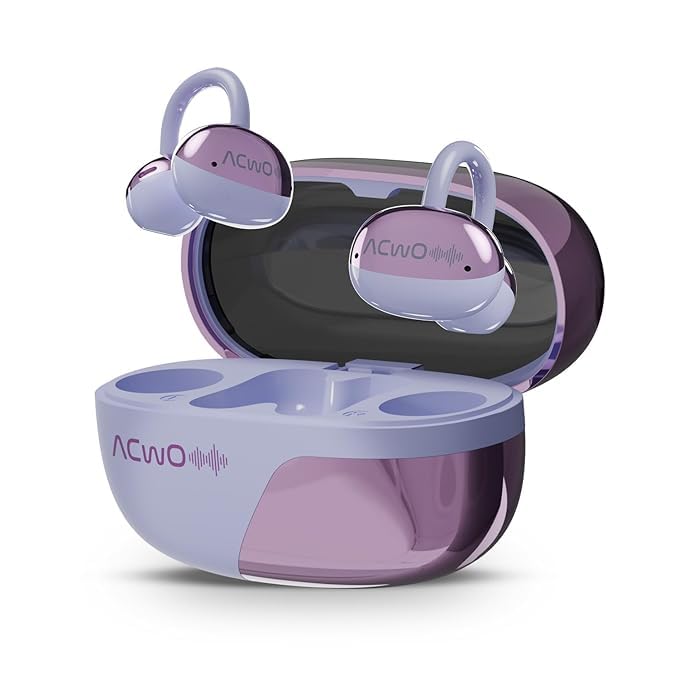
Figure 4: ACwO DwOTS Flow charging case with earbuds inserted.
2. Pairing mei in apparaat
The ACwO DwOTS Flow earbuds use Bluetooth 5.3 for wireless connectivity.
- Iepenje it oplaadkoffer. De earplugs sille automatysk yn koppelingsmodus gean.
- Skeakelje Bluetooth yn op jo apparaat (smartphone, tablet, laptop).
- Sykje nei "ACwO DwOTS Flow" in the list of available Bluetooth devices.
- Select "ACwO DwOTS Flow" to connect. Once connected, a voice prompt will confirm successful pairing.
Dûbele ferbining: These earbuds support connecting to two devices simultaneously. After pairing with the first device, follow the pairing steps for the second device. The earbuds will intelligently switch between devices.

Figure 5: Illustration of ACwO DwOTS Flow connected to two devices simultaneously.
Operating Instructions
It dragen fan de earbuds
The open-ear design ensures comfort and allows you to remain aware of your surroundings. Gently place the earbuds over your ears, ensuring a stable and comfortable fit.

Figure 6: ACwO DwOTS Flow earbuds demonstrating comfortable and stable fit.

Figure 7: Diagram illustrating the open-ear listening concept for environmental awareness and balanced audio.
Audio Wiedergabe
Enjoy X-Fidelity Acoustics with balanced highs, mids, and deep bass.

Figuer 8: Ynterne view highlighting the premium dynamic drivers for enhanced sound quality.
Call Management
The integrated AI-ENC (Environmental Noise Cancellation) microphone ensures clear calls by reducing background noise.
- Oprop beantwurdzje / einigje: Tik ien kear op it oanraakkontrôlegebiet op ien fan beide earbuds.
- Oprop ôfwize: Druk it oanraakkontrôlegebiet op ien fan beide earbuds 2 sekonden yn.
Music & Gaming Modes
Switch between modes to optimize your audio experience.
- Muzyk modus: Provides rich, balanced audio for general listening.
- Gaming modus: Offers dynamic sound with reduced latency for an immersive gaming experience.
- Switching Modes: Refer to the product's quick start guide or packaging for specific touch control gestures to switch between Music and Gaming modes.
Environmental Awareness Mode
This mode allows you to hear your surroundings clearly while enjoying audio, enhancing safety in various environments. This is a core feature of the open-ear design.
Ûnderhâld
- Reiniging: Brûk in sêfte, droege doek om de earplugs en it oplaadkoffer skjin te meitsjen. Foarkom it brûken fan abrasive materialen of hurde gemikaliën.
- Wetter Resistance: The earbuds are IPX5 water resistant, meaning they can withstand splashes and sweat. Do not submerge them in water. Ensure they are dry before placing them back in the charging case.
- Opslach: Bewarje de earbuds yn har oplaadkoffer as se net yn gebrûk binne om se te beskermjen en opladen te hâlden.
Troubleshooting
| Probleem | Mooglike oplossing |
|---|---|
| Earbuds net keppelje |
|
| Gjin lûd of leech folume |
|
| Poor call clarity (AI-ENC Mic) |
|
| Earbuds wurde net opladen |
|
Spesifikaasjes
| Eigenskip | Detail |
|---|---|
| Model Namme | DwOTS Flow |
| Merk | ACwO |
| Konnektivität Technology | Wireless (Bluetooth) |
| Bluetooth Ferzje | 5.3 |
| Earpiece Foarm | Iepen-ear |
| Funksjes foar lûdkontrôle | AI-ENC Noise Reduction |
| Batterij Life | Oant 50 oeren (mei oplaadkoffer) |
| Fast Charging | 10 minuten opladen foar 2.5 oeren spieltiid |
| Wetter Resistance Level | IPX5 |
| Audio Driver Type | Dynamic Driver |
| Control Metoade | Stim (Note: Typically includes touch controls, refer to product packaging for specific gestures.) |
| Kompatibele apparaten | Cellphones, Tablets, Laptops, Gaming Consoles |
| Produkt Ofmjittings | 4.5 x 6 x 2.8 sm |
| Item Gewicht | 150 g |
| Materiaal | Plestik |
| Lân fan oarsprong | Yndia |
Garânsje en stipe
For warranty information, technical support, or service inquiries, please refer to the warranty card included with your product or visit the official ACwO webside. Jo kinne ek direkt kontakt opnimme mei de ferkeaper foar help.


