
1. Ynlieding
The OUKITEL P5000 Pro Portable Power Station is a high-capacity, high-output solar generator designed to provide reliable power for various applications, from home backup during outages to outdoor camping and off-grid living. Featuring a robust LiFePO4 battery and multiple charging options, it ensures your essential devices remain powered.
Wat is yn 'e doaze
- 1 x P5000 Pro Power Station
- 1 x 500W Solar Panel (if purchased as a bundle)
- 1 x AC oplaadkabel
- 1 x Sinne-oplaadkabel
- 1 x autolader
- 1 x User Manual
Note: Due to the product's weight, the power station and solar panels may be delivered in separate packages.
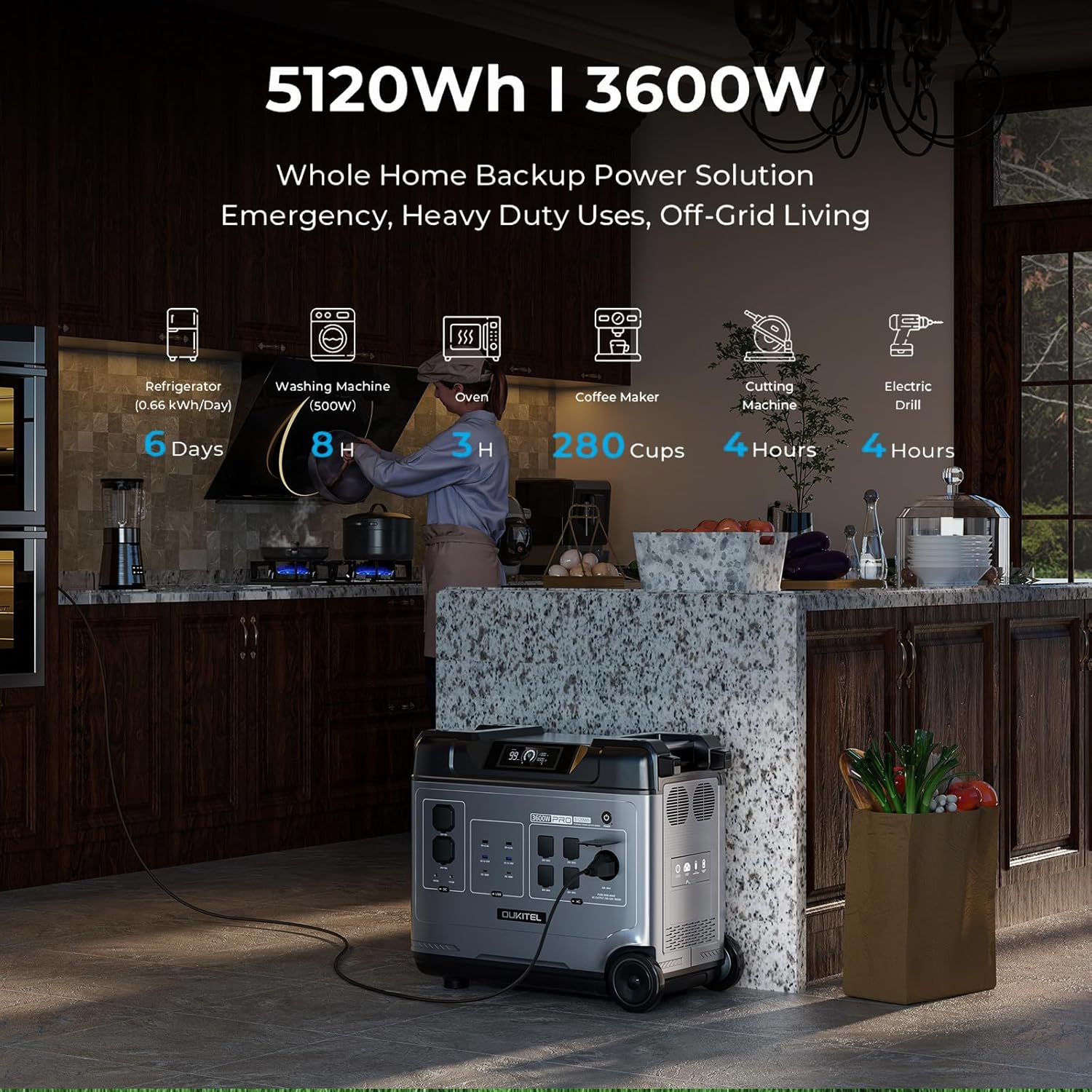
Image: OUKITEL P5000 Pro Portable Power Station with its various ports and accessories.
2. Safety Ynstruksjes
Read all safety warnings and instructions carefully before using this product. Failure to follow these instructions may result in electric shock, fire, or serious injury.
- Demontearje, reparearje of feroarje it apparaat net.
- Hâld it apparaat fuort fan fjoer, waarmteboarnen en direkt sinneljocht.
- Brûk of bewarje it apparaat net yn in badkeamer of yn in gebiet dat bleatsteld is oan wetter of focht.
- Brûk allinnich orizjinele of sertifisearre kabels en accessoires.
- Soargje foar goede fentilaasje tidens gebrûk om oververhitting te foarkommen.
- Hâld bûten it berik fan bern en húsdieren.
- Ferwiderje it produkt neffens lokale regeljouwing.
3. Ynstellen en earste opladen
Initial AC Charging
Before first use, fully charge the P5000 Pro using the provided AC charging cable. The unit supports 1800W fast charging, allowing a full charge in approximately 2.5 hours.
- Connect the AC charging cable to the AC input port on the power station.
- Plug it oare ein fan 'e kabel yn in standert muorre outlet.
- The display will show the charging status and estimated time to full charge.
Video: Demonstrates connecting the AC charging cable to the OUKITEL P5000 Pro for fast charging.
Solar Panel Charging
The P5000 Pro features a built-in MPPT controller for optimized solar charging. It supports up to 1000W solar input, allowing a full charge in approximately 5 hours when combined with AC hybrid charging.
- Fold de sinnepanielen út en set se yn direkt sinneljocht.
- Connect the solar charging cable to the solar input port on the power station.
- Connect the other end of the solar charging cable to the solar panels.
- The display will indicate solar input wattage en oplaadstatus.
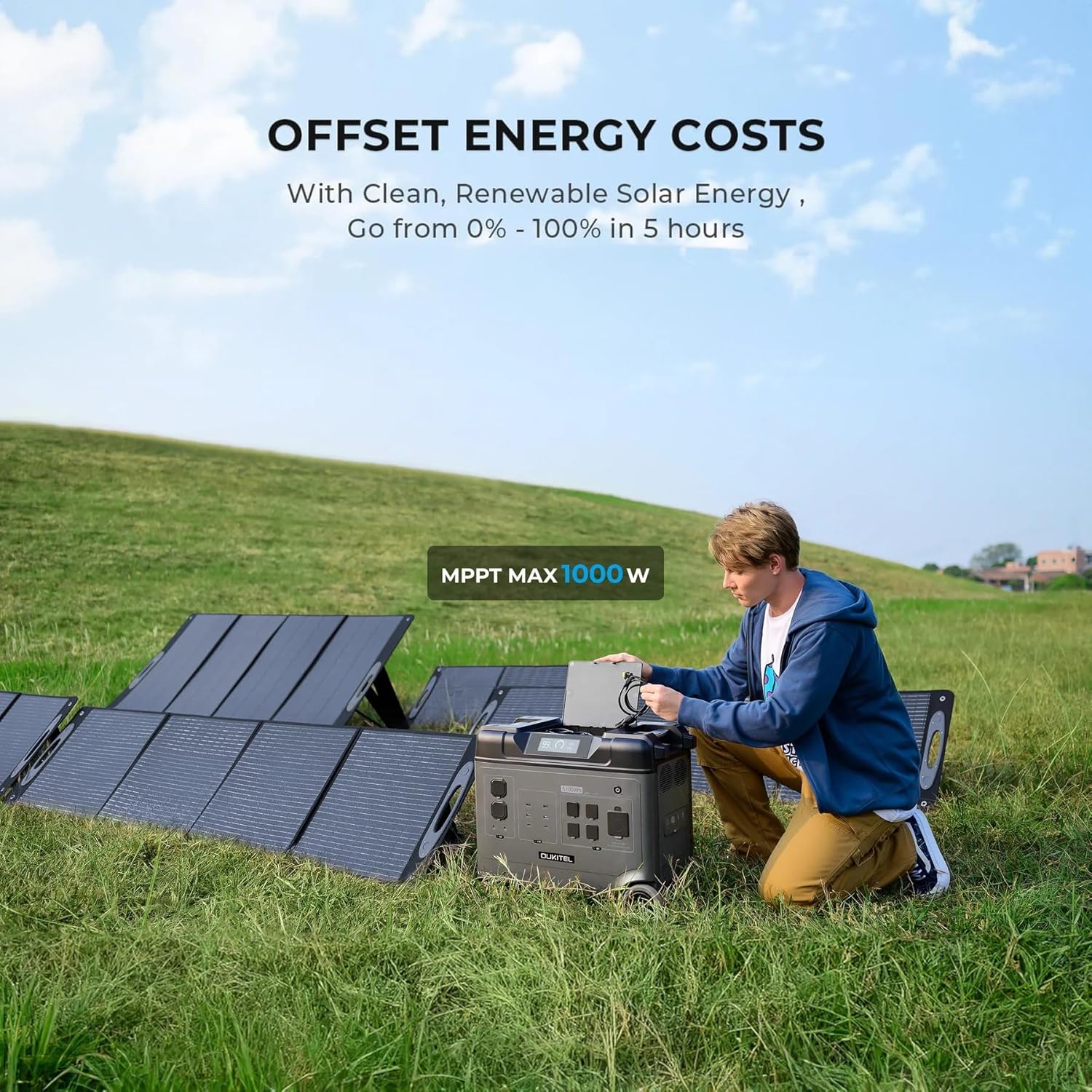
Image: OUKITEL P5000 Pro connected to solar panels for charging in an outdoor setting.
4. Operaasje
Powering Apparaten
The P5000 Pro offers 15 versatile outlets to power a wide range of devices simultaneously.
- AC-stopkontakten (5x): Foar hege-wattage appliances like refrigerators, space heaters, power tools, microwaves, and electric kettles.
- USB-A-poarten (4x): Foar it opladen fan smartphones, tablets en oare apparaten mei USB-oandriuwing.
- USB-C-poarten (2x): Foar apparaten dy't kompatibel binne mei snelladen.
- DC Ports (2x): Foar apparaten dy't op DC-oandreaune stroomfoarsjenning wurkje.
- Cigarette Lighter Port (1x): For car accessories.
- Airline Port (1x): Foar spesifike DC-tapassingen mei hege fermogen.

Image: The OUKITEL P5000 Pro with various cables connected, illustrating its ability to charge multiple devices simultaneously.
Smart App Control
Monitor and control your P5000 Pro remotely via the mobile app. Connect using Bluetooth or Wi-Fi to check battery levels, manage input/output, and schedule charging.
- Download the OUKITEL app from your device's app store.
- Ensure the P5000 Pro is powered on.
- Open the app and follow the instructions to connect via Bluetooth or Wi-Fi.
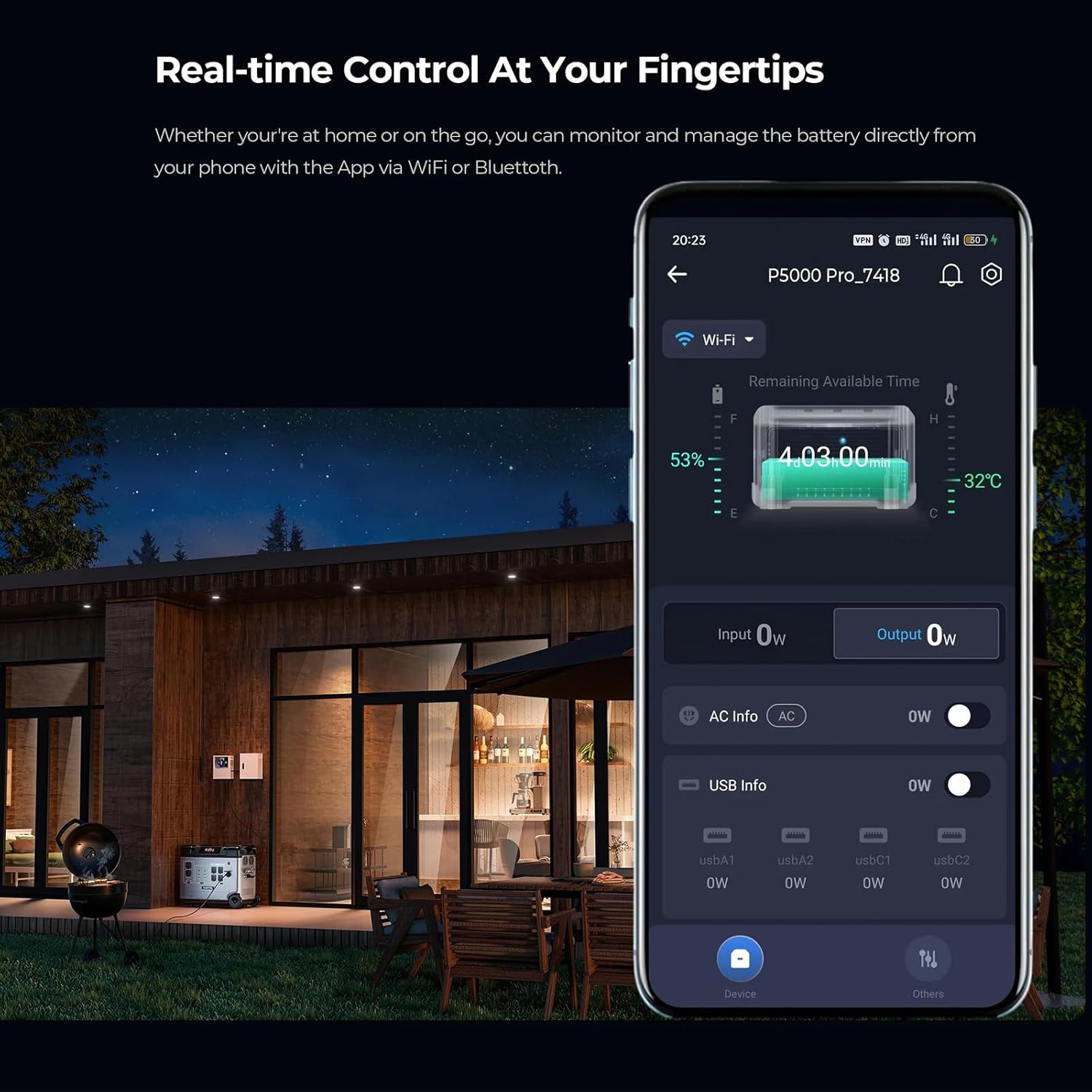
Image: A smartphone displaying the OUKITEL P5000 Pro app, showing real-time control and monitoring features.
Uninterruptible Power Supply (UPS) Funksje
The EPS function provides seamless power transition (<0.01s) during power outages, protecting sensitive electronics like computers, Wi-Fi routers, and medical equipment.
- Connect the P5000 Pro to a wall outlet using the AC charging cable.
- Connect your devices to the AC output ports of the P5000 Pro.
- Yn gefal fan in macht outage, the P5000 Pro will automatically switch to battery power, ensuring continuous operation for connected devices.
Video: Illustrates the seamless UPS function of the OUKITEL P5000 Pro during a power outage, keeping devices running.
Electric Vehicle (EV) Charging
The P5000 Pro can provide emergency power to electric vehicles, offering approximately 24 miles of range for a Tesla.
- Ensure the P5000 Pro is adequately charged.
- Connect the appropriate EV charging cable (not included) to the P5000 Pro's AC output and your EV's charging port.
- Monitor the charging status on both the power station and your vehicle's display.
Video: Shows the OUKITEL P5000 Pro being used to charge an electric vehicle, highlighting its versatility.
5. Underhâld
Batterij Soarch
The P5000 Pro uses a LiFePO4 battery, known for its longevity (6000+ cycles, 10-year lifespan). Proper care ensures maximum performance and lifespan.
- Regelmjittich opladen: For optimal battery health, fully charge the unit at least once every 3-6 months, even if not in use.
- Opslach: Store the power station in a cool, dry place, away from direct sunlight and extreme temperatures. Maintain a charge level between 50% and 80% for long-term storage.
- Reiniging: Brûk in droege, sêfte doek om de bûtenkant fan it apparaat skjin te meitsjen. Brûk gjin agressive gemikaliën of abrasive materialen.
6. Probleemoplossing
If you encounter issues with your OUKITEL P5000 Pro, refer to the following common problems and solutions:
| Probleem | Mooglike oarsaak | Oplossing |
|---|---|---|
| Ienheid draait net oan | Leech batterij; Oan/út-knop net goed yndrukt | Laad it apparaat op; Druk de oan/út-knop 3 sekonden yn. |
| AC-útfier wurket net | AC output not enabled; Overload protection triggered | Druk op de knop foar AC-útfier; Ferminderje de oansletten lading, en start dan de AC-útfier opnij. |
| Sinne-opladen wurket net | Insufficient sunlight; Incorrect connection; Damaged solar panel/cable | Ensure direct sunlight; Check cable connections; Test with another solar panel/cable if possible. |
| App ferbining problemen | Bluetooth/Wi-Fi off; App not updated; Interference | Ensure Bluetooth/Wi-Fi is on; Update app to latest version; Move closer to the unit. |
As it probleem oanhâldt, nim dan kontakt op mei de klanttsjinst.
7. Spesifikaasjes
| Eigenskip | Detail |
|---|---|
| Merk | Keenergy (OUKITEL) |
| Model Namme | P5000 Pro |
| Kapasiteit | 5120wh |
| AC-útfier (beoardiele) | 3600W (Pure Sine Wave) |
| AC Output (Peak) | 6000W |
| Batterij Type | LiFePO4 |
| Lifespan | 6000+ Cycles (to 80% capacity) |
| AC Input (Fast Charge) | 1800W |
| Sinne-ynfier (maks.) | 1000W (MPPT) |
| UPS Funksje | Seamless transition (<0.01s) |
| Kontrôle | Smart App (Bluetooth/Wi-Fi) |
| Ofmjittings (L x B x H) | 22"L x 12"B x 19"H |
| Item Gewicht | 48 pûn sterling |
| Totaal Power Outlets | 15 (5x AC, 4x USB-A, 2x USB-C, 2x DC, 1x Cigarette Lighter, 1x Airline Port) |
8. Garânsje en stipe
The OUKITEL P5000 Pro Portable Power Station comes with a 5 jier fabryksgarânsje, en soarget foar rêst oangeande produktkwaliteit en prestaasjes.
For technical assistance, troubleshooting, or warranty claims, please contact OUKITEL customer service through the official webside as jo retailer.
Please have your purchase receipt and product model number (P5000 Pro) ready when contacting support.