
Ynlieding
This manual provides detailed instructions for the setup, operation, and maintenance of your LIGE EF19-A Smartwatch. This device features a 1.85-inch HD display, Bluetooth calling capabilities, extensive health monitoring, and over 100 sports modes. It is designed for durability with IP68 waterproofing and a robust build. Please read this manual thoroughly to ensure proper use and to maximize the functionality of your smartwatch.
1. Opsette
1.1 Pakketynhâld
- 1 x LIGE EF19-A Smartwatch
- 2 x Watch Straps (1 steel, 1 silicone)
- 1 x USB-oplaadkabel
- 1 x Type-C oplaadkabel
- 1 x Strap Adjuster (Regulator)
- 1 x User Manual
1.2 De smartwatch oplade
Before initial use, fully charge your smartwatch.
- Ferbine de magnetyske oplaadkabel mei de oplaadkontakten oan 'e efterkant fan' e smartwatch.
- Connect the other end of the charging cable (USB or Type-C) to a compatible power source (e.g., USB wall adapter, computer USB port, power bank, car charger).
- It horloazjeskerm sil de oplaadstatus oanjaan. In folsleine lading duorret normaal sawat 2 oeren.

Image: The smartwatch connected to a charging cable, illustrating its 1000 mAh battery capacity and charging process.
A fully charged battery provides up to 7-15 days of normal use and up to 50 days in standby mode.
1.3 App-ynstallaasje en koppeling
To access all features, download the companion app on your smartphone. The smartwatch is compatible with Android 5.1 and higher, and iOS 9.0 and higher.
- Scan the QR code provided in the manual or on the watch packaging, or search for the app name (usually specified in the quick start guide) in your phone's app store (Google Play Store for Android, Apple App Store for iOS).
- Ynstallearje de app en meitsje in akkount oan as jo dêrom frege wurde.
- Soargje derfoar dat Bluetooth ynskeakele is op jo smartphone.
- Open the app and follow the on-screen instructions to add your device. The app will search for your smartwatch.
- Select your smartwatch (e.g., "EF19-A" or similar Bluetooth name) from the list of available devices to pair.
- Confirm the pairing request on both your smartphone and smartwatch if a prompt appears.
1.4 Strap Installation/Adjustment
The smartwatch comes with two interchangeable straps: a steel strap and a silicone strap.
- Om in riem te befestigjen: Align the spring bar with the lug holes on the watch body and slide the pin into place.
- Om in riem te ferwiderjen: Locate the small lever on the spring bar, pull it inwards, and gently detach the strap from the watch body.
- For the steel strap: Use the provided strap adjuster (regulator) to remove or add links for a comfortable fit. Refer to the specific instructions for the strap adjuster if needed.
2. Bedriuwsinstruksjes
2.1 Basisnavigaasje
- Touchscreen: Swipe nei lofts/rjochts, omheech/omleech om troch menu's en funksjes te navigearjen. Tik om te selektearjen.
- Sydknop(pen): Typically, one button serves as a power on/off, back, or home button. Long press for power options, short press to return to the watch face or previous screen.
2.2 Bluetooth-opropen en notifikaasjes
Once paired with your smartphone, the smartwatch allows you to manage calls and receive notifications.
- Oproppen meitsje/ûntfange: When a call comes in, the watch will display the caller ID. You can answer or reject calls directly from the watch. You can also dial numbers or select contacts from the watch interface.
- Berjochtnotifikaasjes: Receive notifications for SMS, Facebook, WhatsApp, Twitter, TikTok, and other apps directly on your watch. Swipe down from the watch face to view resinte notifikaasjes.

Image: The smartwatch showing an incoming call, message notifications, and the voice assistant interface.
2.3 Health Monitoring
De smartwatch hâldt kontinu ferskate sûnensmetriken by.
- Heart Rate: Access the heart rate monitoring function to view dyn hjoeddeistige hertslach en histoaryske gegevens.
- Bloedsoerstof (SpO2): Mjit jo bloedsoerstofnivo's.
- Sliepkwaliteit: The watch automatically tracks your sleep patterns, including deep sleep, light sleep, and wake times. View detailed sleep reports in the companion app.
- Stressnivo: Monitorearje jo stressnivo's de hiele dei troch.
- Breathing Training: Engage in guided breathing exercises to help manage stress.

Image: A user wearing the smartwatch, with the display showing real-time heart rate, blood oxygen saturation, and breathing exercise prompts.
Noat: This device is not a medical device. Health monitoring data is for reference only and should not be used for medical diagnosis or treatment.
2.4 Sport Modes
The smartwatch supports over 100 sports modes for tracking your physical activity.
- Navigate to the "Workout" or "Sports" menu on your watch.
- Select your desired activity (e.g., running, cycling, swimming, hiking, yoga, badminton, basketball, golf).
- The watch will begin tracking metrics such as steps, distance, calories burned, and heart rate.
- End the workout by following the on-screen prompts. Detailed summaries are available on the watch and in the companion app.

Image: A person cycling while wearing the smartwatch, with the display showing steps, distance, calories, and heart rate for different sports activities.
2.5 Torch Function
The smartwatch includes a built-in torch function for instant illumination.
- Access the torch function from the quick settings menu or app list.
- It offers different modes such as constant light, warning mode, and SOS mode.
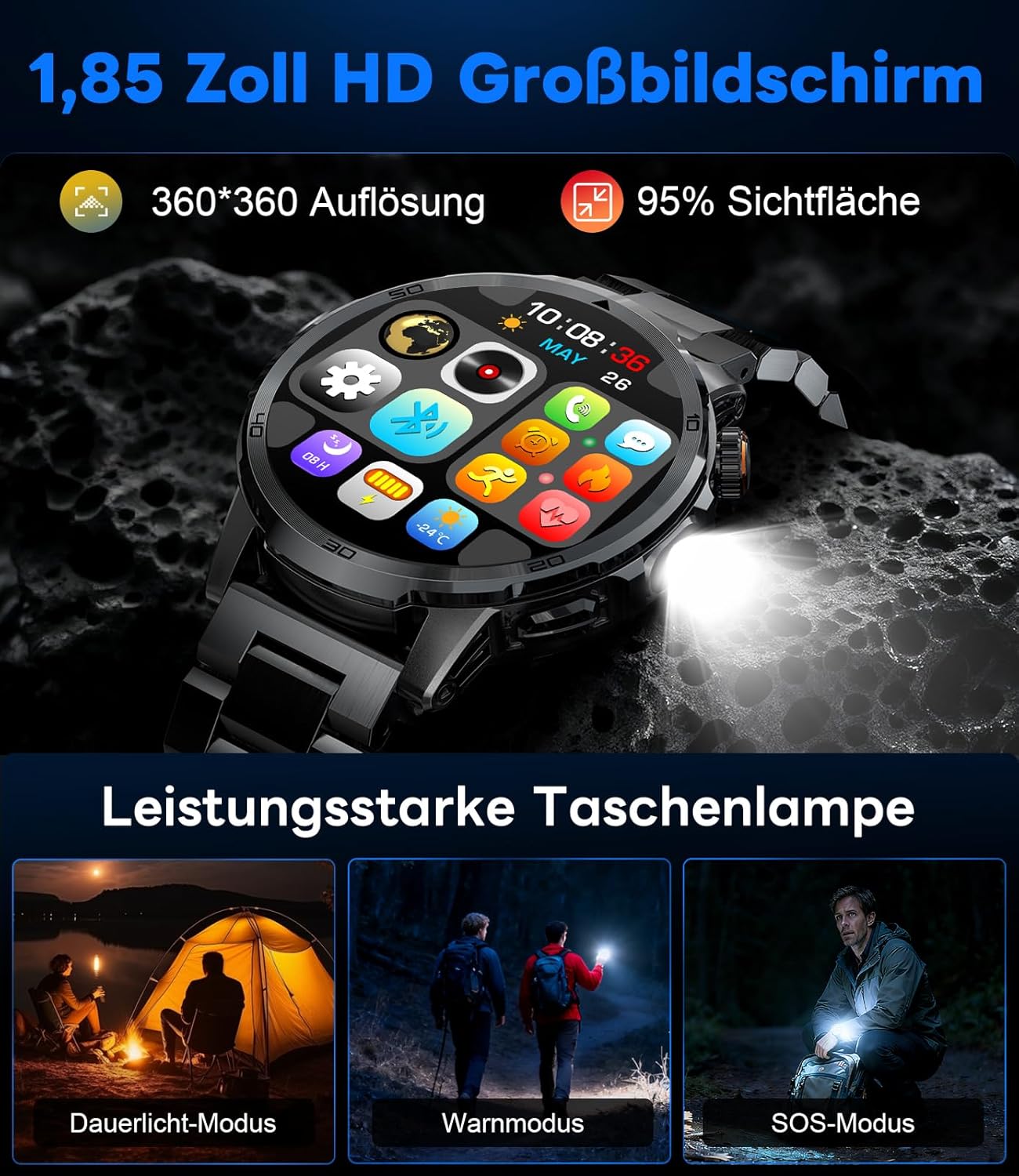
Image: The smartwatch displaying its 1.85-inch HD screen and demonstrating its powerful flashlight feature with different modes.
2.6 Oare funksjes
- Voice Assistant: Activate the voice assistant to control your phone or get information (e.g., "What's the weather?").
- Muzyk kontrôle: Control music playback on your smartphone (play, pause, skip tracks, adjust volume) directly from your watch.
- Kamerakontrôle: Brûk dyn horloazje as in ôfstânsbetsjinning foar de kamera fan dyn smartphone.
- Waarberjocht: View hjoeddeistige waarsomstannichheden en foarsizzingen.
- Alarms en timers: Set alarms and use stopwatch/timer functions.
- Drink herinnering: Set reminders to drink water.
- Gesichten sjen: Customize your watch face from over 100 options or upload your own photos via the app.

Image: The smartwatch interface displaying icons for music control, flashlight, camera control, weather, alarm, and drink reminders.

Image: A selection of diverse watch faces available for customization on the LIGE EF19-A Smartwatch.
3. Underhâld
3.1 Cleaning
- Regularly clean your smartwatch and straps with a soft, dry, lint-free cloth.
- As it nedich is, brûk in bytsje damp doek mei mylde sjippe, en dan droechwrijven.
- Foarkom it brûken fan hurde gemikaliën, skuurmiddels of oplosmiddels, om't dizze de finish en dichtingen fan it horloazje kinne beskeadigje.
- Soargje derfoar dat de oplaadkontakten skjin en droech binne foardat jo oplade.
3.2 Wetterbestindichheid (IP68)
The LIGE EF19-A Smartwatch is IP68 waterproof, meaning it is resistant to dust and can withstand immersion in water up to 1.5 meters for up to 30 minutes.
- It is suitable for daily use, such as hand washing, rain, and shallow water swimming.
- Avoid using the watch in hot water, saunas, or steam rooms, as steam can penetrate the seals and cause damage.
- Druk net ûnder wetter op knoppen.
- After exposure to water, wipe the watch dry before charging or using.

Image: The smartwatch highlighting its robust military-grade design, including resistance to temperature extremes, shock, dust, and IP68 water resistance.
4. Probleemoplossing
4.1 Horloazje giet net oan
- Soargje derfoar dat it horloazje folslein opladen is. Ferbine it teminsten 30 minuten mei de lader.
- Try long-pressing the side button for 10-15 seconds to force a restart.
4.2 Kin net keppele wurde mei smartphone
- Soargje derfoar dat Bluetooth ynskeakele is op jo smartphone.
- Ensure the smartwatch is within Bluetooth range (typically 10 meters).
- Start sawol jo smartphone as de smartwatch opnij op.
- Check if the app has the necessary permissions (location, Bluetooth, etc.).
- If previously paired, try "forgetting" the device in your phone's Bluetooth settings and re-pairing through the app.
4.3 Unkrekte sûnensgegevens
- Soargje derfoar dat it horloazje strak om jo pols droegen wurdt, sawat ien fingerbreedte boppe it polsbonke.
- Foarkom oermjittige beweging tidens mjittingen.
- Meitsje de sensor oan 'e efterkant fan it horloazje skjin.
- Environmental factors and individual physiology can affect readings.
4.4 Notifikaasjes ferskine net
- Kontrolearje oft it horloazje mei súkses keppele is mei jo smartphone.
- Check notification settings within the companion app to ensure desired apps are enabled for notifications.
- Soargje derfoar dat de notifikaasje-ynstellingen fan jo tillefoan de begeliedende app tastean om notifikaasjes wer te jaan.
- Make sure your phone is not in "Do Not Disturb" mode.
5. Spesifikaasjes
| Eigenskip | Spesifikaasje |
|---|---|
| Model Number | EF19-A |
| Skerm | 1.85-inch IPS HD Touch Screen, 360x360 pixels |
| Batterij Kapasiteit | 1000 mAh Lithium Polymer |
| Batterijlibben (normaal gebrûk) | 7-15 dagen |
| Batterijlibben (standby) | Oant 50 dagen |
| Oplaadtiid | Ca. 2 oeren |
| Konnektivität | Bluetooth 5.2 |
| Wetter Resistance | IP68 (wetterdicht) |
| Unthâld Storage Kapasiteit | 128 MB |
| Kompatibele apparaten | Android 5.1+ / iOS 9.0+ Smartphones |
| Health Monitoring | Heart Rate, Blood Oxygen, Sleep Quality, Stress Level |
| Sport Modes | 100+ (e.g., Running, Cycling, Swimming, Hiking, Yoga) |
| Oanfoljende funksjes | Bluetooth Calls, Message Notifications, Torch, Voice Assistant, Music Control, Camera Control, Weather, Alarms, Timers, Drink Reminder, Customizable Watch Faces |
| GPS | Fia smartphone |
| Doelpublyk | Manlju |
6. Warranty Information
The LIGE EF19-A Smartwatch comes with a 2-jierrige garânsje fanôf de datum fan oankeap. Dizze garânsje dekt produksjefouten en storingen by normaal gebrûk.
De garânsje dekt net:
- Skea feroarsake troch ferkeard gebrûk, ûngelok, misbrûk, ferwaarloazing of net-autorisearre modifikaasje.
- Normal wear and tear, including scratches, dents, or cosmetic damage.
- Damage caused by exposure to extreme temperatures, liquids (beyond IP68 rating), or corrosive environments.
- Damage to accessories (straps, charging cables) unless defective upon receipt.
To claim warranty service, please retain your proof of purchase and contact customer support.
7. Klant Support
If you encounter any issues or have questions regarding your LIGE EF19-A Smartwatch that are not covered in this manual, please contact our customer support team.
- Refer to the contact information provided on the product packaging or the official LIGE website.
- When contacting support, please provide your product model number (EF19-A) and a detailed description of the issue.


