
1. Ynlieding
This manual provides essential instructions for the safe and effective use of your DNT Optics TNC335R ThermNight Thermal & Night Vision Multispectral Scope, bundled with the QDM150 Quick Detach Mount. The TNC335R is an advanced optical device designed for enhanced observation capabilities in various lighting conditions, offering both thermal and night vision functionalities. Please read this manual thoroughly before operating the device.
2. Safety Information
- Eye Safety: Never look directly at the sun or other intense light sources through the scope, as this can cause permanent eye damage.
- Batterijfeiligens: Use only recommended battery types. Do not mix old and new batteries, or different types of batteries. Dispose of batteries according to local regulations.
- Montage: Ensure the scope is securely mounted to your firearm using the QDM150 mount. Improper mounting can lead to injury or damage to the device.
- Miljeubetingsten: Avoid exposing the device to extreme temperatures, direct impact, or corrosive substances.
- Ûnderhâld: Do not attempt to disassemble or modify the scope. Refer all servicing to authorized DNT Optics personnel.
3. Package Ynhâld
Kontrolearje oft alle items yn jo pakket oanwêzich binne:
- DNT Optics TNC335R ThermNight Multispectral Scope
- QDM150 Quick Detach Mount
- Lens Caps
- Rechargeable Batterij
- USB-oplaadkabel
- Lins skjinmakdoek
- User Manual (dit dokumint)
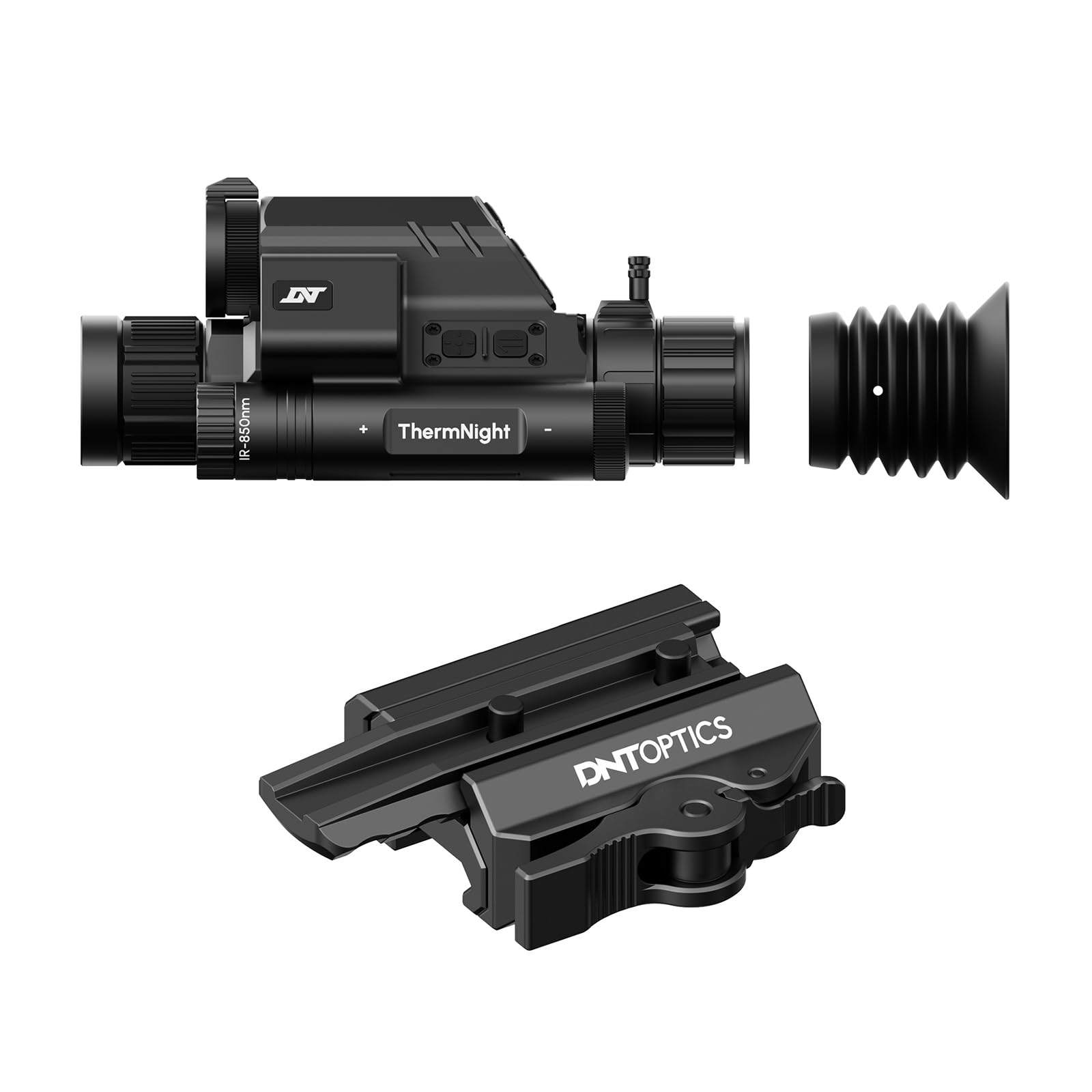
Image 1: DNT Optics TNC335R ThermNight Multispectral Scope with QDM150 mount. This image displays the main scope unit alongside its quick-detach mounting system, providing a visual reference for the product.
4. Opsette
4.1 Batterij Ynstallaasje
- Locate the battery compartment on the scope.
- Screw de batterij cap.
- Insert the rechargeable battery, ensuring correct polarity (+/-).
- Securely replace the battery cap.
- Charge the battery fully before first use using the provided USB cable.
4.2 Mounting the QDM150
- Attach the QDM150 mount to the scope according to the mount's specific instructions, ensuring it is firmly secured.
- Position the scope with the QDM150 mount onto your rifle's Picatinny rail.
- Engage the quick-detach levers to lock the mount onto the rail. Verify that the scope is stable and does not wobble.
4.3 Earste ynskeakeljen en nulstellen
- Druk op de oan/út-knop en hâld dy yndrukt oant it display opljochtet.
- Perform initial zeroing of the scope according to standard rifle scope zeroing procedures. Refer to the detailed zeroing guide available on the DNT Optics webside foar wiidweidige ynstruksjes.
5. Bestjoeren
5.1 Power On / Off
- Power On: Druk en hâld de macht knop foar likernôch 3 sekonden.
- Útskeakelje: Press and hold the power button for approximately 5 seconds until the display shuts down.
5.2 Mode Seleksje
The TNC335R offers multiple observation modes:
- Termyske modus: Detects heat signatures. Ideal for low-light or obscured conditions.
- Nachtsichtmodus: Amplifies ambient light for clear viewing in near-darkness.
- Dagmodus: Standard optical viewing for daylight conditions.
Press the 'Mode' button to cycle through the available observation modes.
5.3 Reticle Adjustment
Use the directional buttons or rotary dial (depending on model variant) to adjust the reticle's position for precise aiming. Refer to the on-screen menu for specific reticle options and adjustments.
5.4 Brightness and Contrast
Navigate to the 'Display Settings' in the main menu to adjust screen brightness and image contrast for optimal viewyn ferskillende omjouwings.
5.5 Digitale zoom
Press the 'Zoom' button to cycle through available digital magnification levels. Note that higher digital zoom levels may reduce image clarity.
6. Underhâld
6.1 Cleaning
- Lenzen: Use the provided lens cleaning cloth or a soft, lint-free cloth specifically designed for optics. Gently wipe the lens surfaces. For stubborn dirt, use a small amount of lens cleaning fluid.
- Lichem: Feie it lichem fan 'e teleskoop ôf mei in sêfte, damp doek. Foarkom skuurmiddels of oplosmiddels.
6.2 Batterij Soarch
- Laad de batterij regelmjittich op, sels as jo it net faak brûke, om de libbensdoer te behâlden.
- Store the device with a partially charged battery if storing for extended periods.
6.3 Opslach
Store the scope in a cool, dry place, away from direct sunlight and extreme temperatures. Use the lens caps to protect the optical surfaces.
7. Probleemoplossing
| Probleem | Mooglike oarsaak | Oplossing |
|---|---|---|
| Apparaat giet net oan. | Low or depleted battery; incorrectly installed battery. | Charge the battery; ensure battery is installed with correct polarity. |
| De ôfbylding is wazig of ûndúdlik. | Lens caps still on; dirty lenses; focus adjustment needed. | Remove lens caps; clean lenses; adjust the focus ring. |
| Knoppen reagearje net. | Device frozen; low battery. | Perform a soft reset (refer to DNT Optics website for specific instructions); charge battery. |
| QDM150 mount feels loose. | Levers not fully engaged; mounting screws loose. | Ensure quick-detach levers are fully locked; tighten any accessible mounting screws. |
8. Spesifikaasjes
- Merk: DNT Optics
- Model Namme: TNC335R
- Item Gewicht: 29.8 wyb
- Materiaal: Aluminium
- Kompatibele apparaten: Rifle, Shotgun
- Nachtsicht: Ja
- Draadkruistype: Krús
- Thread Type: 1/2"-28
- Kleur: Swart
9. Garânsje en stipe
DNT Optics products are covered by a limited warranty. For detailed warranty information, product registration, and technical support, please visit the official DNT Optics webside of nim kontakt op mei harren klanttsjinstôfdieling. Bewarje jo oankeapbewiis as bewiis fan oankeap foar garânsjeclaims.
Offisjeel Website: DNT Optics Store on Amazon