
1. Ynlieding
This manual provides detailed instructions for the safe and efficient use of your Surfans F20 Pro Android Hi-Res Music Player. Please read this manual thoroughly before operating the device and retain it for future reference.
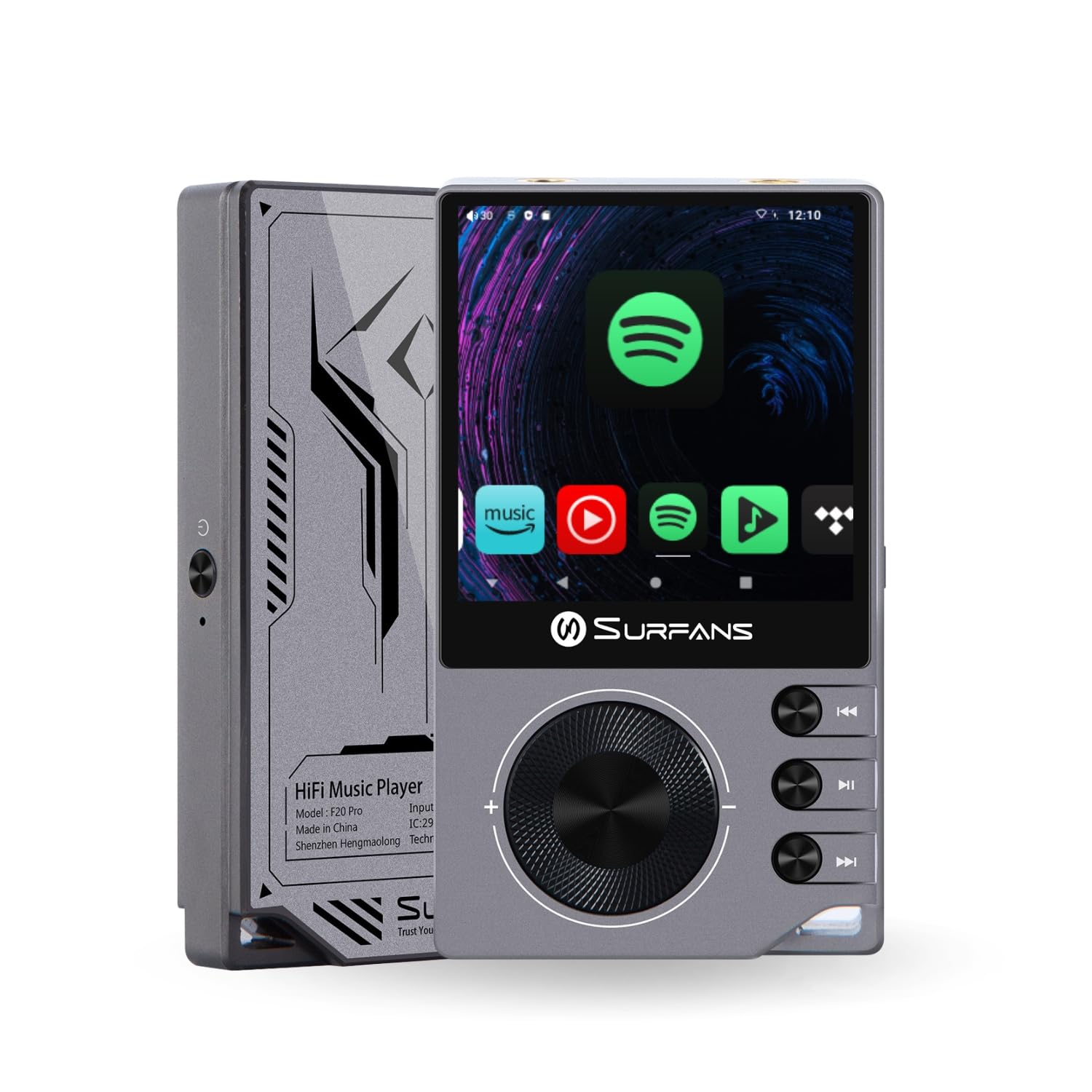
The Surfans F20 Pro Hi-Res Music Player, showcasing its compact design and touchscreen interface.
2. Package Ynhâld
Kontrolearje oft alle items yn it pakket oanwêzich binne:
- Surfans F20 Pro Hi-Res Music Player
- USB Type-C-kabel
- 32 GB MicroSD Memory Card (pre-installed or separate)
- Beskermjende Case
- User Manual (dit dokumint)
3. Apparaat oerview
Familiarize yourself with the physical components and ports of your F20 Pro player.

Foar- en efterkant view of the Surfans F20 Pro, highlighting its robust CNC metal chassis and button layout.
3.1. Key Features
- Dual ESS9018Q2M DACs: For high-fidelity audio processing.
- Octa-Core Android 12 System: Enables streaming app compatibility and smooth operation.
- 3.5mm Single-Ended & 4.4mm Balanced Outputs: Versatile headphone connectivity.
- Bluetooth 5.0 mei LDAC: High-quality wireless audio transmission.
- Dual-Band Wi-Fi (2.4GHz & 5GHz): For stable internet connectivity.
- útwreide opslach: Supports up to 1TB via MicroSD card.
- 2.7-inch touchscreen: Yntuïtive brûkersynterface.
4. Opsette
4.1. It opladen fan it apparaat
Before first use, fully charge the F20 Pro. Connect the included USB Type-C cable to the device's charging port and a compatible USB power adapter (not included) or computer USB port. The charging indicator will show the charging status.
4.2. In MicroSD-kaart ynfoegje
The F20 Pro supports MicroSD cards up to 1TB for expanded storage. Locate the MicroSD card slot on the side of the device. Gently insert the card until it clicks into place. To remove, push the card in again until it springs out.
4.3. Earste ynskeakeling
Press and hold the power button until the screen illuminates. Follow the on-screen prompts to complete the initial setup, including language selection and Wi-Fi connection.
4.4. Ferbine mei Wi-Fi
Navigearje nei Ynstellings > Netwurk en ynternet > Wi-Fi. Select your desired network and enter the password if prompted. The F20 Pro supports both 2.4GHz and 5GHz Wi-Fi bands.

The Surfans F20 Pro demonstrating its dual-band Wi-Fi capability for fast and stable connections.
4.5. Bluetooth-keppeling
Om Bluetooth-koptelefoanen of -sprekkers te ferbinen:
- Soargje derfoar dat jo Bluetooth-apparaat yn koppelingsmodus is.
- On the F20 Pro, go to Ynstellings> Ferbûne apparaten> Koppel nij apparaat.
- Select your device from the list and confirm pairing.

An illustration of the Bluetooth 5.0 chip, indicating support for high-resolution wireless audio codecs like LDAC.
5. It operearjen fan it apparaat
5.1. Basic Navigaasje
The F20 Pro features a 2.7-inch touchscreen for navigation. Swipe to scroll, tap to select, and use the physical buttons for quick controls:
- Power knop: Power on/off, screen on/off.
- Volume Wheel: Past it folume fan audio-útfier oan.
- Playback Control Knoppen: Ofspylje/Pauze, Folgjende track, Foarige track.
5.2. Muzyk Wiedergabe
The F20 Pro supports various audio formats including DSD512, 192kHz/24bit, FLAC, WAV, WMA, M4A, MP3, MP2, and AAC.
5.2.1. Lokaal Files
Oerdrage muzyk files to the device's internal storage or MicroSD card via USB connection to a computer. Use the pre-installed music player application to browse and play your library.
5.2.2. Streaming-applikaasjes
The Android 12 operating system allows installation of streaming apps like Spotify, Apple Music, Tidal, or YouTube. Connect to Wi-Fi and download apps from the Google Play Store or other compatible sources.

The Surfans F20 Pro's screen showing various streaming application icons, demonstrating its Android capabilities.
5.3. Headphone Connections
The device offers both single-ended and balanced audio outputs.
- 3.5mm Single-Ended Útfier: Standard headphone jack (125mW/32Ω).
- 4.4mm balansearre útfier: For enhanced audio performance with compatible headphones (500mW/32Ω).

Close-up view of the 3.5mm single-ended and 4.4mm balanced audio output ports on the Surfans F20 Pro.
6. Underhâld
6.1. Cleaning
Use a soft, dry, lint-free cloth to clean the device. Avoid using abrasive cleaners or solvents, which may damage the surface.
6.2. Software Updates
Periodically check for software updates to ensure optimal performance and access to new features. Updates can typically be found in Ynstellings > Systeem > Systeemupdate.
6.3. Batterij Soarch
Om de libbensduur fan 'e batterij te ferlingjen, foarkom it faak folslein ûntladen fan it apparaat. Bewarje it apparaat op in koel, droech plak as it foar langere perioaden net brûkt wurdt.

In ynterne view of battery cells, representing the long-lasting battery capacity of the F20 Pro.
7. Probleemoplossing
If you encounter issues with your F20 Pro, refer to the following common problems and solutions:
| Probleem | Mooglike oarsaak | Oplossing |
|---|---|---|
| Apparaat giet net oan | Leech batterijlibben; Systeemcrash | Laad it apparaat op; Druk de oan/út-knop 10-15 sekonden yn om opnij te starten. |
| Gjin lûdútfier | Volume too low; Incorrect output selected; Faulty headphones | Increase volume; Check headphone connection; Test with different headphones. |
| Kin gjin ferbining meitsje mei Wi-Fi | Ferkeard wachtwurd; Bûten berik; Routerprobleem | Verify password; Move closer to router; Restart router. |
| Trage prestaasjes/App crashes | Tefolle apps rinne; Weinig opslach; Ferâldere software | Close background apps; Free up storage; Check for system updates. |
8. Spesifikaasjes
Detailed technical specifications for the Surfans F20 Pro:
| Eigenskip | Detail |
|---|---|
| Merk | Surfans |
| Model Namme | F20 PRO |
| DAC-chips | Dual ESS9018Q2M |
| Op-Amps | Dual OPA1612 |
| Bestjoeringssysteem | Android 12 |
| RAAM | 3GB |
| Ynterne opslach | 32GB |
| Wreidzjen opslach | Oant 1TB fia MicroSD-kaart |
| Skermgrutte | 2.73 ynms |
| Konnektivität | Aux, Bluetooth 5.0 (LDAC), USB Type-C, Wi-Fi (2.4GHz & 5GHz) |
| Audio útgongen | 3.5mm Single-Ended (125mW/32Ω), 4.4mm Balanced (500mW/32Ω) |
| Stipe audioformaten | DSD512, 192kHz/24bit, FLAC, WAV, WMA, M4A, MP3, MP2, AAC |
| Kleur | Griis |

An illustration of the dual ESS9018K2M DAC chips, central to the F20 Pro's high-resolution audio capabilities.
9. Warranty Information
The Surfans F20 Pro comes with a 1-Arige garânsje fan 'e datum fan oankeap. Dizze garânsje dekt produksjefouten en fakmanskip by normaal gebrûk. It dekt gjin skea feroarsake troch misbrûk, ûngemakken, net-autorisearre oanpassingen of normale slijtage. Bewarje jo bewiis fan oankeap foar garânsjeclaims.
10. Klant Support
For further assistance, technical support, or warranty inquiries, please contact Surfans customer service through the official website or your retailer. You may also find additional resources and FAQs online.