
1. Ynlieding
The Audizio Desio is a versatile digital radio that combines classic aesthetics with modern audio technology. It features DAB, DAB+, and FM tuning for clear radio reception, along with Bluetooth 5.0 for wireless streaming, a USB port for media playback, and a 3.5mm AUX input for wired connections. The radio is equipped with a 2.4-inch color LCD display and integrated stereo speakers, making it suitable for various environments such as living rooms, kitchens, or bedrooms.
This manual provides detailed instructions for setting up, operating, and maintaining your Audizio Desio radio. Please read it thoroughly before use to ensure proper functionality and to maximize your listening experience.
2. Safety Information
- Soargje derfoar dat it folume fan 'e stroomadaptertage komt oerien mei jo lokale stroomfoarsjenning foardat jo it oanslute.
- Stel it apparaat net bleat oan rein, focht of ekstreme temperatueren.
- Foarkom it pleatsen fan it apparaat tichtby waarmteboarnen of yn direkt sinneljocht.
- Iepenje de c netasing; ferwize alle ûnderhâld nei kwalifisearre personiel.
- Hâld de ienheid fuort fan sterke magnetyske fjilden.
- Reinigje de ienheid allinich mei in sêfte, droege doek.
3. Package Ynhâld
Kontrolearje asjebleaft oft alle items oanwêzich binne by it útpakken:
- Audizio Desio DAB/DAB+/FM Radio
- Stromadapter (DC 5V)
- Remote Control
- User Manual
4. Kontroles en ferbiningen
Front Panel Controls
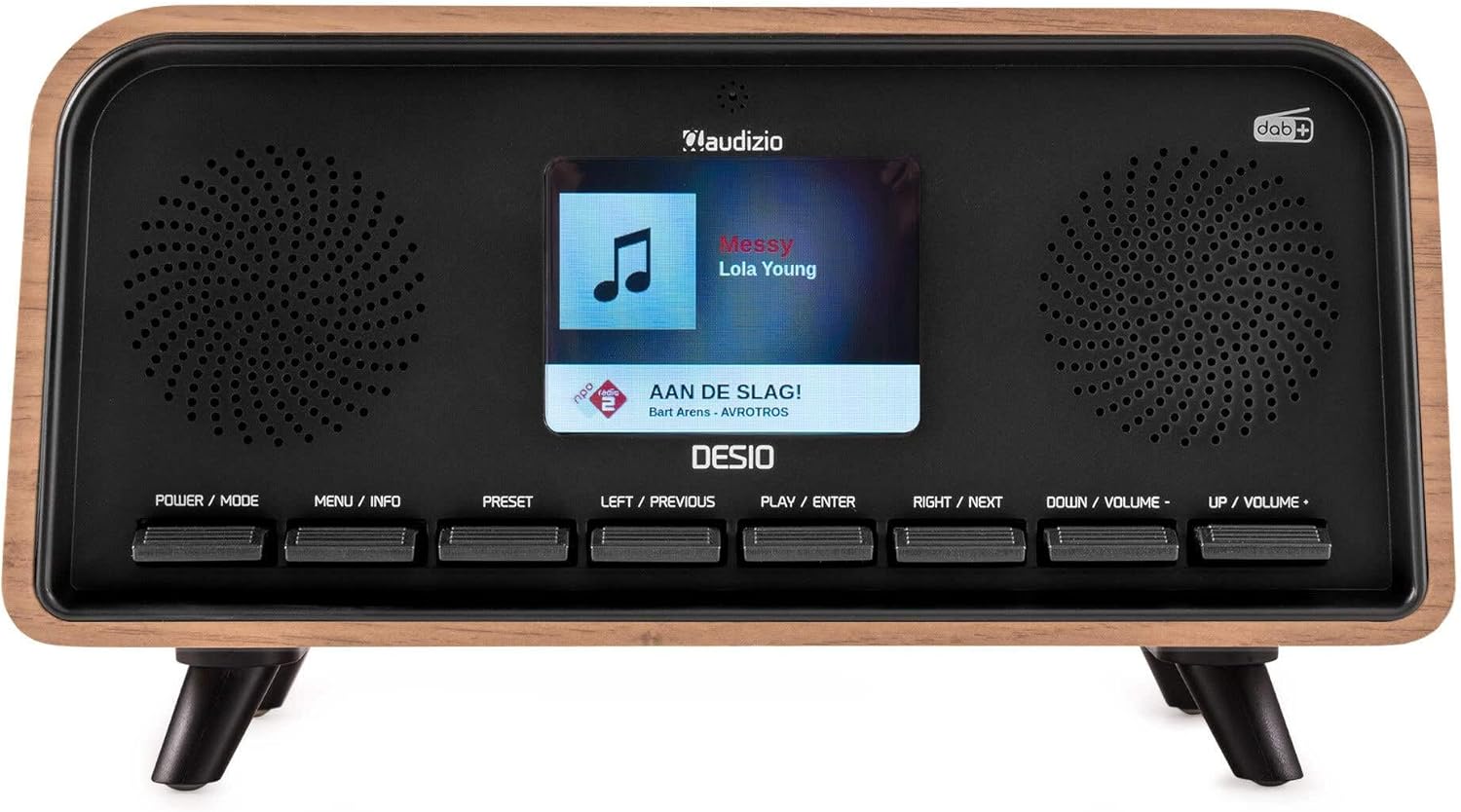
Front view of the Audizio Desio radio, showing the display playing music with artist and track information. The control buttons are visible below the screen.
- POWER / MODE: Press to turn on/off. Press and hold to switch between DAB, FM, Bluetooth, USB, and AUX modes.
- MENU / INFO: Press to access menu options. In playback mode, press to cycle through information display.
- PRESET: Press to recall saved stations. Press and hold to save current station.
- LEFT / PREVIOUS: Navigate left in menus, or skip to previous track/station.
- PLAY / ENTER: Confirm selection in menus, or play/pause media.
- RIGHT / NEXT: Navigate right in menus, or skip to next track/station.
- DOWN / VOLUME -: Decrease volume, or navigate down in menus.
- UP / VOLUME +: Increase volume, or navigate up in menus.
Rear Panel Connections
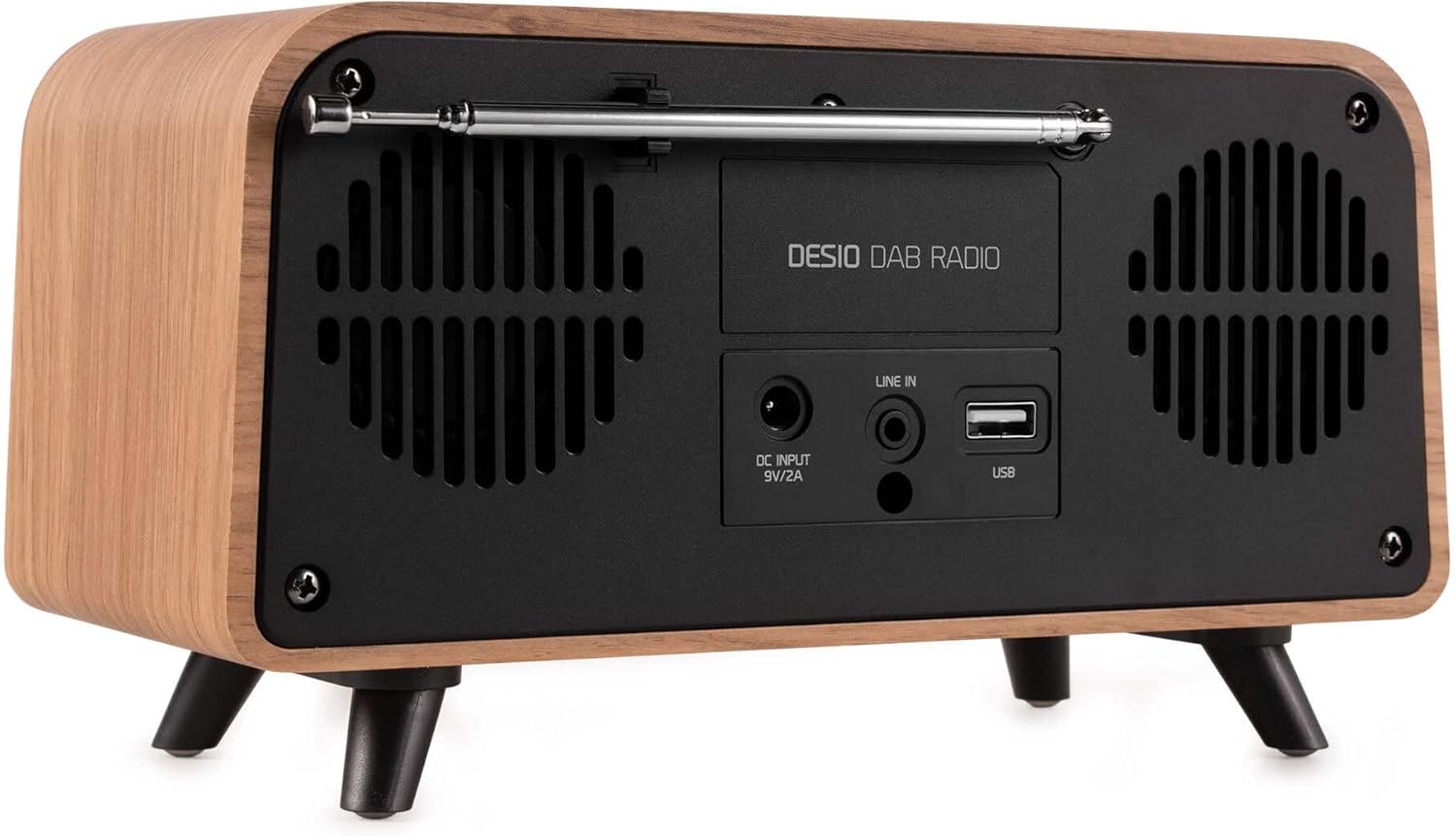
Rear view of the Audizio Desio radio, highlighting the DC INPUT 9V/2A, LINE IN (3.5mm AUX), and USB ports. The telescopic antenna is extended.
- DC INPUT 9V/2A: Ferbine de levere stroomadapter hjir.
- LINE IN (3.5mm AUX): Ferbine eksterne audio-apparaten mei in 3.5mm audiokabel.
- USB: Insert a USB flash drive for MP3 playback.
- Teleskopyske antenne: Extend fully for optimal DAB/DAB+ and FM reception.
5. Initial Setup
- Ferbine macht: Plug the provided DC 5V power adapter into the DC INPUT port on the rear of the radio, then plug the adapter into a wall outlet.
- Antenne útwreidzje: Fully extend the telescopic antenna located on the rear of the unit for best reception.
- Power On: Druk op de POWER / MODE knop om de radio yn te skeakeljen.
- First-time DAB Scan: Upon first power-on, the radio will automatically perform a full scan for DAB/DAB+ stations. This may take a few minutes. The display will show the scanning progress.
- Tiid/datum ynstelle: The time and date will usually be set automatically via DAB signal. If not, you can manually set them via the menu.
6. Bedriuwsinstruksjes
6.1 DAB/DAB+ Radio Bediening

Front view of the Audizio Desio radio, displaying a DAB radio station ('NPO Klassiek') and current time.
- Select DAB Mode: Druk op de POWER / MODE button repeatedly until 'DAB' is displayed.
- Sykje nei stasjons: If no stations are found or you wish to rescan, press MENU / INFO, brûke dan LEFT / PREVIOUS or RJOCHTS / NEXT to select 'Full Scan' and press PLAY / ENTER.
- Selektearje stasjon: Brûk de LEFT / PREVIOUS or RJOCHTS / NEXT buttons to browse available stations. Press PLAY / ENTER in stasjon te selektearjen.
- Preset opslaan: Om in stasjon op te slaan, druk en hâld de knop yndrukt PRESET knop. Brûke LEFT / PREVIOUS or RJOCHTS / NEXT to choose a preset number (1-50), then press PLAY / ENTER te befêstigjen.
- Preset weromhelje: Om in opsleine stasjon werom te heljen, druk op de PRESET button (do not hold). Use LEFT / PREVIOUS or RJOCHTS / NEXT om de winske foarôf ynstelde ynstelling te selektearjen, druk dan op PLAY / ENTER.

Front view of the Audizio Desio radio, showing the 'Preset Recall' menu on the display, indicating empty preset slots.
6.2 FM-radio-operaasje
- Selektearje FM-modus: Druk op de POWER / MODE button repeatedly until 'FM' is displayed.
- Auto Scan: Druk en hâld PLAY / ENTER to automatically scan for and save available FM stations.
- Hânlieding tuning: Gebrûk LEFT / PREVIOUS or RJOCHTS / NEXT om de frekwinsje fyn ôf te stimmen.
- Save/Recall Presets: Follow the same procedure as for DAB radio (Section 6.1).
6.3 Bluetooth (BT) operaasje

Front view of the Audizio Desio radio, with the display showing 'BT' (Bluetooth) mode and 'Connected' status.
- Select BT Mode: Druk op de POWER / MODE button repeatedly until 'BT' is displayed. The radio will enter pairing mode, indicated by a flashing Bluetooth icon.
- Pair-apparaat: On your smartphone, tablet, or laptop, enable Bluetooth and search for available devices. Select 'Audizio Desio' from the list.
- Ferbine: Once paired, the display will show 'Connected'. You can now stream audio from your device to the radio.
- Playback Control: Use your connected device or the radio's PLAY / ENTER, LEFT / PREVIOUS, en RJOCHTS / NEXT knoppen om it ôfspieljen te kontrolearjen.
6.4 USB-ôfspieljen

Front view of the Audizio Desio radio, with the display showing 'USB' mode, current time, and details of an MP3 file wurdt spile.
- USB-stasjon ynfoegje: Insert a USB flash drive (formatted to FAT32) containing MP3 files yn 'e USB-poarte oan' e efterkant fan 'e radio.
- Select USB Mode: Druk op de POWER / MODE button repeatedly until 'USB' is displayed. The radio will automatically start playing the first compatible audio file.
- Navigearje Files: Gebrûk LEFT / PREVIOUS or RJOCHTS / NEXT to skip tracks. Press PLAY / ENTER om it ôfspieljen te pausen/ferfetsje.
6.5 AUX-ynfier
- Apparaat ferbine: Connect an external audio device (e.g., MP3 player, smartphone) to the 'LINE IN' (3.5mm AUX) port on the rear of the radio using a 3.5mm audio cable (not included).
- Selektearje AUX-modus: Druk op de POWER / MODE button repeatedly until 'AUX' is displayed.
- Kontrolearje Wiedergabe: Playback is controlled directly from your connected external device. Adjust volume using the radio's volume controls.
6.6 Alarm- en timerfunksjes
- Alarm ynstelle: Tagong ta de alarmynstellingen fia de MENU / INFO button. You can set multiple alarms with customizable sources (DAB, FM, Buzzer), volume, and recurrence (daily, weekdays, weekends).
- Slieptimer: The sleep timer allows the radio to turn off automatically after a set period. Access this function via the MENU / INFO button and select the desired duration.
- Snooze Funksje: When an alarm sounds, press any button (except Power) to activate the snooze function for a short period.
7. Underhâld
- Reiniging: Use a soft, dry, lint-free cloth to clean the radio's surface. Do not use abrasive cleaners, waxes, or solvents.
- Antenne soarch: Behannelje de teleskopyske antenne foarsichtich om te foarkommen dat er bûgt of brekt.
- Opslach: If storing the radio for an extended period, disconnect it from the power supply and store it in a cool, dry place.
8. Probleemoplossing
| Probleem | Mooglike oarsaak | Oplossing |
|---|---|---|
| Gjin macht | Stroomadapter net oansletten of defekt stopkontakt. | Kontrolearje de ferbining fan 'e stroomadapter en besykje in oar stopkontakt. |
| Minne DAB/FM-ûntfangst | Antenna not fully extended or poor signal area. | Fully extend the antenna. Try repositioning the radio. Perform a full scan. |
| Bluetooth makket gjin ferbining | Radio not in BT mode, device not in pairing mode, or too far away. | Ensure radio is in BT mode. Put your device in pairing mode. Move device closer to the radio (within 10m). |
| USB-ôfspieljen wurket net | USB drive not inserted correctly, unsupported file format, or drive not FAT32. | Doch de USB-stasjon opnij yn. Soargje derfoar files are MP3. Check USB drive format (FAT32). |
| Gjin lûd fan AUX | Radio not in AUX mode, cable faulty, or external device volume low. | Select AUX mode. Check 3.5mm cable. Increase volume on both radio and external device. |
9. Technyske spesifikaasjes
- Merk: Audizio
- Model: Desio
- Tuner Technology: FM, DAB+
- Bluetooth: Version 5.0 (Range: 10m)
- Wiedergabe opsjes: Bluetooth, USB, 3.5mm AUX input
- Foarôf ynstelde stasjons: 50
- Skerm: 2.4 inch Kleuren LCD
- Funksjes: Alarm, Sleep Timer, Snooze, Dimming, Week/Weekend Alarm
- Max Speaker Power: 30 watt
- Streamtafier: DC 5V (Power Adapter)
- Produkt Ofmjittings (H x B x D): 32 x 16 x 18 sm
- Gewicht: 1.66 kg
10. Garânsje en stipe
Dit produkt wurdt levere mei in standert fabryksgarânsje. Foar detaillearre garânsjebetingsten en -kondysjes, sjoch de dokumintaasje dy't by oankeap levere is of nim kontakt op mei jo winkelier.
For technical support, troubleshooting assistance, or service inquiries, please contact the Audizio customer support team or your local dealer. Please have your product model number (Desio) and purchase information ready when contacting support.