
Ynlieding
This manual provides essential information for setting up, operating, maintaining, and troubleshooting your HP 15.6-inch FHD IPS Touchscreen Laptop. Please read this guide thoroughly to ensure optimal performance and longevity of your device. This laptop features an AMD Ryzen 7 7730U processor, 64GB DDR4 RAM, 2.28TB storage (2TB SSD + 288GB Docking Station Set), AMD Radeon Graphics, and runs on Windows 11 Pro.
Opsette
Unpacking and Initial Power-On
Carefully remove all components from the packaging. Connect the power adapter to the laptop and a power outlet. Press the power button to turn on the laptop. Follow the on-screen instructions to complete the initial Windows 11 Pro setup.
Ynbegrepen Accessories
Your laptop package includes the following accessories:
- 1x 7-in-1 Docking Station with 256GB Storage
- 1x 32GB MicroSD Card with Adapter
- 1x Type-C gegevenskabel
- 1x 3-in-1 Charging Cable
- 1x Suede Cleaning Cloth
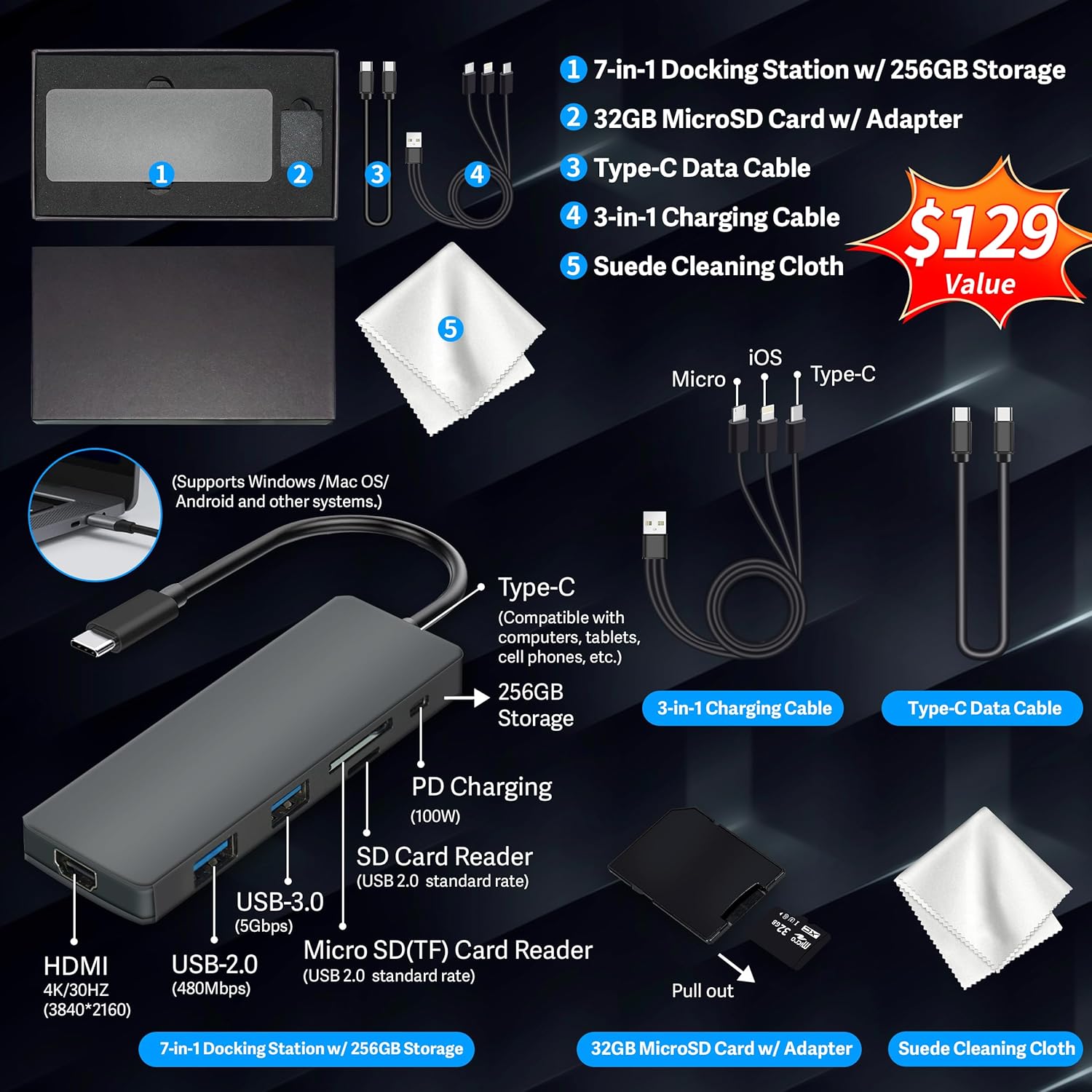
Figure 1: Included accessories, including the 7-in-1 docking station, various cables, and a cleaning cloth.
Betsjinje fan jo laptop
Display Features
The HP 15.6-inch laptop features an FHD IPS touchscreen display with a resolution of 1920 x 1080 pixels and an anti-glare coating. This display provides clear and vibrant visuals from various viewyn hoeken.

Figure 2: The 15.6-inch FHD IPS display offers crisp and vivid details.
Connectivity and Peripherals
Your laptop is equipped with various connectivity options and integrated features to enhance your user experience.
- 720p HD-kamera: For video calls and online meetings.
- Wi-Fi 6: Foar hege-snelheid draadloze ynternetferbining.
- Bluetooth: For connecting wireless peripherals such as mice, keyboards, and headphones.
- Numeryk toetseboerd: A full numeric keypad is integrated for efficient data entry and calculations.

Figure 3: Key features for staying connected and productive, including the numeric keypad.
The laptop includes multiple ports for connecting external devices:
- 2x USB Type-A ports
- 1x USB Type-C port
- 1x HDMI-poarte
- 1x Headphone/Microphone Combo jack

Figure 4: Multi-port configuration on the laptop for various connections.
Prestaasjes en multitasking
Equipped with an AMD Ryzen 7 7730U processor, 64GB DDR4 RAM, and AMD Radeon Graphics, this laptop is designed for efficient multitasking and demanding applications. The 2.28TB storage (2TB SSD + 288GB Docking Station Set) provides ample space and fast access to your files.

Figure 5: Core specifications for performance and storage.

Figure 6: Laptop demonstrating effortless multitasking with several applications running simultaneously.
The laptop is designed for extended use, offering reliable battery life to support your daily tasks.

Figure 7: The laptop supports continuous work throughout the day with its battery performance.
Ûnderhâld
To ensure the longevity and optimal performance of your HP laptop, follow these maintenance guidelines:
- Reiniging: Use the provided suede cleaning cloth or a soft, lint-free cloth to clean the screen and exterior. Avoid harsh chemicals.
- Software Updates: Regularly update your Windows 11 Pro operating system and drivers to ensure security and performance.
- Batterij soarch: Foarkom it faak folslein ûntladen fan 'e batterij. Laad de batterij op oant sawat 50-70% foar lange opslach.
- Ventilaasje: Soargje derfoar dat de fentilaasje-iepeningen fan 'e laptop net blokkearre binne om oerferhitting te foarkommen. Brûk de laptop op in hurde, flakke oerflak.
- Opslach: Bewarje de laptop op in koel, droech plak, fuort fan direkt sinneljocht en ekstreme temperatueren.
Troubleshooting
Dit diel behannelet faak foarkommende problemen dy't jo mei jo laptop tsjinkomme kinne.
Laptop giet net oan
- Soargje derfoar dat de stroomadapter feilich ferbûn is mei sawol de laptop as in wurkjend stopkontakt.
- Kontrolearje oft it stopkontakt wurket troch in oar apparaat deryn oan te sluten.
- As de batterij folslein leech is, lit it dan teminsten 15-30 minuten oplade foardat jo besykje it oan te setten.
Skerm bliuwt leech
- Kontrolearje oft de laptop oan is (oan/út-lampke).
- Try connecting an external monitor to see if display output is available.
- Pas de helderheid fan it skerm oan mei de funksjetoetsen.
Problemen mei Wi-Fi-ferbining
- Soargje derfoar dat Wi-Fi ynskeakele is yn Windows-ynstellingen.
- Start jo router en modem opnij op.
- Update your Wi-Fi drivers through Device Manager.
- Kontrolearje op alle fysike obstakels of ynterferinsje.
Slow Performance
- Slút ûnnedige applikaasjes dy't op 'e eftergrûn rinne.
- Kontrolearje Taakbehearder foar prosessen dy't in hege CPU- of RAM-ferbrûk hawwe.
- Soargje derfoar dat jo bestjoeringssysteem en stjoerprogramma's by de tiid binne.
- Fier in skiifopruiming en defragmentaasje út (foar HDD's, net nedich foar SSD's).
- Scan op malware of firussen.
Spesifikaasjes
Below are the detailed technical specifications for your HP 15.6-inch FHD IPS Touchscreen Laptop.

Figure 8: Laptop dimensions and weight for portability.
| Eigenskip | Detail |
|---|---|
| Merk | HP |
| Model Namme | HP 15.6" FHD IPS Touchscreen Laptop |
| Skermgrutte | 15.6 ynms |
| Display Resolúsje | 1920 x 1080 piksels (FHD) |
| Display Type | LED IPS Touchscreen |
| Prozessor | AMD Ryzen 7 7730U (8 Cores, 2 GHz base) |
| Graphics Coprocessor | AMD Radeon Grafiken (Yntegreare) |
| RAM Unthâld | 64 GB DDR4 (3200 MHz) |
| Opslach | 2 TB SSD + 288 GB Docking Station Set (Total 2.28 TB) |
| Bestjoeringssysteem | Windows 11 Pro |
| Konnektivität | Wi-Fi 6 (802.11ax), Bluetooth, HDMI, USB |
| Ports | 2x USB Type-A, 1x USB Type-C, 1x HDMI, 1x Headphone/Microphone Combo |
| Webcam | 720p HD-kamera |
| Toetseboerd | Folsleine grutte mei numeryk toetseboerd |
| Ofmjittings (L x B x D) | 14.17" x 9.29" x 0.73" |
| Item Gewicht | 3.52 lbs (sawat 1.6 kg) |
| Kleur | Sulver |
| UPC | 196188514924 |
| ASIN | B0FX2NR2WN |
Warranty Information
Your HP laptop comes with a manufacturer's warranty. For upgraded components (RAM/SSD), a 1-year warranty is provided by SnowBell. The original 1-year manufacturer warranty applies to all other components of the laptop. Please retain your proof of purchase for warranty claims. For detailed terms and conditions, refer to the warranty documentation included with your product or visit the official HP support website.
Stypje
Foar fierdere assistinsje, technyske stipe of tsjinstfragen, ferwize jo nei de folgjende boarnen:
- HP Official Support Website: Besite support.hp.com foar stjoerprogramma's, hantliedingen en hantliedingen foar probleemoplossing.
- Online help: Utilize the built-in Windows 11 Pro help features for software-related questions.
- Kontakt mei de winkelier: For issues related to upgraded components or purchase, contact SnowBell or your point of purchase.