
Produkt oerview
The BTMETER BT-881W is a versatile digital instrument designed to measure various environmental parameters, including wind speed, ambient temperature, humidity, and Wet Bulb Globe Temperature (WBGT). It serves as both a digital anemometer and a heat stress monitor, suitable for indoor and outdoor applications.
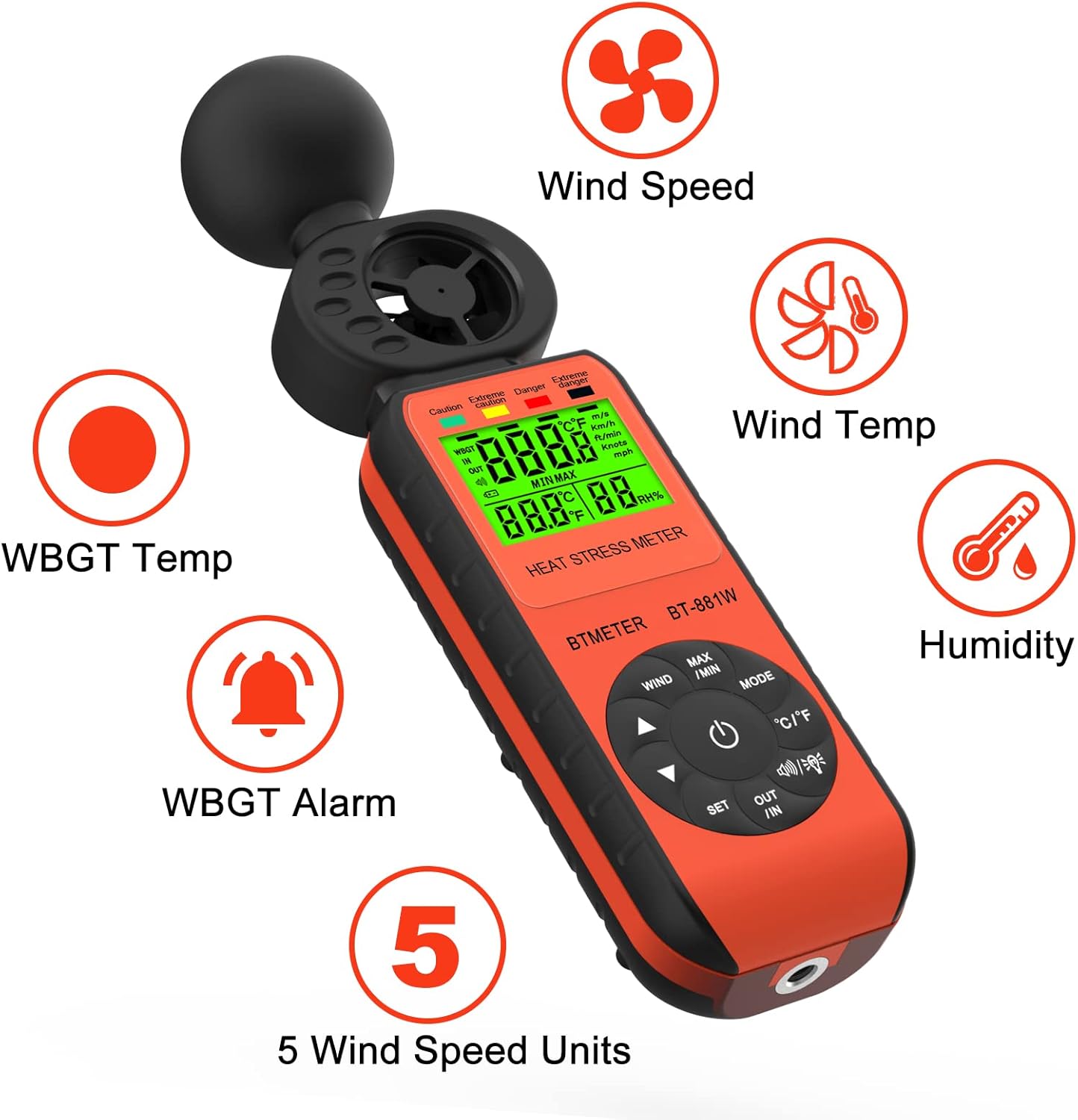
Figure 1: BTMETER BT-881W Heat Stress Meter Anemometer with its primary functions: Wind Speed, Wind Temperature, WBGT Temperature, Humidity, WBGT Alarms, and 5 Wind Speed Units.
Key Features:
- Multifunksjonele mjitting: Measures wind speed, ambient temperature, humidity, and WBGT.
- Hege krektens: Features upgraded wind and temperature sensors for precise readings.
- WBGT Monitoring: Includes WBGT alarms and supports indoor/outdoor WBGT measurement modes.
- Brûkerfreonlik: Offers 5 air velocity units, 2 temperature units, data hold, backlit LCD, and auto power-off.
- Statief montage: Equipped with a 1/4" screw hole for tripod installation.
Opsette
Batterij ynstallaasje:
The BT-881W requires one 9V battery (not included). To install the battery:
- Sykje it deksel fan it batterijfak oan 'e efterkant fan it apparaat.
- Iepenje it deksel.
- Insert a 9V battery, ensuring correct polarity.
- Slút it deksel fan it batterijfak feilich.
Tripodmontage (opsjoneel):
For stable measurements, the device can be mounted on a tripod. A 1/4" screw hole is located at the bottom of the unit.
- Locate the 1/4" screw hole at the base of the meter.
- Align the meter with your tripod's mounting screw.
- Gently twist the meter onto the tripod until it is secure.

figuer 2: Rear view of the BT-881W showing the battery compartment and dimensions.
Operating Instructions
Power On/Off:
- Druk op de Krêft knop om it apparaat yn te skeakeljen.
- It apparaat hat in automatyske útskeakelfunksje om de batterijlibben te besparjen.
Mode Switching (Wind Speed / WBGT):
Druk op de WIZE button to switch between wind speed measurement and WBGT (Wet Bulb Globe Temperature) measurement.
Wind Speed Unit Selection:
In wind speed mode, press the WYN button to cycle through the 5 available air velocity units: m/s, Ft/min, Knots, Km/h, Mph.

Figure 3: Display showing various wind speed units and the tripod mounting option.
Temperature Unit Switching (°C / °F):
Druk op de ° C / ° F. knop om te wikseljen tusken temperatuerienheden Celsius en Fahrenheit.
Indoor/Outdoor WBGT Mode:
In WBGT display mode, press the ÚT YN button to switch between indoor and outdoor WBGT measurement modes. This helps account for differences in temperature, humidity, and direct or radiant sunlight.
Data Hold Funksje:
Druk op de MAX/MIN button briefly to activate the data hold function, which freezes the current measurement on the display. Press again to release.
WBGT Alarm Settings:
The device can alert you when the black globe temperature (TG) level reaches a set threshold (20~50°C).
- Druk op de SET knop om de alarmynstellingsmodus yn te gean.
- Brûk de pylkknoppen (▲ / ▼) to adjust the alarm temperature value.
- When WBGT alarms are triggered, the backlight color changes to red.

Figure 4: WBGT alarm levels and corresponding temperature ranges (Caution, Extreme Caution, Danger, Extreme Danger).
Fideo-demonstraasje:
Video 1: Official BTMETER 881W Heat Stress Meter Anemometer demonstration, covering unboxing, basic operation, and feature highlights.
Ûnderhâld
- Hâld it apparaat skjin en droech. Brûk in sêft, damp doek foar skjinmeitsjen; brûk gjin abrasive reinigingsmiddelen of oplosmiddels.
- Store the device in its protective pouch when not in use to prevent damage.
- Remove the battery if the device will not be used for an extended period to prevent battery leakage.
- Foarkom it bleatstellen fan it apparaat oan ekstreme temperatueren, direkte sinne, of hege fochtigens.
Troubleshooting
If you encounter issues with your BTMETER BT-881W, consider the following common troubleshooting steps:
- Apparaat wurdt net ynskeakele: Kontrolearje oft de 9V-batterij goed ynstalleare is en genôch lading hat. Ferfang de batterij as it nedich is.
- Unkrekte lêzingen: Ensure the sensors are clean and unobstructed. Allow the device to equilibrate to the environment for several minutes, especially for WBGT measurements.
- Problemen mei werjefte: If the display is dim or flickering, replace the battery.
- WBGT alarm not working: Verify that the alarm temperature is set correctly in WBGT mode.
Foar fierdere help, sjoch de seksje Stipe.
Spesifikaasjes
| Model Number | BT-881W |
| Produkt Ofmjittings | 2.05 x 1.57 x 8.19 inch (5.2 x 4.0 x 20.8 sm) |
| Item Gewicht | 4.96 ounces (0.31 pûn) |
| Power Boarne | Battery Powered (1 x 9V battery required, not included) |
| Display Type | LCD |
| Sensortechnology | Ultrasone |
| Wind Speed Range | 0~30 m/s |
| Ambient temperatuerberik | 0 ~ 50 ° C (32 ~ 122 ° F) |
| Temperatuer Accuracy | ±0.6°C (±2°C overall) |
| Luftfeuchtichheid Range | 0.1%~99.9% RH |
| WBGT Temperature Range | 32~122°F (Celsius/Fahrenheit Switchable) |
| Materiaal Type | Plestik |
| Ynbegrepen komponinten | 1*Heat Stress Meter, 1* User manual |
Garânsje en stipe
Garânsje ynformaasje:
The BTMETER BT-881W comes with a 1-jierrige fabrikant garânsje. All BTMETER electrical products are strictly calibrated before shipment.
Technyske stipe:
BTMETER provides lifetime technical support for this product. For any technical inquiries, troubleshooting assistance, or warranty claims, please contact BTMETER customer service directly. Refer to the contact information provided with your purchase or visit the official BTMETER webside foar stipe details.