
1. Wichtige Notice
Please carefully check the store name and ensure you are purchasing products sold by "LUZHAN." We have received customer feedback stating that products received did not match the description and were of poor quality. Upon investigation, we found that these customers did not purchase the products from us. To prevent such incidents from happening again in the future and to avoid unnecessary misunderstandings, please carefully verify the store name LUZHAN.

Image: Important notice to verify seller name LUZHAN for authentic products.
2. Oerview
The XIAOMI POCO X8 Pro Max 5G is a high-performance smartphone designed for advanced users. It features a powerful Mediatek Dimensity 9500s processor, a vibrant 1.5K 120Hz AMOLED display, a large 8500mAh battery with 100W HyperCharge, and a 50 MP Light Fusion 600 camera system with OIS. This manual provides essential information for setting up and operating your device.
Ofbylding: Foar- en efterkant view of the POCO X8 Pro Max 5G smartphone.
Fideo: In oerview of the POCO X8 Pro Series, highlighting key features and design.
3. Opsette
3.1 Wat sit der yn 'e doaze
- XIAOMI POCO X8 Pro Max 5G Smartphone
- Charger
- Skermbeskermer (foarôf oanbrocht of ynbegrepen)
3.2 Ynstellings foar it earste apparaat
- Power On: Press and hold the power button located on the side of the device until the XIAOMI logo appears.
- Taal en regio: Folgje de oanwizings op it skerm om jo foarkarstaal en regio te selektearjen.
- Ferbine mei Wi-Fi: Select your Wi-Fi network and enter the password to connect to the internet. This is necessary for initial setup and software updates.
- Google akkount: Meld jo oan mei jo Google-akkount of meitsje in nij akkount oan. Dit is essensjeel foar tagong ta de Google Play Store en oare Google-tsjinsten.
- Gegevens oerdracht: If you are upgrading from another device, you may have the option to transfer your data (apps, photos, contacts) during this stage.
- Feiligens opset: Set up your preferred security method, such as a PIN, pattern, password, or fingerprint. The device supports an ultrasonic fingerprint sensor.
- Folsleine opset: Follow any remaining prompts to finalize the setup process.
3.3 SIM-kaart en eSIM-ynstelling
The POCO X8 Pro Max 5G supports physical SIM cards and eSIM functionality.
- Physical SIM: Use the provided SIM ejector tool to open the SIM tray. Insert your Nano-SIM card(s) into the tray, ensuring proper orientation. Close the tray securely.
- eSIM: Foar eSIM-aktivearring, gean nei Ynstellings > Netwurk en ynternet > SIM-kaarten and follow the instructions to add an eSIM profile provided by your carrier.
4. Bedriuwsinstruksjes
4.1 Display Features
Your device features a 6.83-inch 1.5K ultra-bright AMOLED display with a 120Hz refresh rate for smooth visuals and a 24x super resolution touch for enhanced responsiveness. It also includes eye protection features and Corning Gorilla Glass 7i for durability.
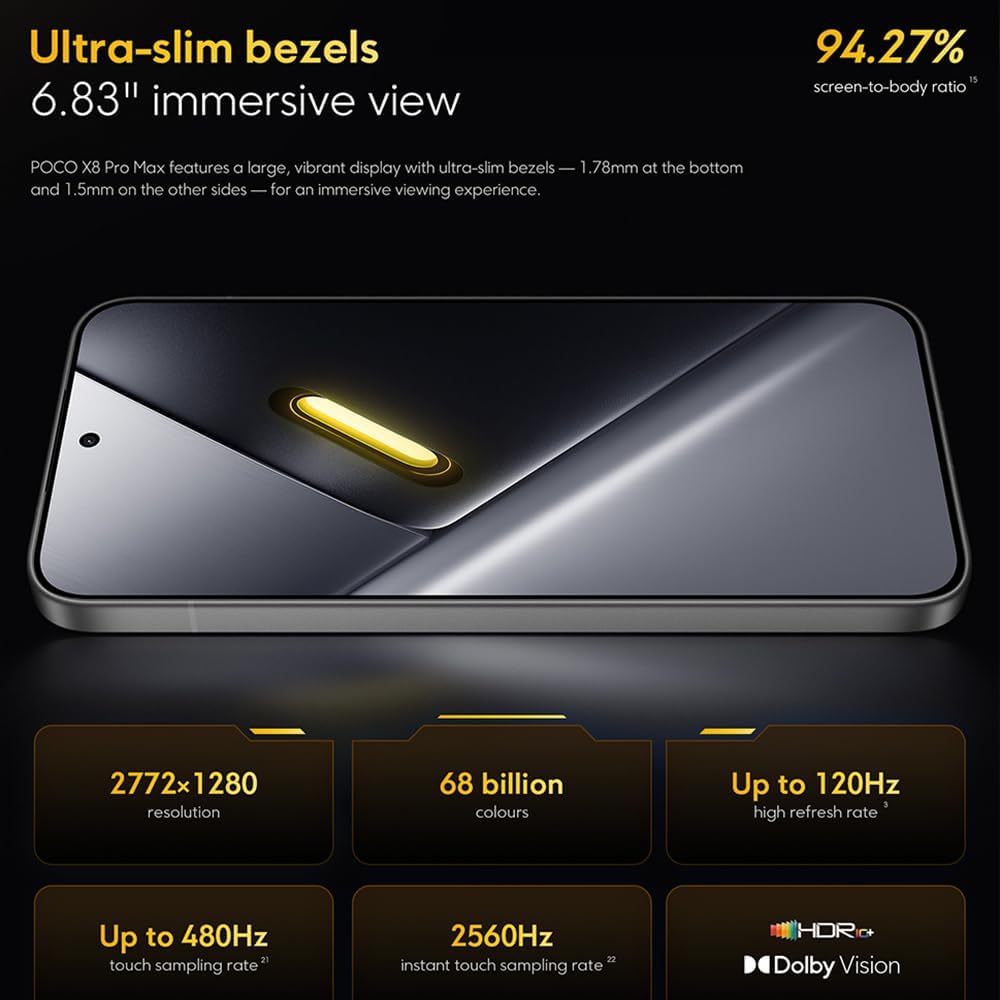
Image: The 6.83-inch 1.5K ultra-bright AMOLED display with minimal bezels.
4.2 Prestaasje
Powered by the Mediatek Dimensity 9500s chipset (3nm, 4+4 All Big Core architecture, NPU890 AI processor), the POCO X8 Pro Max 5G delivers high performance. The POCO 3D IceLoop cooling system ensures efficient heat dissipation, maintaining optimal performance during intensive tasks like gaming.

Image: Diagram illustrating the Mediatek Dimensity 9500s flagship platform.

Image: Illustration of the 5800mm² ultra-large LHP area for cooling.
4.3 Kamerasysteem
The device features a 50 MP Light Fusion 600 main camera with OIS (Optical Image Stabilization) and an 8 MP ultra-wide camera. It supports portrait mode with bokeh + HDR and dynamic video-to-still conversion.

Image: Close-up of the 50 MP main camera and 8 MP ultra-wide camera system.
4.4 Batterij en opladen
Equipped with a massive 8500 mAh (typical) battery, the POCO X8 Pro Max 5G offers extended usage. It supports 100W HyperCharge, allowing for rapid recharging. A 16% ultra-high carbon-silicon content contributes to its high energy density.

Image: Illustration highlighting the massive 8500mAh battery capacity.

Image: Visual representation of the 100W HyperCharge technology.
4.5 audio
The device features symmetrical dual stereo speakers (1115F) for a balanced and immersive audio experience.
4.6 software
The POCO X8 Pro Max 5G comes with Xiaomi HyperOS 3 installed, offering an optimized and user-friendly interface based on Android 16.
5. Underhâld
5.1 Jo apparaat skjinmeitsje
- Brûk in sêfte, pluisfrije doek om it skerm en it efterpaniel ôf te feegjen.
- Foarkom it brûken fan hurde gemikaliën, abrasive materialen of aerosolsprays.
- Foar koppige flekken, in bytsje dampMeitsje de doek skjin mei wetter of in skermreiniger dy't bedoeld is foar elektroanika.
5.2 Dust and Water Resistance
The device is certified for IP68 dust and water resistance. This means it can withstand immersion in up to 2 meters of water for 30 minutes under specific laboratory conditions. However, water and dust resistance may deteriorate over time with normal wear and tear. The warranty does not cover liquid damage. Avoid exposing the device to hot water, saltwater, or other liquids.

Image: Visual representation of the IP68 dust and water resistance.
5.3 Software Updates
Kontrolearje regelmjittich op software-updates en ynstallearje se om te soargjen dat jo apparaat de lêste funksjes, feiligenspatches en prestaasjeferbetteringen hat. Jo kinne dizze opsje meastentiids fine yn Ynstellings > Oer tillefoan > Systeemupdate.
6. Probleemoplossing
6.1 Mienskiplike problemen en oplossings
- Apparaat giet net oan: Soargje derfoar dat de batterij opladen is. Ferbine it apparaat mei de lader en wachtsje in pear minuten foardat jo besykje it wer oan te setten.
- Skerm reagearret net: Besykje it apparaat opnij te starten troch de oan/út-knop in langere perioade yn te hâlden (bygelyks 10-15 sekonden) oant it opnij opstart.
- Apps dy't crashje: Meitsje de cache fan 'e problematyske app wis (Ynstellings > Apps > [Appnamme] > Opslach > Cache wiskje) or reinstall the app. Ensure your device software is up to date.
- Min batterij libben: Check background app usage, reduce screen brightness, disable unnecessary features like GPS or Bluetooth when not in use, and ensure your software is updated.
- Problemen mei netwurkferbining: Restart your device. Check if your SIM card is properly inserted. Toggle Airplane Mode on and off. Reset network settings (Ynstellings > Systeem > Opsjes weromsette > Wi-Fi, mobyl en Bluetooth weromsette).
6.2 Fabriek weromsette
If you encounter persistent issues, a factory reset may be necessary. Warskôging: Dit sil alle gegevens op jo apparaat wiskje. Meitsje in reservekopy fan wichtige gegevens foardat jo trochgean. Gean nei Ynstellings> Systeem> Opsjes weromsette> Alle gegevens wiskje (fabriek weromsette) en folgje de ynstruksjes op it skerm.
7. Spesifikaasjes
| Eigenskip | Spesifikaasje |
|---|---|
| Merk | XIAOMI |
| Model Namme | POCO X8 Pro Max 5G |
| Bestjoeringssysteem | Android 16 (with Xiaomi HyperOS 3) |
| Unthâld Storage Kapasiteit | 512 GB |
| Skermgrutte | 6.83 ynms |
| Display Type | AMOLED, 1.5K, 120Hz refresh rate |
| Cellular Technology | 5G |
| Kleur | Noir (Swart) |
| Connector Type | USB Type C |
| Biometryske feiligens | Fingerprint Recognition (Ultrasonic) |
| Batterij Kapasiteit | 8500 mAh (Lithium-polymeer) |
| Opladen | 100W HyperCharge |
| Haadkamera | 50 MP Light Fusion 600 with OIS |
| Ultrawide kamera | 8 MP |
| Prozessor | Mediatek Dimensity 9500s |
| Stof- en wetterresistinsje | IP68 |
| Jier fan Model | 2025 |
| Lân fan oarsprong | Sina |
8. Garânsje en stipe
For detailed warranty information and customer support, please refer to the warranty card included with your product or visit the official XIAOMI webside. Bewarje jo bewiis fan oankeap foar garânsjeclaims.
Online resources and FAQs may also be available on the XIAOMI support portal.