Ynlieding
Tankewol foar de oankeapasing the Blow BT460 Portable Bluetooth Speaker. This manual provides essential information for the safe and efficient operation of your device. Please read it thoroughly before use and retain it for future reference.
Safety Information
- Stel it apparaat net bleat oan ekstreme temperatueren, direkt sinneljocht of hege fochtigens.
- Meitsje de sprekker te fallen of te ûnderwurpen oan sterke ynfloeden.
- Demontearje it apparaat net sels of besykje it net te reparearjen. Lit alle ûnderhâldswurk oer oan kwalifisearre personiel.
- Keep the speaker away from water and other liquids. This device is not waterproof.
- Brûk allinnich de oantsjutte oplaadkabel en stroomboarne.
Produkt oerview
The Blow BT460 is a versatile portable Bluetooth speaker designed for high-quality audio playback. It features a maximum output of 20W, Bluetooth connectivity, FM radio, MicroSD card slot, and an AUX input. Its compact dimensions make it suitable for both home use and travel.

Ofbylding: Front view of the Blow BT460 Portable Bluetooth Speaker, showcasing its grey cylindrical design with a mesh grille and silver accents.
Pakketynhâld
Kontrolearje asjebleaft it pakket op de folgjende items:
- Blow BT460 Portable Bluetooth Speaker
- USB-oplaadkabel
- AUX Audiokabel
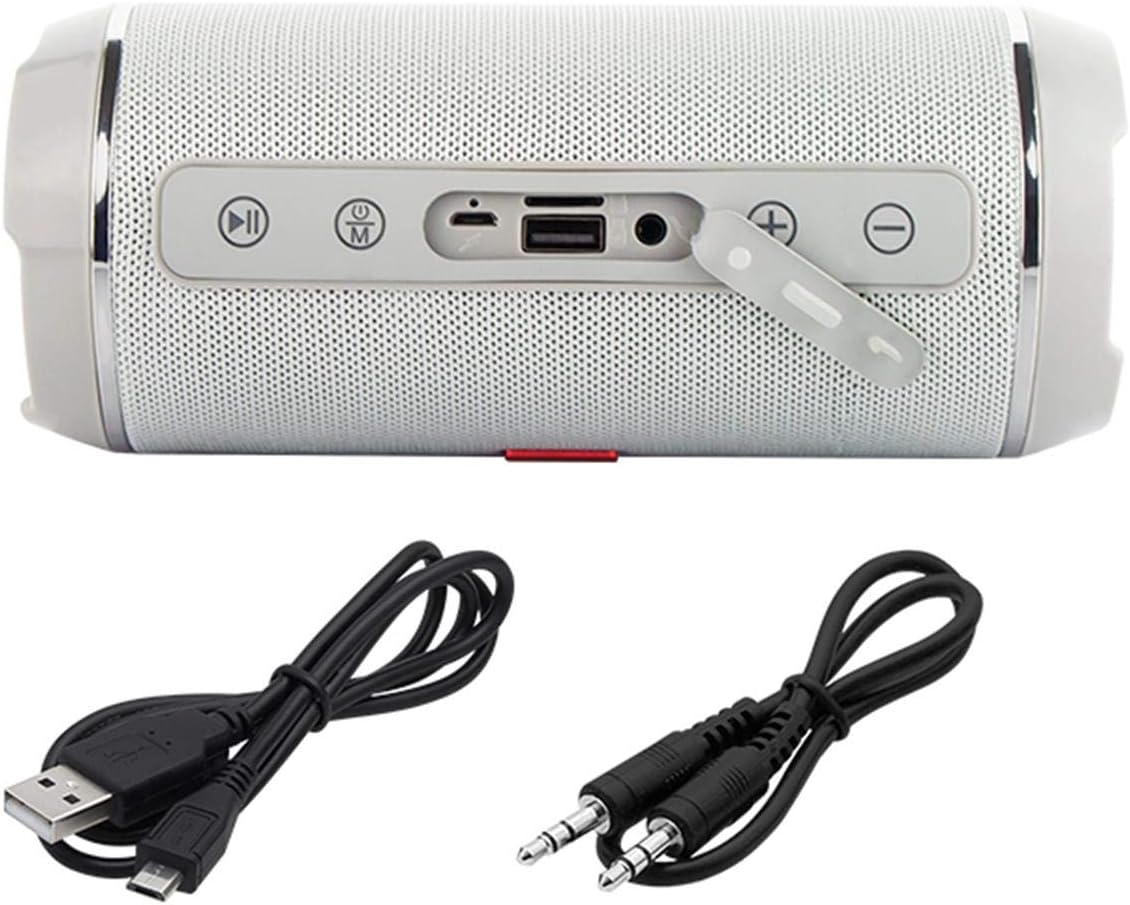
Image: The Blow BT460 speaker shown with its top panel revealing control buttons and ports, alongside the included USB charging cable and AUX audio cable.
Kontrôles en havens
Meitsje josels bekend mei de kontrôles en oanslutingsports fan 'e sprekker:
- Power knop: Druk en hâld yndrukt om de sprekker oan of út te skeakeljen.
- Modusknop (M): Press to switch between Bluetooth, FM Radio, AUX, and MicroSD modes.
- Knop spielje/pauze: Audioôfspieling spielje of pauzearje.
- Foarich nûmer / Folume omleech (-): Koart yndrukke foar foarich nûmer, lang yndrukke om it folume te ferminderjen.
- Folgjende nûmer / Folume omheech (+): Koart yndrukke foar it folgjende nûmer, lang yndrukke om it folume te ferheegjen.
- MicroSD -kaartslot: Doch in MicroSD-kaart yn foar it ôfspyljen fan audio.
- USB-poarte: For USB drive playback or charging other devices (if supported).
- AUX-ynfier: Ferbine eksterne audio-apparaten mei de 3.5mm AUX-kabel.
- Micro USB -oplaadpoort: Connect the USB charging cable to power the speaker.
Opsette
1. De sprekker oplade
- Connect the Micro USB end of the charging cable to the speaker's charging port.
- Connect the standard USB end to a USB power adapter (not included) or a computer's USB port.
- It oplaadindikatorljocht sil oangean. It sil útskeakelje of fan kleur feroarje as it folslein opladen is.
- A full charge typically takes 3-4 hours and provides 3-4 hours of music playback.
2. Power On / Off
- To power on, press and hold the Power button until you hear an audible indication.
- Om út te skeakeljen, druk op de oan/út-knop en hâld dy nochris yndrukt oant de sprekker útskeakelt.
Operating Instructions
1. Bluetooth-keppeling
- Ensure the speaker is powered on and in Bluetooth mode (press the 'M' button if necessary). The speaker will enter pairing mode, indicated by a flashing LED.
- Skeakelje Bluetooth yn op jo mobyl apparaat (smartphone, tablet, ensfh.) en sykje nei beskikbere apparaten.
- Select "BT460" from the list of devices.
- Sadree't de sprekker keppele is, sil hy in befêstigingslûd útstjoere en sil de LED-yndikator ophâlde mei knipperjen.
- You can now play audio from your device through the speaker. The Bluetooth range is approximately 10 meters.
2. AUX-modus
- Ferbine ien ein fan 'e 3.5mm AUX-audiokabel mei de AUX-ynfierpoarte fan 'e sprekker.
- Connect the other end to the headphone jack or audio output of your external audio device (e.g., MP3 player, CD player).
- Druk op de 'M' knop op 'e sprekker om oer te skeakeljen nei AUX-modus.
- Bestjoer it ôfspyljen en folume fan jo eksterne apparaat.
3. Ofspyljen fan MicroSD-kaart
- Insert a MicroSD card (with audio files) yn 'e MicroSD-kaartslot op 'e sprekker.
- The speaker will automatically switch to MicroSD mode and begin playing music. If not, press the 'M' button to select MicroSD mode.
- Brûk de knoppen Ofspielje/Pauze, Foarige nûmer en Folgjende nûmer om it ôfspyljen te kontrolearjen.
4. FM Radio
- Press the 'M' button to switch to FM Radio mode.
- Om beskikbere stasjons automatysk te scannen en op te slaan, hâld de knop Ofspielje/Pauze yndrukt. De sprekker sil automatysk stasjons scannen en opslaan.
- Use the Previous Track (-) and Next Track (+) buttons to navigate between saved FM stations.
5. Volume Control
- Long press the Next Track (+) button to increase the volume.
- Long press the Previous Track (-) button to decrease the volume.
Ûnderhâld
- Reiniging: Brûk in sêfte, droege doek om it oerflak fan 'e sprekker skjin te meitsjen. Brûk gjin abrasive skjinmakkers of oplosmiddels.
- Opslach: As de sprekker foar langere perioaden net yn gebrûk is, bewarje dy dan op in koel, droech plak, fuort fan direkt sinneljocht en ekstreme temperatueren.
- Batterij soarch: Om de batterijlibben te ferlingjen, foarkom it faak folslein ûntladen fan 'e batterij. Laad de sprekker regelmjittich op, sels as er net yn gebrûk is.
Troubleshooting
| Probleem | Mooglike oarsaak | Oplossing |
|---|---|---|
| De sprekker giet net oan. | Batterij is leech. | Laad de sprekker op mei de levere USB-kabel. |
| Gjin lûd. | It folume is te leech; de ferkearde modus selektearre; it apparaat is net keppele. | Ferheegje it folume; druk op 'M' om de juste modus te selektearjen; ferbine it Bluetooth-apparaat opnij. |
| Bluetooth-apparaat kin gjin ferbining meitsje. | Sprekker net yn koppelingsmodus; apparaat te fier fuort; ynterferinsje. | Ensure speaker is in Bluetooth pairing mode; move device closer (within 10m); restart both devices. |
| FM-radio-ûntfangst is min. | Swak sinjaal; miljeu-ynterferinsje. | Ferpleats de sprekker nei in gebiet mei bettere ûntfangst. |
Spesifikaasjes
| Merk | Blaze |
| Model Namme | BT460 |
| Wireless Communication Technology | Bluetooth |
| Konnektivität Technology | Hulp, Bluetooth, USB |
| Speaker Output Power | 20 Watt (RMS) |
| Power Boarne | Battery Powered (2000 mAh integrated battery) |
| Batterij Life | 3-4 hours (music playback) |
| Bluetooth berik | 10 meter |
| Control Metoade | Remote Control (if applicable, otherwise on-device buttons) |
| Ofmjittings (L x B x H) | 2.79 x 24.64 x 16.51 sm |
| Item Gewicht | 679g wy |
| Kompatibele apparaten | MP3-spieler, smartphone |
| Kleur | Grey (schwarz.) |
Garânsje en stipe
This product comes with a limited warranty. Please refer to the warranty card included in your package for specific terms and conditions. For technical support or service inquiries, please contact your retailer or the manufacturer's customer service channels.