1. Ynlieding
This manual provides detailed instructions for the installation, operation, and maintenance of your Tiandy TC-C32XN 2MP Fixed IP Dome Turret Camera. Please read this manual thoroughly before using the product to ensure correct usage and optimal performance. Keep this manual for future reference.
2. Safety Information
- Ensure the power supply matches the camera's requirements to prevent damage.
- Stel de kamera net bleat oan ekstreme temperatueren, fochtigens of korrosive omjouwings.
- Avoid pointing the camera directly at strong light sources for extended periods, as this may damage the image sensor.
- Behannelje de kamera foarsichtich. Lit it net falle en stel it net bloot oan sterke trillingen.
- All installation and service should be performed by qualified personnel.
- Skeakelje de stroom út foardat jo skjinmeitsje of ûnderhâld útfiere.
3. Package Ynhâld
Kontrolearje oft alle items yn jo pakket oanwêzich binne:
- Tiandy TC-C32XN 2MP Fixed IP Dome Turret Camera
- Adapter
- Montageskroeven en muorrepluggen
- Fluchstartgids (as ynbegrepen)
4. Produkt Overview
The Tiandy TC-C32XN is a 2MP Fixed IP Dome Turret Camera designed for reliable surveillance. It features Smart IR for clear night vision up to 30 meters, a built-in microphone, and an SD card slot for local storage.

figuer 4.1: Front view of the Tiandy TC-C32XN camera, showing the lens and IR illuminators.
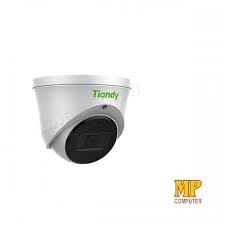
figuer 4.2: Side view of the Tiandy TC-C32XN camera, highlighting its dome turret form factor.
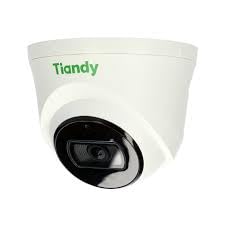
Figuer 4.3: Hoekich view of the Tiandy TC-C32XN camera, showcasing syn kompakte ûntwerp.
5. Opset en ynstallaasje
5.1 Montage
- Selektearje in lokaasje: Choose a suitable outdoor or indoor location (IP67 rated for outdoor use) that provides the desired viewing angle and is within reach of power and network connections. The camera is designed for protruding mounting.
- Boarjen: Brûk de levere montagesjabloan (as fan tapassing) om gatten foar de montageskroeven te markearjen en te boarjen.
- Befeiligje de kamera: Attach the camera base securely to the mounting surface using the provided screws and wall plugs.
5.2 Bedrading
- Power Connection: Connect the provided adapter to the camera's power input and then to a power outlet. The camera operates on corded electric power.
- Netwurkferbining: Connect an Ethernet cable from your network router or PoE switch to the camera's Ethernet port. This camera supports Ethernet connectivity for data transmission.
5.3 Inisjele konfiguraasje
- Power On: Once wired, power on the camera.
- Netwurkûntdekking: Use the Tiandy client software or a network scanner tool to discover the camera's IP address on your local network.
- Tagong ta kamera: Iepenje a web browser and enter the camera's IP address to access its web interface. Log in using the default credentials (refer to the quick start guide for default username/password).
- Standert wachtwurd feroarje: For security, immediately change the default password upon first login.
- NVR Integration: If using with an NVR, add the camera to your NVR system following the NVR's instructions. This camera is compatible with all brand NVRs.
- Mobile App Setup: Download the official Tiandy mobile application (available for Android and iOS) and follow the in-app instructions to add your camera for remote viewing en kontrôle.
6. Bedriuwsinstruksjes
6.1 Live View en opname
Access the camera's live view troch de web interface, NVR, or mobile app. Configure recording schedules and methods (continuous, motion-triggered) via the camera's settings.
6.2 Smart IR and Night Vision
The camera features Smart IR technology, which automatically adjusts the intensity of its infrared LEDs to prevent overexposure of objects close to the camera, ensuring clear images in low-light conditions up to 30 meters. It also supports 'Night Color' low light technology for enhanced visibility.
6.3 Bewegingsdeteksje en warskôgings
Configure motion detection zones and sensitivity in the camera settings. The camera supports 'Motion Only' alert types. When motion is detected, the camera can trigger recordings, send notifications to your mobile device, or activate other configured actions. It also supports advanced features like tripwire and perimeter intrusion detection.
6.4 Audio Functionality
The built-in microphone allows for audio monitoring of the surveillance area. Audio settings can be adjusted in the camera's web ynterface of NVR.
6.5 SD-kaartopslach
Insert a compatible SD card into the camera's SD card slot for local storage of recordings. Ensure the card is formatted correctly via the camera's settings. The camera supports SD flash memory type.
6.6 Reset knop
A reset button is included for restoring the camera to its factory default settings. Consult the quick start guide for the exact location and procedure for your model.
7. Underhâld
- Reiniging: Feie de kameralens en de behuizing foarsichtich ôf mei in sêfte, droege doek. Brûk gjin agressive gemikaliën of skurende reinigingsmiddels.
- Firmware -updates: Regularly check the Tiandy official website for firmware updates. Keeping your camera's firmware up-to-date ensures optimal performance and security.
- Kabel ynspeksje: Periodically inspect all cables for signs of wear or damage, especially for outdoor installations.
8. Probleemoplossing
- Gjin macht: Soargje derfoar dat de stroomadapter goed oansletten is en dat it stopkontakt funksjonearret.
- Gjin fideo: Check network cable connections. Verify the camera's IP address and network settings. Ensure the camera is properly added to your NVR or viewyn software.
- Mine ôfbyldingskwaliteit: Clean the camera lens. Adjust focus if applicable. Check lighting conditions and camera placement.
- Problemen mei netwurkferbining: Verify router and network cable functionality. Restart the camera and network devices.
- Kin gjin tagong krije Web Ynterface: Ensure your computer is on the same network segment as the camera. Verify the camera's IP address. Try resetting the camera to factory defaults if necessary (this will erase all settings).
9. Spesifikaasjes
| Eigenskip | Spesifikaasje |
|---|---|
| Model | TC-C32XN |
| Effektive noch resolúsje | 2 MP (1920x1080) |
| Frame Rate | 30 frames per sekonde |
| Foto Sensor Technology | CMOS (1/2.8") |
| Night Vision Range | 30 Metres (Smart IR) |
| Low Light Technology | Nacht kleur |
| Optyske zoom | 3 x |
| Ynboude mikrofoan | Ja |
| SD Card Slot | Yes (Flash Memory Type: SD) |
| Soart warskôging | Motion Only (supports tripwire and perimeter) |
| Konnektivität Technology | Wireless (IR), Ethernet |
| Power Boarne | Corded elektryske |
| Ynternasjonale beskerming Rating | IP67 |
| Form Factor | Dome Turret |
| Mounting Type | Utstekkend |
| Kompatibiliteit fan bestjoeringssysteem | Android, iOS |
| Produkt Ofmjittings (L x B x H) | 50 x 50 x 70 Millimeter |
| Item Gewicht | 20g wy |
| Ynbegrepen komponinten | Adapter |
| Kleur | Wyt |
10. Garânsje en stipe
For warranty information and technical support, please refer to the warranty card included with your product or visit the official Tiandy website. Contact the seller or manufacturer directly for assistance with product issues or inquiries.


